WordPress is a full-fledged Content Management System (CMS).
What exactly is a CMS?
A Content Management System (CMS) is software that lets people create, manage, organize, and publish digital content without needing to write raw HTML, FTP files, or low-level server scripts. At minimum a CMS provides:
- A user-friendly dashboard and editor to create and update content.
- A media library to manage images, audio, and files.
- Content types (posts, pages) and taxonomies (categories, tags) to structure information.
- User roles and permissions to control who can edit, publish, or administer the site.
- A templating system so the same content can be presented with different designs.
- Storage and retrieval of content in a database or similar back end.
These features remove technical barriers and let non-developers publish and maintain websites reliably and repeatedly.
how WordPress went from blog to CMS :
WordPress was born in 2003 as a fork of b2/cafelog, originally focused on blogging. Early strengths were usability and a clean publishing workflow. The evolution into a general CMS was gradual and driven by both technical enhancements and community demand. Key milestones:
- Early 2000s: Blogging-first focus and rapid user adoption.
- 2008–2010 (WordPress 2.x → 3.0): Introduction of features like custom menus, custom post types, and multisite. These turned WordPress into a more flexible content framework.
- 2018 onward: Gutenberg block editor and Full Site Editing (FSE) moved UI and layout control into the editor, pushing WordPress toward being a Digital Experience Platform (DXP), not just a CMS.
The open-source community and plugin/theme ecosystem played a huge role in accelerating that shift — thousands of contributors created add-ons that expanded WordPress far beyond blogging.
Three-layer that makes WordPress a CMS :
WordPress is best understood as a modular system with three main layers:
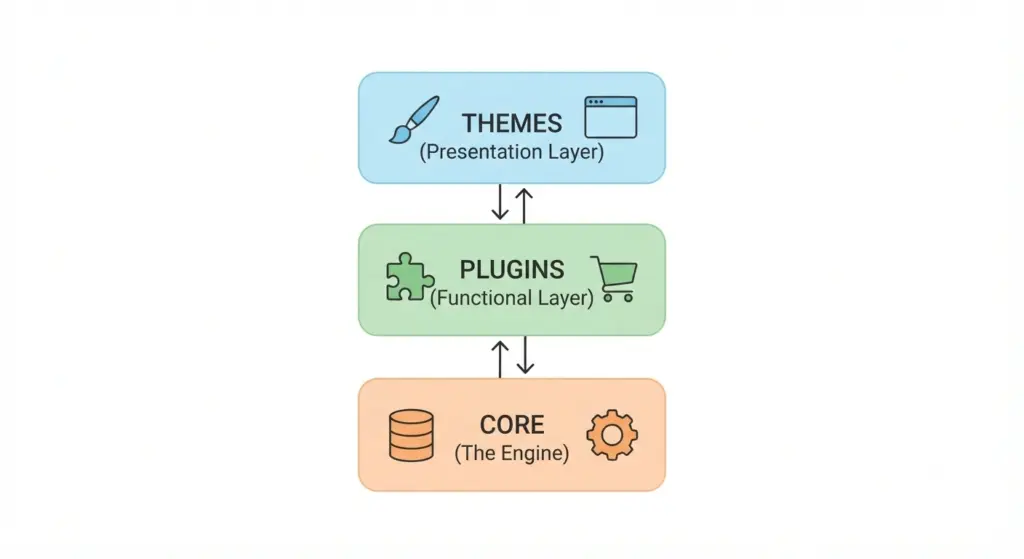
The Core:
- Written primarily in PHP and typically paired with MySQL or MariaDB.
- Provides the database abstraction, user authentication, REST API endpoints, hooks (actions and filters) for extensibility, and update mechanisms.
- Maintained by the WordPress core team and contributors; security updates and releases come regularly.
Themes:
- Themes control layout, typography, and visual identity.
- Because content is stored separately, switching themes changes design without losing content.
- Contemporary themes support block templates and FSE, allowing designers to define page-level templates using the same block system editors use.
Plugins:
- Plugins extend core functionality without altering core files.
- Popular examples: WooCommerce (e-commerce), Yoast/RankMath (SEO), MemberPress (membership), LearnDash (LMS).
- Plugin architecture enables WordPress to be reshaped into nearly any web application.
This separation of concerns (content, presentation, behavior) is a core characteristic of modern CMS platforms.
How WordPress satisfies standard CMS requirements :
Let’s map common CMS requirements to WordPress features:
Content creation and editing
- Classic editor, Gutenberg block editor, and third-party page builders provide WYSIWYG-style editing.
- Revisions, autosave, and scheduled publishing are built in.
Media management
- Centralized media library supports images, audio, video, and documents.
- Uploads are stored on disk and referenced in the database; many hosts and plugins add CDN and offload options.
Structured content
- Custom post types and custom fields (via APIs or plugins like Advanced Custom Fields) allow structured data beyond posts and pages.
- Custom taxonomies organize content in hierarchical or flat structures.
User roles and permissions
- Default roles (Administrator, Editor, Author, Contributor, Subscriber) provide basic permission systems; granular control available via plugins.
Extensibility and integrations
- REST API and hooks make integrations with external apps straightforward.
- Massive plugin ecosystem (tens of thousands of plugins) covers analytics, CRM, marketing automation, payment gateways, and more.
Multisite and multi-language
- Multisite supports networks of sites from a single install.
- Multi-language solutions available via plugins (WPML, Polylang) or by building specialized setups.
Logging, backups, and security tools
- Backup and security solutions exist as plugins or managed hosting features (e.g., offsite backups, malware scans, firewalls).
Collectively, these meet and exceed the baseline expectations for a CMS.
WordPress vs. other CMS platforms :
Comparisons are often subjective, but here’s a pragmatic breakdown:
WordPress
- Strengths: Usability, largest ecosystem, extreme flexibility, low barrier to entry.
- Best for: Blogs, business sites, e-commerce (via WooCommerce), news sites, small-to-medium enterprises, and many enterprise deployments with proper architecture.
- Barrier: Low-to-medium; many tasks can be done by non-developers, but custom work needs developers.
Drupal
- Strengths: Highly configurable data models, granular access control, strong for complex, enterprise-grade projects with complicated content relationships.
- Best for: Governments, universities, complex multi-site deployments with strict data modeling.
- Barrier: High, needs experienced development teams.
- Curious which platform wins? Read a detailed comparison: Drupal vs WordPress
Joomla
- Strengths: Middle ground—more structure than WordPress out of the box, simpler than Drupal for certain use cases.
- Best for: Sites needing built-in user management and more structure without Drupal complexity.
- Barrier: Medium.
- Want to know more about which platform wins? Read a detailed comparison: Joomla vs WordPress
Shopify / Wix / Squarespace
- Strengths: Turnkey hosting, security and updates handled by vendor, easy store creation (Shopify).
- Best for: Users who prefer minimal maintenance and are fine with vendor lock-in.
- Barrier: Low, but limited ownership/control and customization compared to self-hosted WordPress.
- Deciding between them? Check detailed comparison: Wix vs WordPress
or Squarespace vs WordPress
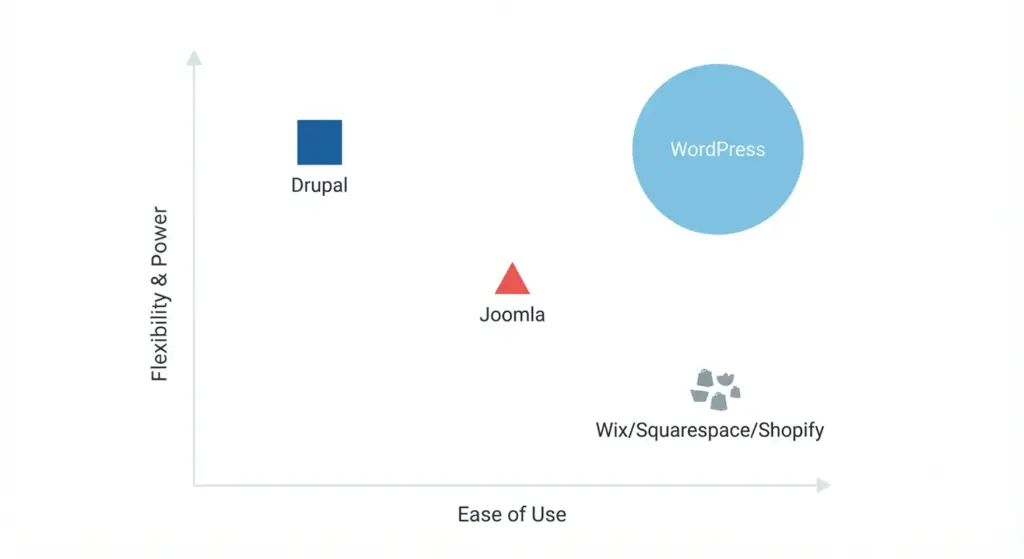
Real-world choice often comes down to trade-offs: speed to market and ecosystem vs. fine-grained control and enterprise-grade architecture.
Who uses WordPress?
- Roughly 40%+ of websites use WordPress (varies with data source and time).
- From personal blogs to large publishers: examples include TechCrunch, The New Yorker, and Sony Music (which demonstrates that WordPress can be scaled and hardened for enterprise).
- Large agencies and enterprises increasingly adopt WordPress when paired with strong DevOps, caching, CDNs, and security practices.
The breadth of use cases — small business sites, content-heavy media outlets, e-commerce stores, and internal knowledge bases — demonstrates WordPress’s CMS capabilities.
Choosing WordPress as your CMS :
Ownership and portability
- Self-hosted WordPress (WordPress.org) gives you file and data ownership. You can migrate hosts or export data as needed.
Ecosystem and community
- One of the largest developer and user communities in the open-source world. That means plugins, themes, tutorials, and troubleshooting are abundant.
Cost flexibility
- Core software is free. Costs depend on hosting, premium themes, plugins, and development resources — which makes it affordable for beginners and scalable for enterprises.
SEO and content-first design
- Clean URL structure, metadata, and accessibility features make WordPress friendly to search engines. Plugins add further optimization control.
Rapid prototyping and deployment
- Pre-built themes and plugins allow building functional sites very quickly, often with less custom code.
The downsides:
Security
- Popularity makes WordPress a frequent target for attacks. Risks come from:
- Outdated core, themes, or plugins.
- Poorly coded third-party plugins.
- Weak hosting or misconfiguration.
- Mitigation: Use managed WordPress hosting, enforce updates, employ security plugins, use WAFs/CDNs, and follow least-privilege user roles.
Performance and bloat
- Heavy themes or too many plugins can slow a site. Poorly coded plugins can add database queries and memory usage.
- Mitigation: Audit plugins, use caching, CDN, optimized images, and performance-minded hosting.
Maintenance overhead
- Unlike closed SaaS builders where the vendor patches everything, WordPress requires active maintenance: core updates, plugin compatibility checks, backups, and security monitoring.
Quality control in plugins/themes
- Because anyone can publish a plugin or theme, quality varies. Vetting and testing are necessary.
Common WordPress CMS use cases :
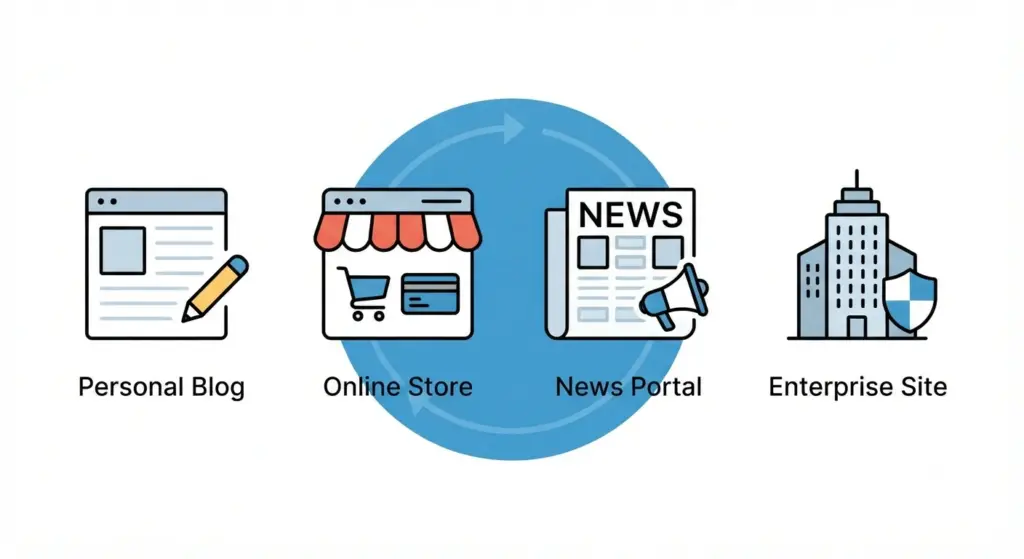
Content publishing and news sites
- Feature-rich editorial workflows with roles, scheduled publishing, and content categorization.
E-commerce
- WooCommerce turns WordPress into a full e-commerce platform with product types, payment gateways, inventory management, and extensions for subscriptions or bookings.
Membership and learning platforms
- Membership plugins and LMS plugins can gate content, sell access, and track progress.
Corporate sites and microsites
- Multisite or multi-environment setups power multi-brand corporate sites with centralized management.
Headless CMS and decoupled architectures
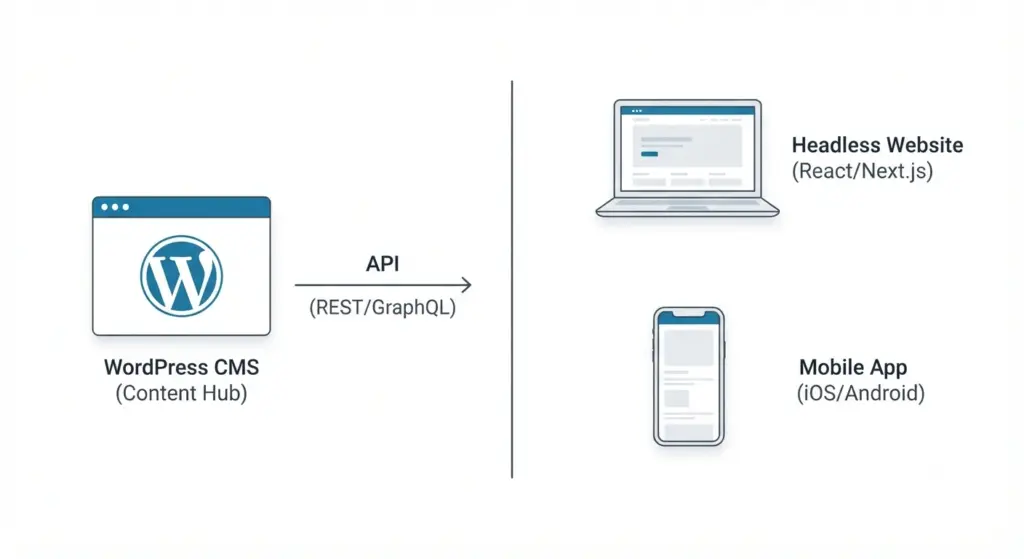
- Use WordPress as a headless CMS (REST API or GraphQL via plugins) to serve content to React, Angular, Vue apps, mobile apps, or static site generators (SSG) like Next.js.
These patterns show WordPress isn’t limited to classic page/post websites — it can be the content backend for modern application architectures.
Practices for using WordPress as a CMS
Choose the right hosting
- Managed WordPress hosts (Kinsta, WP Engine, Flywheel, etc.) offer staging, automated backups, and platform-level security.
- For scale, consider containerized or cloud-native setups with autoscaling and robust caching layers.
Limit and vet plugins
- Use well-supported plugins with active maintenance, good reviews, and transparent codebases.
- Remove unused plugins and test updates in staging before production.
Use version control and staging workflows
- Keep code (themes, custom plugins) in Git.
- Test updates in staging and deploy via CI/CD for predictable rollouts.
Harden security
- Enforce strong passwords and two-factor authentication.
- Use principle of least privilege for user accounts.
- Schedule regular backups and test restore procedures.
Optimize for performance
- Caching (page, object), CDN, optimized images, and database cleanup.
- Consider static caching or hybrid headless approaches for extreme scale.
Accessibility and SEO
- Pick themes and implement templates that follow accessibility (WCAG) guidelines and SEO best practices.
Following these practices dramatically reduces typical WordPress pain points.
Advanced topics , WordPress as a DXP and headless CMS
Full Site Editing (FSE) and Gutenberg blocks
- FSE lets you edit templates, parts, and patterns using blocks. This reduces reliance on PHP theme templates and empowers designers/content teams.
Headless/Decoupled WordPress
- WordPress serves content via REST API or GraphQL; frontend rendered by frameworks like Next.js, Gatsby, or single-page apps.
- Benefits: improved frontend performance, separation of concerns, modern developer experience.
- Considerations: you lose some built-in WordPress previewing and editing UX; integration complexity increases.
- Interested in the full technical breakdown? Read our detailed guide: What is Headless WordPress?
Multisite and enterprise management
- Multisite is useful for managing multiple related sites from a single install, but it complicates plugin management and isolation.
- Enterprises often combine WordPress with custom identity providers, SSO, and auditing tools.
These advances push WordPress beyond “just a CMS” toward a platform capable of powering complex digital experiences.
When WordPress might not be the right choice
extremely strict security rules and certifications are required
- Certain government or defense projects require systems with specific certs or hardened stacks where Drupal or custom-built platforms might be preferable.
vendor-managed turnkey hosting with no maintenance is desired
- Users who want minimal responsibility might prefer Wix, Squarespace, or Shopify.
Very large data models and complex content relationships
- While possible in WordPress, projects that require highly complex relational models sometimes fit Drupal better out of the box.
Tiny, single-purpose microsites or landing pages
- A static site generator or a SaaS landing-page builder may be faster and cheaper when you don’t need a dynamic CMS.
Choosing the right tool is about fit — WordPress is capable but not always the optimal choice.
Migration, scaling, and long-term maintenance considerations
Migrating to/from WordPress
- Import/export tools exist, but complex migrations (from proprietary platforms or enterprise CMSs) require mapping content types, taxonomies, and URL redirects.
- Planning redirects and preserving SEO is critical during migration.
Scaling WordPress for high traffic
- Use object and page caching, CDN, database replicas, and horizontal scaling for PHP workers.
- Offload static assets, use efficient database indexing, and adopt queue systems for background tasks.
Governance and content lifecycle
- Establish publishing guidelines, content lifecycle policies, and roles to avoid content sprawl.
- Use analytics and regular content audits to keep the site performant and SEO-friendly.
These operational considerations separate hobby sites from reliable production systems.
Cost and resource estimate , what to budget for
Costs vary widely depending on scope. Typical components:
- Hosting: $10/month (shared) to $500+/month (managed or cloud infra) or far more for enterprise.
- Domain: $10–$50/year.
- Premium theme or page builder: $50–$200 one-time or yearly.
- Premium plugins: $50–$300/year per plugin, depending on functionality.
- Development & maintenance: Freelance or agency rates vary; retainer or hourly costs depend on complexity.
- Security and backups: either included with managed hosting or additional plugin/service costs.
The total for a robust business site often runs from a few hundred to several thousand dollars per year; complex enterprise setups run much higher.
SEO considerations specific to WordPress
WordPress is inherently SEO-friendly, but best results require configuration:
- Use SEO plugins (Yoast, RankMath) for sitemaps, metadata, and structured data.
- Configure clean permalinks and canonical tags.
- Use schema markup for articles, products, events.
- Optimize site speed (essential for search rankings): caching, optimized hosting, and image compression.
- Maintain content quality and avoid duplicate content (category/tag pages can create duplicates if not configured correctly).
With correct implementation, WordPress can be an SEO powerhouse for content-driven sites.
Common myths and realities
Myth: “WordPress is only for blogs”
Reality: WordPress started as a blogging platform but is now used for e-commerce, LMS, membership sites, enterprise portals, and headless setups.
Myth: “WordPress is insecure”
Reality: WordPress is a frequent target because of its popularity. Proper hardening, reputable plugins, and managed hosting mitigate most risks.
Myth: “WordPress can’t scale”
Reality: Many large-scale sites use WordPress successfully. Scaling requires architecture (caching layers, CDNs, optimized DB, horizontal scaling), not a platform swap.
Separating myths from facts helps set realistic expectations.
decision checklist , is WordPress right for you?
If most of the following are true, WordPress is a strong fit:
- You need editorial workflows, scheduled publishing, or content teams.
- You want ownership of your data and control over your hosting.
- You need plugins for e-commerce, membership, or LMS functionality.
- You want a large ecosystem of themes, plugins, and developers.
- You’re okay investing in maintenance, security, and performance tuning.
If your priority is zero maintenance, full vendor management, or a heavily regulated environment with special compliance needs, consider managed SaaS or other CMS platforms.
Practical next steps if you choose WordPress :
beginners
- Start with a trusted managed WordPress host to remove server-level maintenance.
- Choose a well-supported theme and minimal plugins.
- Learn the block editor and set up essential SEO and backup plugins.
businesses and agencies
- Create a staging environment and use version control.
- Audit plugin usage and implement a deployment pipeline.
- Invest in security audits and performance profiling.
developers building complex systems
- Consider headless WordPress for decoupled front-ends.
- Use custom post types, custom tables (if needed), and well-documented APIs.
- Automate testing and CI/CD deployments.
These pragmatic steps will reduce common pitfalls and accelerate success.
The future , where WordPress is headed :
- Full Site Editing and block-based patterns are changing how design and content interact, moving toward composition-based site building.
- Headless and hybrid architectures will continue to grow, letting WordPress serve as a content hub while modern front ends deliver interactive experiences.
- Continued investment in performance, accessibility, and editor capabilities is likely as the platform competes with SaaS and modern frontend frameworks.
WordPress’s trajectory indicates it will remain a dominant CMS while evolving into a more modern, flexible DXP.
Final verdict , concise answer and actionable perspective
Yes , WordPress is a true, full-featured CMS. It combines content management fundamentals with a huge ecosystem of themes and plugins, making it suitable for a vast range of sites from simple blogs to enterprise-grade digital experiences. The platform’s advantages are usability, extensibility, ownership, and SEO friendliness; the trade-offs are security and maintenance responsibilities and the need for good governance and performance practices.
If your priorities are control, flexibility, and a rich plugin ecosystem , and you’re willing to invest in maintenance and security , WordPress is an excellent choice. If you want a completely hands-off, vendor-managed experience or have extremely specialized compliance requirements, investigate SaaS alternatives or other enterprise CMS options.
Quick FAQ
Is WordPress free?
- The core software is free (open source). Hosting, premium plugins, themes, and development cost extra.
What’s the difference between WordPress.com and WordPress.org?
- WordPress.org is the self-hosted, open-source software. WordPress.com is a hosting service with plans that can be either managed (less control) or business-level (more control but still not the same as self-hosting).
Can WordPress be headless?
- Yes. Use the REST API or GraphQL (via WPGraphQL) to serve content to separate front-end apps.
Do I need to know code to use WordPress?
- No for basic sites. For custom themes, advanced features, or performance tuning, developer skills are necessary.