Headless WordPress:
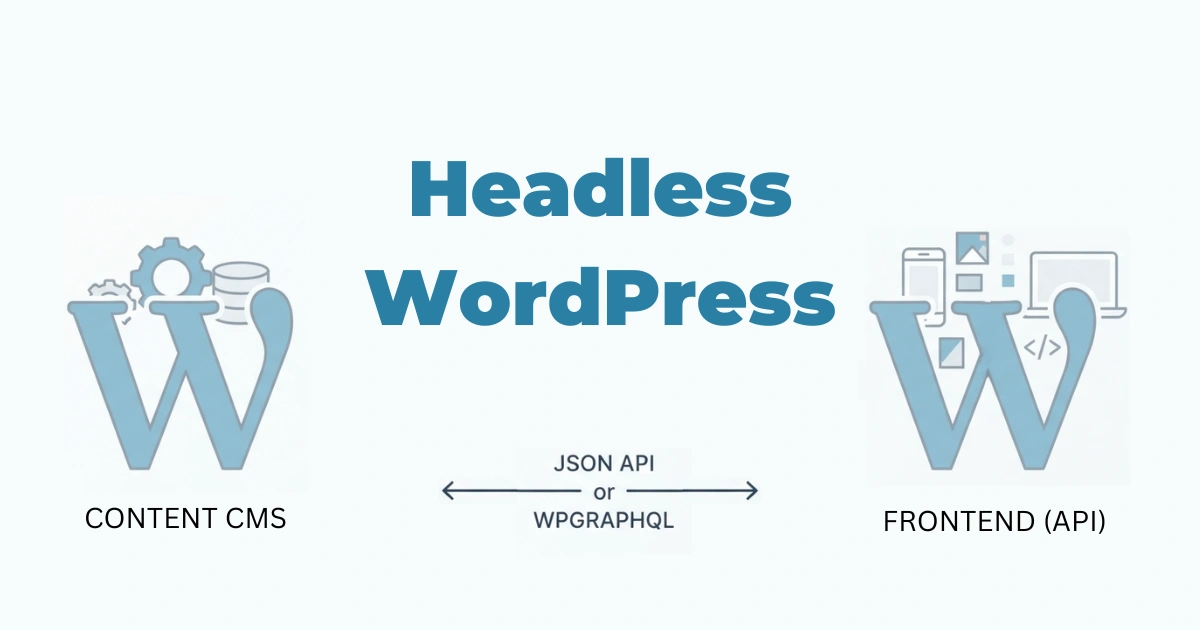
In 2026 the conversation about websites has shifted. It’s no longer enough to “have a website” — organizations care about speed, resilience, personalization, and delivering content wherever users are. WordPress still powers a huge portion of the web, but modern demands have pushed many teams to rethink its role. Headless WordPress is one of the most important architectural patterns to emerge from that rethinking: it keeps WordPress where it’s strongest (content editing and management) while replacing or decoupling what it does poorly for certain use cases (monolithic frontend rendering).
What does “headless” mean?
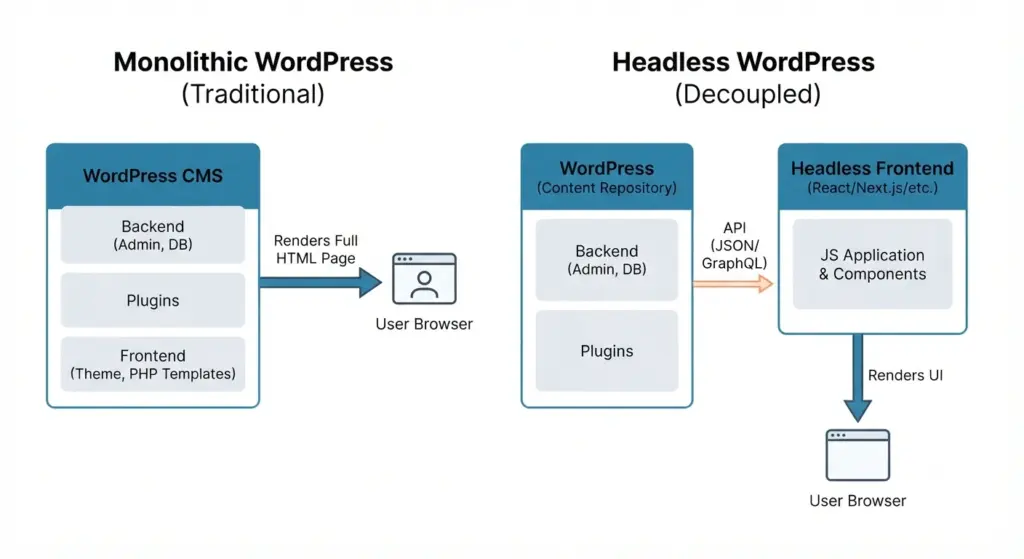
Headless vs. traditional (monolithic) WordPress
- Traditional WordPress is monolithic: backend (admin, content, plugins) and frontend (theme, PHP templates) are tightly coupled. Visiting a page triggers PHP execution, DB queries, template rendering, and returns full HTML.
- Headless WordPress decouples backend and frontend. WordPress remains the content repository (the “body”), but it exposes content via APIs (REST, GraphQL). A separate frontend application (the “head”) consumes those APIs and renders the UI using modern frameworks (React, Vue, Svelte, Next.js, Nuxt, SvelteKit, etc.) or SSG/SSR tooling.
Why “decoupled” is often a better term
“Headless” implies removing the head entirely; in practice teams usually build a new head (or many heads) and keep WordPress as the single source of truth. “Decoupled” emphasizes the independent evolution and communication via APIs.
How headless WordPress works
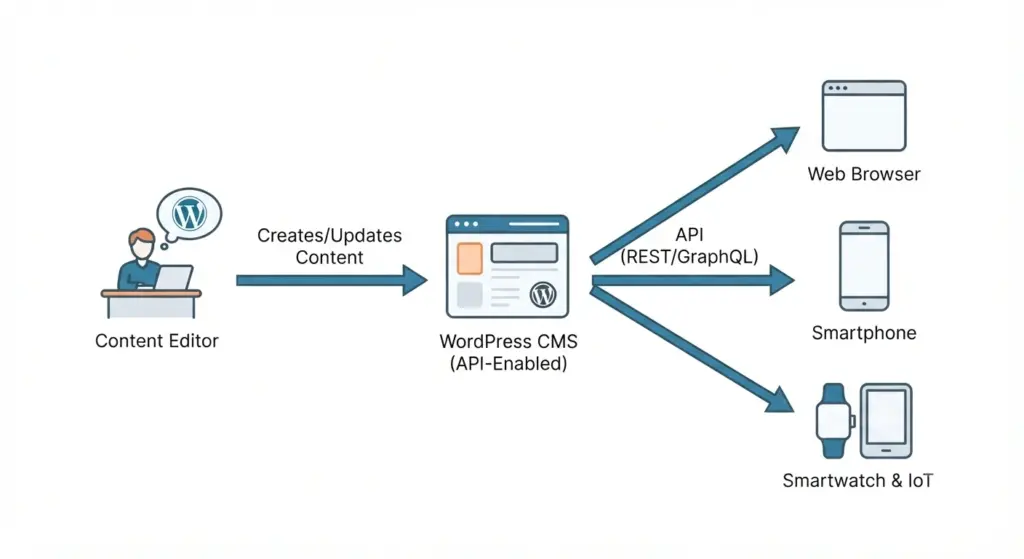
1) The content repository (WordPress backend)
- Authors write posts, manage media, define custom post types and taxonomies in WordPress as usual.
- Plugins like WPGraphQL or enhancements to the REST API expose structured content, relationships, and custom fields (ACF, custom blocks) in machine-readable formats (JSON/GraphQL).
2) The API layer
- REST API: built-in, easy to use, widely supported.
- GraphQL (via WPGraphQL): offers flexible queries, smaller payloads, and better support for complex relationships. In 2026 GraphQL is a first-class option for complex frontends.
- Authentication and caching live here: conditional access, role-based endpoints, and edge caching strategies are important.
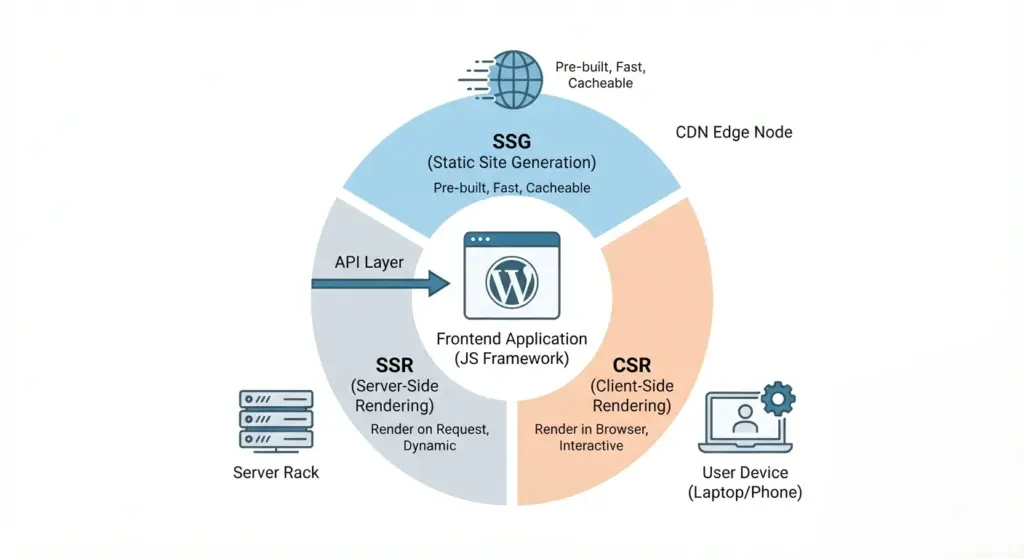
3) The frontend (presentation/application)
- Frontend apps fetch content from WordPress via API and render it. Options include:
- Static Site Generation (SSG): build time rendering (e.g., Next.js export, SvelteKit prerender) producing static HTML served from CDN.
- Server-Side Rendering (SSR): render on demand (e.g., Next.js/Node SSR) for personalization and frequently changing pages.
- Client-Side Rendering (CSR): SPA that fetches data at runtime — less common as sole strategy because of SEO/perf trade-offs.
- Hybrid: SSG for public content, SSR or ISR (Incremental Static Regeneration) for dynamic sections.
- Multi-channel: same WordPress content can power web frontends, mobile apps, IoT screens, voice assistants, and more.
Core benefits of going headless
Performance and user experience
- Static pages and CDN edge delivery reduce Time to First Byte (TTFB) and Largest Contentful Paint (LCP).
- Modern frontend frameworks allow granular code-splitting, hydration strategies, and faster perceived interactivity.
- Techniques like Edge Rendering, ISR, and selective hydration further balance speed and freshness.
Frontend freedom and UX innovation
- Use any UI framework or design system without being constrained by PHP themes or legacy template hierarchies.
- Build app-like interactions, progressive web apps, or advanced personalization without hacky plugin workarounds.
Omnichannel content distribution
- One CMS, many channels: reuse content across web, native apps, kiosks, digital signage, and third-party platforms via APIs.
Security isolation
- Hiding the WordPress admin behind VPNs/firewalls, exposing only the API to trusted callers, reduces attack vectors.
- Static frontends mean fewer runtime vulnerabilities in public-facing code.
Better scalability
- Frontend scales via CDN and edge nodes; backend scale focuses on content updates and editorial activity rather than every pageview.
Trade-offs and where headless hurts
Loss of editor-preview (WYSIWYG) out of the box
- WordPress preview relies on theme rendering. Headless setups often need a custom preview server or a render preview microservice to give editors accurate previews, which requires development.
Plugin and ecosystem incompatibilities
- Many plugins (page builders, some SEO tools, caching plugins that expect a theme) assume a monolithic flow. You may need to:
- Use headless-compatible plugins.
- Re-implement functionality in the frontend (forms, analytics events).
- Use middleware or microservices to support missing features.
Increased engineering cost and operational overhead
- Two codebases: maintain WordPress and the frontend app. That increases testing, CI/CD complexity, monitoring, and specialized hiring (frontend JS engineers, DevOps).
- Runtime complexity: SSR, caching invalidation, and API rate-limits require proper design.
SEO and content considerations
- SEO can be excellent with a headless setup but requires careful implementation: server-side rendering or prerendering, canonical tags, meta handling, structured data, and sitemap generation must be implemented in the frontend.
When headless is the right choice
Headless is a good fit when one or more of the following are true:
- You must deliver content to multiple platforms (web + mobile app + devices).
- Performance at scale is a critical business requirement (global CDN, sub-second loads).
- You need a bespoke user experience or product-like interactions (complex UIs, personalization).
- Your team can support a JS-heavy stack or you have access to agencies/partners with headless experience.
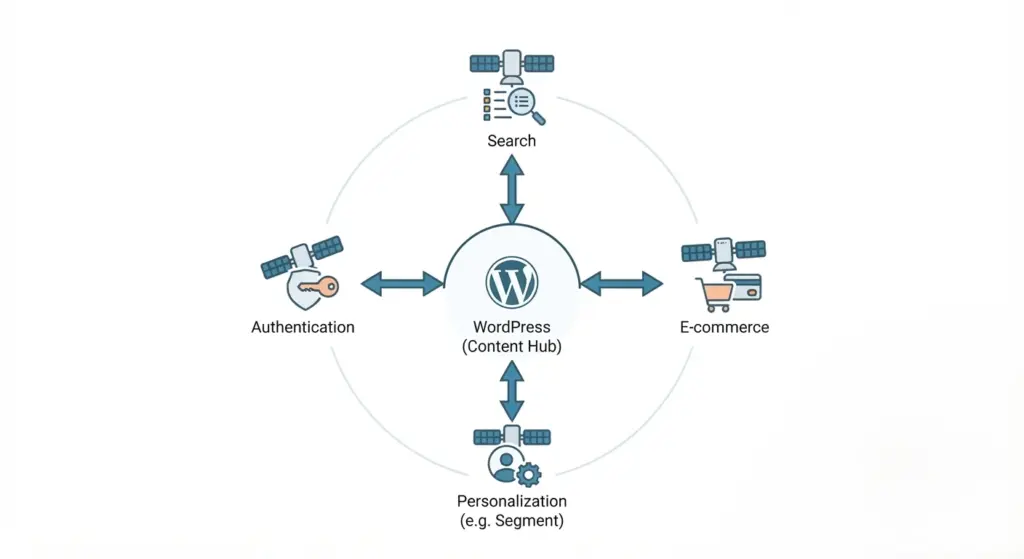
- You want to adopt a composable architecture: best-of-breed tools for search, commerce, analytics, and personalization.
When to stick with traditional WordPress:
- Small business sites, simple blogs, or marketing sites where speed-to-market and low maintenance matter.
- Heavy dependency on page builders and plugins that have no headless equivalent.
- Tight budgets and no access to frontend engineering resources.
Architectural patterns and deployment models
1) Static-first (SSG) + Incremental updates
- Pre-build all public pages at deploy time; serve from CDN.
- Use Incremental Static Regeneration (ISR) or webhook-triggered rebuilds for updated content. Good for mostly-static editorial sites.
2) SSR + Edge rendering
- Use SSR where personalization, server logic, or frequently changing data is required.
- Edge platforms (Vercel, Netlify Edge, Cloudflare Workers) allow low-latency renders close to users.
3) Hybrid (SSG + CSR + SSR)
- Build public landing pages statically; hydrate interactive components client-side; use SSR for logged-in or dynamic areas.
4) Middleware and microservices
- Offload forms, payments, search, and user auth to specialized services (e.g., Algolia/Typesense for search, Stripe for payments, Auth0/Clerk for auth).
- Use a middleware layer/API gateway to combine data from WordPress and these services for the frontend.
5) Headless commerce + WordPress
- Use WordPress for content and a headless commerce platform (Shopify Storefront API, Commerce.js, Medusa) for the transaction layer.
Migration checklist — what to plan before you go headless
- Audit content
- Inventory post types, custom fields, taxonomies, media, and relationships.
- Identify content editors’ workflows (preview, scheduling, revisions).
- Inventory plugins and features
- List plugins that affect frontend, SEO, forms, redirects, analytics.
- Mark which must be replaced or reimplemented.
- Define API contract
- Choose REST vs GraphQL. Design endpoints and include required metadata (meta tags, structured data).
- Plan pagination, filtering, and performance (selective fields).
- Preview strategy
- Implement a preview server or a secure preview proxy that can render a draft in the headless frontend.
- Integrate preview buttons into WP admin.
- SEO & metadata
- Ensure frontend generates canonical tags, hreflang, meta titles/descriptions, Open Graph/Twitter tags, and structured data.
- Decide sitemap generation strategy — frontend or a separate generator.
- Media handling
- Decide whether to keep media on WP, use a dedicated asset CDN (Cloudinary, Bunny, S3+CDN), or serve directly from WP but cache aggressively.
- Forms & submissions
- Replace server-dependent forms (WP forms) with API-based endpoints or third-party form processors that handle submissions and spam protection.
- Authentication & user flows
- Design for user sessions, comment systems, and role-based content. Use token-based auth or middleware if you need to protect content.
- Caching & invalidation
- Plan granular cache invalidation: webhooks on content change, selective ISR, or purge API calls to CDN.
- Monitoring, observability, and error handling
- Set up Sentry/LogRocket for frontend errors, server logs for APIs, and uptime monitoring.
SEO with headless WordPress :
Headless WordPress can be highly SEO-friendly — but it requires deliberate implementation.
Key SEO principles for headless
- Serve crawlable HTML: Prefer SSG or SSR so crawlers and social crawlers see full HTML with metadata.
- Manage meta tags in the frontend: Title, description, Open Graph, Twitter tags. These must reflect editorial settings stored in WP (e.g., Yoast/RankMath equivalents or custom meta fields exposed via API).
- Structured data (JSON-LD): Generate at render time with content-specific schema (Article, BreadcrumbList, Organization, Product).
- Canonicals & canonicalization: Frontend must generate correct canonical URLs and handle trailing slashes, query strings, and pagination.
- Sitemaps: Auto-generate sitemaps that include lastmod and priority. Can be built during SSG or provided by a lightweight serverless function.
- hreflang and internationalization: Expose language and regional variants from WP and render hreflang links on the head.
- Page speed and Core Web Vitals: Use preconnect, preload, optimized images, modern image formats (AVIF/WebP), and edge delivery.
- Redirects and link equity: Implement server-level or edge-level redirects for changed URL structures; map old routes to new ones.
Handling SEO plugins and metadata
- Many popular SEO plugins assume server-rendered themes. For headless, either:
- Use headless-compatible SEO plugins that expose metadata (e.g., Yoast with REST/GraphQL support), or
- Store SEO metadata in custom fields and surface them through the API so the frontend can render tags.
Editor experience :
A poor editorial experience kills adoption. Address these areas:
- Preview: Build a secure preview environment that fetches draft data from WordPress and renders it exactly like production. Options include a preview server or embedding a preview frame with authenticated access.
- Block editor compatibility: Modern headless setups usually keep Gutenberg for editing. Use blocks but map block output to structured data in the API. Consider headless-friendly block libraries.
- Inline media and embeds: Ensure oEmbed and embedded media have clear, fast delivery, and that responsive images are supported.
- Scheduling, revision history, and A/B testing: Keep editorial features intact by surfacing them through the API and building admin dashboards or integrations that mirror editorial workflows.
- Training and documentation: Provide editorial training and a short manual on previewing and publishing in the new environment.
Security, backups, and governance
- Harden WordPress admin: restrict access via IP allowlists, two-factor authentication, and IP-based firewalls. Consider isolating WP admin on an internal network or VPN.
- API authentication: Use application keys, signed tokens, or OAuth for private endpoints. Public endpoints (public posts) can remain public but rate-limited and cached.
- Backups and rollback: Maintain regular backups of DB and media. Version your content schema and have rollback plans for breaking API changes.
- Vulnerability management: Keep WP core, plugins, and server packages updated on controlled schedules. Run security scans.
- Least privilege: Only give editors necessary rights; use scoped API keys for integrations.
Tooling & platforms to consider :
- Frontend frameworks: Next.js (React), Remix, Nuxt (Vue), SvelteKit, Astro (island architecture), Qwik for hyper-performance.
- GraphQL: WPGraphQL to expose a flexible API.
- Static/Edge hosts: Vercel, Netlify, Cloudflare Pages + Workers, Fastly Compute@Edge for low-latency global distribution.
- Image/CDN: Cloudinary, Imgix, Bunny.net, or native edge image transforms on host providers.
- Search: Algolia, Typesense, MeiliSearch for instant search; Strapi integration for authoring alternatives (if moving away from WP).
- E-commerce: Shopify Storefront API, BigCommerce headless, Commerce.js, or Medusa for headless commerce.
- Personalization: Segment, RudderStack, or open-source personalization engines; or integrate experimentation platforms (LaunchDarkly, Optimizely).
- Analytics: Server-side analytics collection options to preserve privacy and avoid client-side sampling issues.
- Forms & workflows: Formspree, Netlify Forms, or custom serverless endpoints to collect submissions.
- CI/CD and orchestration: Git-based workflows, GitHub Actions, and preview deploys for editorial preview environments.
Cost, team, and time expectations
- Initial cost: Higher than a traditional WP site due to frontend development and integrations. Expect 2–4x development effort for complex projects.
- Ongoing cost: Hosting for frontend (often low with CDN), WordPress hosting (managed or containerized), and maintenance for two codebases.
- Team: At minimum, a frontend engineer with experience in chosen JS framework, a WordPress developer for API and backend work, and DevOps to manage deployments and caching. For enterprises, add QA, SEO specialists, and product designers.
- Time to launch: Simple headless implementations (SSG blog) can be implemented in weeks; complex multi-platform systems with personalization and commerce can take months.
Migration patterns and phased approaches
Phased migration strategy
- Audit and plan.
- Build a minimal frontend proof-of-concept for a subset of content (e.g., blog section).
- Implement API endpoints and preview capability.
- Migrate landing pages gradually, keep critical pages on the old theme if needed.
- Complete cutover and decommission the old theme or keep it as a fallback.
Big-bang migration
- Rebuild all pages and switch at once. Risky for large sites with complex redirects and SEO history. Only advisable with significant testing and staging.
Real-world examples and use cases
- Publishers: Use SSG + ISR to serve millions of readers with low latency and frequent updates.
- Ecommerce brands: WordPress for editorial content + headless commerce for catalog and purchase flows for fast, branded storefronts.
- Enterprises: Multi-site content distribution to web, apps, kiosks, and partner platforms with a centralized CMS.
- SaaS marketing sites: Use headless to integrate product data, live demos, and interactive docs without being constrained by theme limitations.
Common pitfalls and how to avoid them
- Forgetting SEO basics — ensure server-rendered HTML, metadata, sitemaps, and structured data are implemented.
- Ignoring editor preview — build preview early in the project.
- Over-architecting — don’t build microservices for every small feature; pick pragmatic tools that solve real problems.
- Poor caching strategy — design cache invalidation and webhook flows from day one to avoid stale content or overbuilds.
- Underestimating media performance — use CDNs and modern image formats with responsive breakpoints.
Measuring success: KPIs and monitoring
Track these metrics to evaluate a headless rollout:
- Core Web Vitals (LCP, CLS, FID / INP)
- Time to Interactive (TTI) and First Contentful Paint (FCP)
- Bounce rate and session duration
- Search engine rankings and organic traffic (post-launch vs pre-launch)
- Conversion rates (leads, purchases)
- Build and deploy times, incidence of broken preview links, editorial time-to-publish
- Uptime and API error rate for WP endpoints
- Cost per thousand requests and hosting costs
The future: composable architecture and evolving tooling
- Composability will continue to grow: best-of-breed services stitched together via APIs (headless CMS, headless commerce, headless search).
- Tooling will keep lowering barriers: frameworks, starter kits (Faust.js, Frontity historically, and newer integrations), and managed solutions to simplify preview and content delivery.
- Edge-native rendering and “render-as-you-go” models will reduce latency further while keeping content fresh.
Decision checklist — is headless WordPress worth it?
Answer yes if most of the following apply:
- You need multi-channel delivery.
- Performance is a strategic priority.
- You need advanced UX or app-like interactions.
- Your team can support frontend JS and DevOps, or you can hire/contract it.
- You’re building an enterprise-grade site or product requiring composability.
Stick with traditional WordPress if:
- You want fastest time-to-market and minimal engineering overhead.
- You rely heavily on page builders and existing plugin ecosystems.
- Editorial simplicity and low cost outweigh the benefits of headless.
Final thoughts
Headless WordPress is a powerful option for teams that need flexibility, performance, and omnichannel delivery. It’s an architectural choice that shifts responsibilities — from theme integration and plugin convenience to API design, frontend engineering, caching, and editorial tooling. When done right, it unlocks modern experiences and scale while preserving WordPress’s familiar editorial strength.