What is a top interactive product configurator?
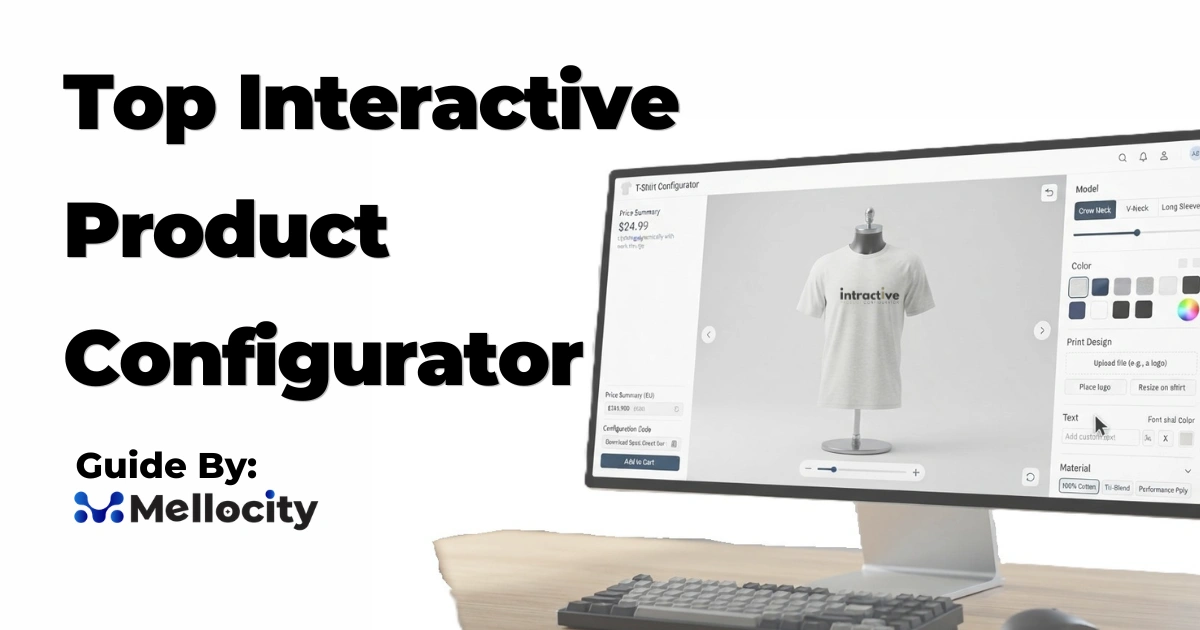
A top interactive product configurator is an advanced software tool that lets customers or sales teams customize products in real time—selecting options like color, material, size, and features—while seeing instant visual updates, accurate pricing, and validation that every combination is technically valid and manufacturable.
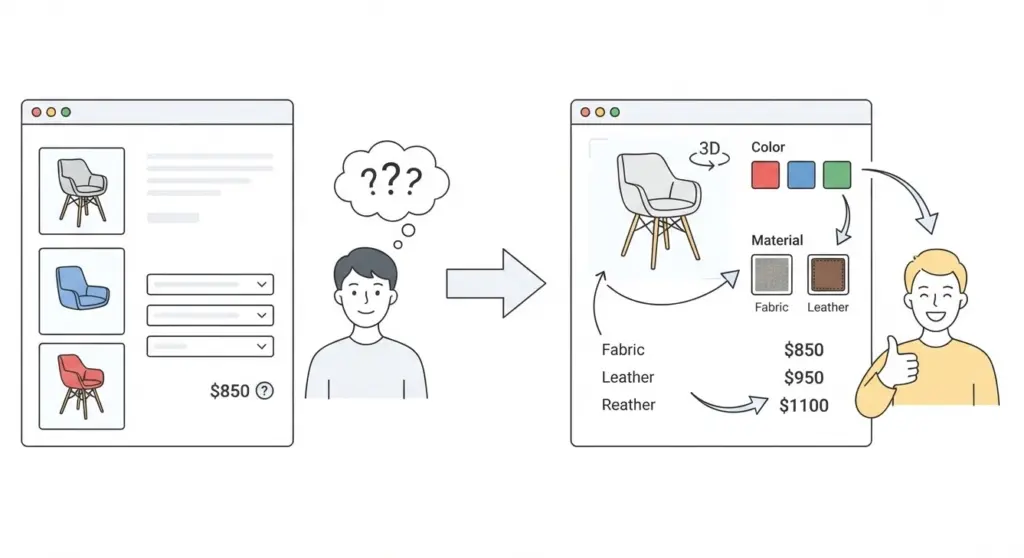
If you sell customizable products, you have probably noticed that static product pages leave buyers guessing. They wonder: Will this color work with that material? How much does this upgrade actually cost? Is this combination even possible? A top interactive product configurator answers all of these questions on the spot, turning uncertainty into confidence and confidence into sales.
What Makes a Product Configurator “Interactive” and “Top”?
Not every customization tool deserves the label “top interactive product configurator.” The best solutions combine several capabilities that go far beyond simple dropdown menus.
Core Characteristics of a Top Interactive Product Configurator
A high-performing configurator typically includes:
- Real-time 3D or high-quality 2D visualization that updates instantly as options change, without page reloads.
- Rule-based configuration logic that enforces valid combinations and prevents impossible or unmanufacturable selections.
- Dynamic pricing calculations that reflect the exact cost of each option and update the total in real time.
- Guided selling flows that walk users through choices step by step, especially useful for complex products with many variants.
- Seamless integrations with ecommerce platforms (Shopify, WooCommerce), CRM systems, and ERP software so configured orders flow smoothly into production and sales workflows.
- Mobile-ready delivery ensuring the configurator performs well on phones and tablets without requiring app downloads.
When these elements work together, the result is an experience that feels responsive, trustworthy, and genuinely helpful—not just a flashy widget.
How It Works Behind the Scenes
At a technical level, a product configurator follows a clear pipeline:
- Product model definition – Attributes, options, and variants are defined (e.g., frame material, fabric type, dimensions).
- Rules and constraints – Logic determines which combinations are allowed (e.g., “leather upholstery not available with this frame”).
- Calculations – Pricing, lead times, or other metrics are computed based on selections.
- Validation – The system checks that the configuration is valid and manufacturable.
- Output generation – The final configuration produces order data, quotes, CAD parameters, BOMs, or ERP-ready records.
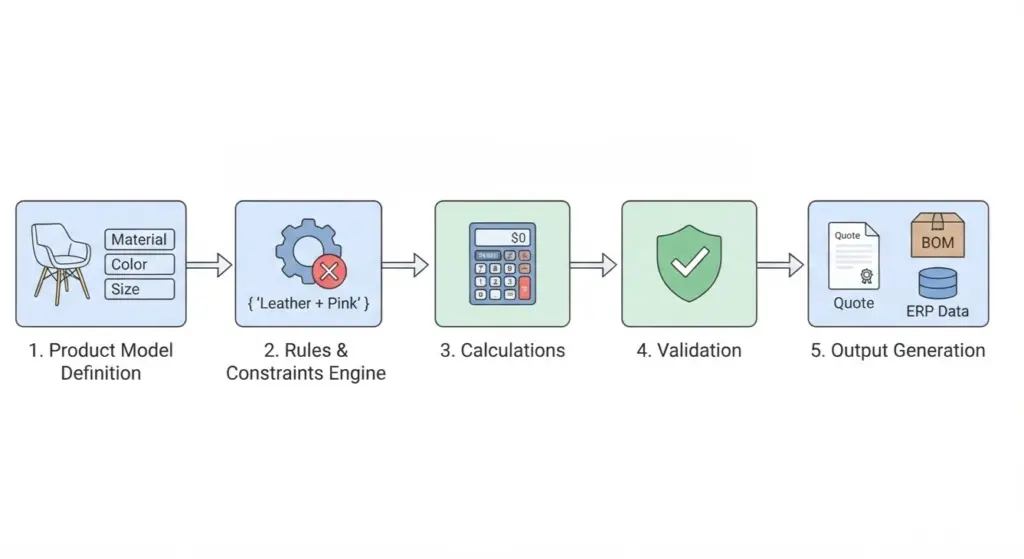
This structure ensures that every configured product is not only visually appealing but also technically feasible and accurately priced.
Why Businesses Invest in Interactive Product Configurators
The business case for interactive configurators is no longer theoretical. Multiple sources report consistent improvements across key ecommerce and sales metrics.
Conversion and Revenue Impact
Recent data points to significant gains:
- Companies implementing interactive product personalization see an average conversion uplift of around 150% compared to static product pages, according to 2026 data cited by Kickflip.
- When 3D rendering and augmented reality are added, conversion improvements can reach up to 250% in some scenarios.
- Shopify reports that merchants using 3D content on their stores see an average 94% conversion lift versus those using only static images.
- Add-to-cart rates increase by 40% to 80% when customers can verify exactly what they are getting through interactive configuration.
- Average Order Value (AOV) tends to climb by 20% to 40%, as premium upgrades become more tangible when visualized instantly.
- In furniture retail specifically, interactive 3D platforms have been associated with sales increases of up to 40% and a 64% increase in purchase intent.
These numbers matter because they reflect reduced uncertainty at the point of decision. When buyers can see and validate their exact configuration, they move forward faster and with more confidence.
Operational Benefits Beyond Sales
Interactive configurators also improve internal efficiency:
- Fewer returns – Customers preview variations before purchase, reducing mismatched expectations. Some analyses suggest returns can drop by 25–30% with well-implemented configurators.
- Better leads for sales teams – In B2B contexts, configured options and clear intent flow directly into CRM and quoting systems, shortening sales cycles.
- Lower content production costs – Automated packshot and image generation reduce the need for individual photoshoots for every variant.
- Reduced configuration errors – Rule engines prevent invalid combinations from ever reaching production, cutting rework and delays.
For many businesses, the ROI comes not just from higher conversion but from lower operational friction across sales, marketing, and production.
Key Features to Look for in a Top Interactive Product Configurator
When evaluating tools, focus on capabilities that directly impact user experience, data accuracy, and integration.
Essential Features
Real-time 3D visualization
Product changes should update instantly without page reloads or manual effort. High-quality rendering and multiple viewing angles help users understand complex configurations.
Rules engine and constraint management
A robust rules engine handles compatibility rules, pricing tiers, and configuration logic without requiring manual intervention at the point of sale. This is critical for complex products with many dependencies.
Dynamic pricing and calculations
The configurator should support complex pricing models, including relative pricing (e.g., “+$120 for leather”), discounts, and multi-currency support, with prices updating in real time.
Guided selling and step-by-step flows
For products with hundreds or thousands of variants, guided selling walks customers through choices in a logical sequence, reducing overwhelm and decision fatigue.
Mobile optimization and performance
The configurator must work smoothly on mobile devices, with fast load times and touch-friendly controls. Browser-based AR (no app download) is an increasingly common expectation.
Integrations with ecommerce and business systems
Native integrations with Shopify, WooCommerce, or other platforms, plus APIs for ERP and CRM connections, ensure configured orders flow seamlessly into existing workflows.
Analytics and reporting
Built-in analytics help track which options are popular, where users drop off, and how configuration affects conversion and AOV.
Backend content management
Non-technical users should be able to add or update product configurations and 3D assets without developer support, keeping the tool sustainable over time.
Advanced Capabilities (Nice to Have)
Depending on your needs, you might also consider:
- Automated packshot generation – High-quality product images generated automatically for every configuration.
- AR and VR viewing – Browser-based augmented reality that lets customers visualize products in their own space.
- AI-assisted model creation – Tools that help generate or optimize 3D models more quickly.
- Quote and proposal workflows – “Get a quote” functionality for B2B or high-value B2C purchases, integrated with CPQ-style processes.
- Multilingual and multi-region support – Essential for global brands selling across different markets.
Types of Product Configurators and When to Use Them
Not all configurators serve the same purpose. Understanding the main types helps you match the tool to your business model.
Ecommerce Visual Configurators
Designed primarily for B2C online stores, these focus on:
- Real-time visual preview
- Simple to moderate rule logic
- Direct checkout integration
- Strong mobile and social sharing features
They are ideal for custom apparel, furniture, home decor, accessories, and other visually driven products where customers want to “see it before they buy it.”
B2B CPQ-Style Configurators
Configure-Price-Quote (CPQ) tools target complex B2B sales:
- Deep rule engines for engineering constraints
- Integration with CRM and ERP
- Quote generation and approval workflows
- Support for sales reps configuring on behalf of customers
These suit manufacturers, industrial equipment sellers, and any business where configurations must align with production capabilities and pricing contracts.
Hybrid Solutions
Some platforms bridge both worlds, offering:
- Visual customization for end customers
- Backend workflows for sales and engineering
- Flexible deployment as embedded widgets or standalone experiences
Hybrid tools work well for businesses that sell both direct-to-consumer and through dealers or sales teams.
Leading Interactive Product Configurator Tools in 2026
Several platforms consistently appear in 2026 roundups and buyer guides. The “best” choice depends on your product complexity, technical resources, and sales model.
Simplio3D
Best for: Retailers and manufacturers needing flexible 3D configurators with strong logic and integrations.
- Web-based 3D product configurator and visualization platform
- Conditional logic and real-time pricing
- Supports lead generation, quotations, and direct ecommerce
- Shopify and WooCommerce integration, plus open API for ERP/CRM
- Competitive pricing with a free trial and strong customer satisfaction ratings
Kickflip
Best for: Ecommerce brands seeking no-code visual customization without heavy development.
- No-code editor for marketing teams to build and modify configurators
- Real-time visual preview for colors, materials, text, logos, and components
- Dynamic price updates with relative pricing display
- “Get a Quote” functionality for CPQ-style workflows
- Native Shopify and WooCommerce integrations
- Bulk ordering capabilities
Vivid 3D
Best for: Enterprise teams managing 3D assets at scale across ecommerce, sales, and manufacturing.
- Scalable, future-proof infrastructure for large catalogs
- Deployed at brands like Living Spaces, Lippert Components, and Hastings Tile and Bath
- Strong focus on asset management and multi-channel delivery
Jotform Configure
Best for: Teams prioritizing ease of use and rapid deployment with solid form-based configuration.
- Ranked highly for features, ease of use, and value in 2026 evaluations
- Integrates with Jotform’s broader form and workflow ecosystem
- Suitable for moderate-complexity products and lead capture scenarios
Shopify Product Configurator (and similar apps)
Best for: Shopify merchants wanting a tightly integrated, app-based solution.
- Real-time visual preview tied to variants and checkout
- Text input, uploads, and option selections linked to product variants
- Minimal setup for stores already on Shopify
Unity-Based and Custom Solutions
For highly specialized needs, some businesses build configurators using engines like Unity, especially when:
- Photorealistic rendering is critical
- AR/VR experiences are a priority
- Off-the-shelf tools cannot handle unique product logic
These require more development resources but offer maximum flexibility.
How to Choose Among Them
Ask yourself:
- Do I need visual configuration or full CPQ workflows?
- Is this for leads, quotes, or direct checkout?
- Do I need ERP/CRM integration now or later?
- How complex is my product logic, and can my team maintain it?
Matching your answers to each platform’s strengths will narrow the field quickly.
Implementing a Top Interactive Product Configurator:
Rolling out a configurator successfully is as much about process as it is about software.
1. Map Your Product Logic
Before touching any tool, document:
- All options and variants
- Dependencies and constraints (what cannot be combined)
- Pricing rules and any tiered or volume-based pricing
- Required outputs (quote, BOM, CAD data, order specs)
This becomes the blueprint for your rules engine.
2. Prepare Your Assets
For visual configurators:
- Gather or create 3D models or high-quality 2D images for each variant
- Ensure consistent lighting, angles, and naming conventions
- Plan for future variants so the system can scale
Automated packshot generation can reduce long-term asset creation costs.
3. Integrate with Existing Systems
Decide early how the configurator will connect to:
- Your ecommerce platform (Shopify, WooCommerce, etc.)
- CRM for lead and quote tracking
- ERP for production and inventory
- Analytics tools for behavior tracking
APIs and native integrations simplify this, but some custom work may be needed.
4. Test with Real Users
Run usability tests with:
- Actual customers or prospects
- Sales reps who will use the tool
- Support teams who handle post-purchase questions
Watch where users hesitate, misinterpret options, or abandon the flow. Refine the steps, labels, and defaults accordingly.
5. Measure and Iterate
Track key metrics before and after launch:
- Conversion rate
- Average order value
- Return rate
- Time to quote or purchase
- Content production costs
Use these to justify further investment and guide ongoing improvements.
Common Mistakes to Avoid
Even with a powerful tool, certain pitfalls can undermine results.
- Overcomplicating the interface – Too many options visible at once can overwhelm users. Use guided flows and progressive disclosure.
- Weak or missing rules – Allowing invalid configurations erodes trust and creates production issues. Invest time in robust rule definition.
- Ignoring mobile performance – A significant share of traffic is mobile; slow or broken mobile experiences kill conversion.
- Treating it as a one-off project – Products evolve, and so should your configurator. Plan for ongoing updates and asset management.
- Focusing only on visuals – Beautiful rendering matters, but accurate pricing, clear specs, and smooth checkout or quote workflows matter more for actual sales.
FAQs
What is the difference between a product configurator and CPQ?
A product configurator focuses on letting users customize a product with visual feedback and rule validation. CPQ (Configure-Price-Quote) systems are broader, often targeting B2B sales with deep pricing engines, approval workflows, and integration into complex sales processes. Many modern tools blend both capabilities.
Do I need 3D models to use an interactive product configurator?
Not necessarily. High-quality 2D images with layered compositing can work well for many products. However, 3D models provide more flexibility for rotation, zoom, and AR experiences, and are increasingly expected for complex or high-value items.
How long does it take to implement a product configurator?
Timelines vary by complexity. Simple no-code configurators on platforms like Shopify can be live in days to weeks. Enterprise-grade solutions with deep integrations and complex rules may take several months. The bulk of the time is usually spent mapping product logic and preparing assets, not just software setup.
Can a product configurator work for both B2B and B2C?
Yes. Hybrid platforms support visual customization for end customers while also feeding configured data into B2B workflows like quotes, proposals, and ERP systems. The key is choosing a tool with flexible deployment and integration options.
What metrics should I track to measure ROI?
Focus on conversion rate, average order value, return rate, content production costs (e.g., photography), and sales team efficiency (time to quote, error rates). Compare these before and after implementation over a meaningful period, typically three to six months.
Is a product configurator worth it for small ecommerce stores?
It can be, especially if you sell customizable products and currently rely on static images or manual back-and-forth for options. No-code tools with affordable pricing make it feasible for smaller stores to test the impact on conversion and AOV before committing to larger investments.
Do product configurators reduce returns?
Yes, by letting customers preview exact variations before purchase, they reduce mismatched expectations. Some analyses suggest returns can drop by 25–30% with well-implemented configurators, though results depend on product type and implementation quality.
Can I update product options without a developer?
Many modern configurators include backend content management that allows non-technical users to add or update options, pricing, and assets. This is an important feature to confirm during evaluation, especially if your product range changes frequently.