Choosing the right foundation for your digital presence is one of the most consequential technical decisions your organization will make. For small business owners, CTOs, and e-commerce store managers, understanding the nuances of web hosting and WordPress hosting is not merely about finding a place to store files—it is about securing performance, scalability, and reliability for revenue-generating assets. This guide provides a comprehensive, technically rigorous exploration of hosting architectures, performance optimization strategies, security hardening protocols, and strategic selection criteria tailored for professional stakeholders who demand excellence.
Understanding Web Hosting and WordPress Hosting:
What Is Web Hosting?
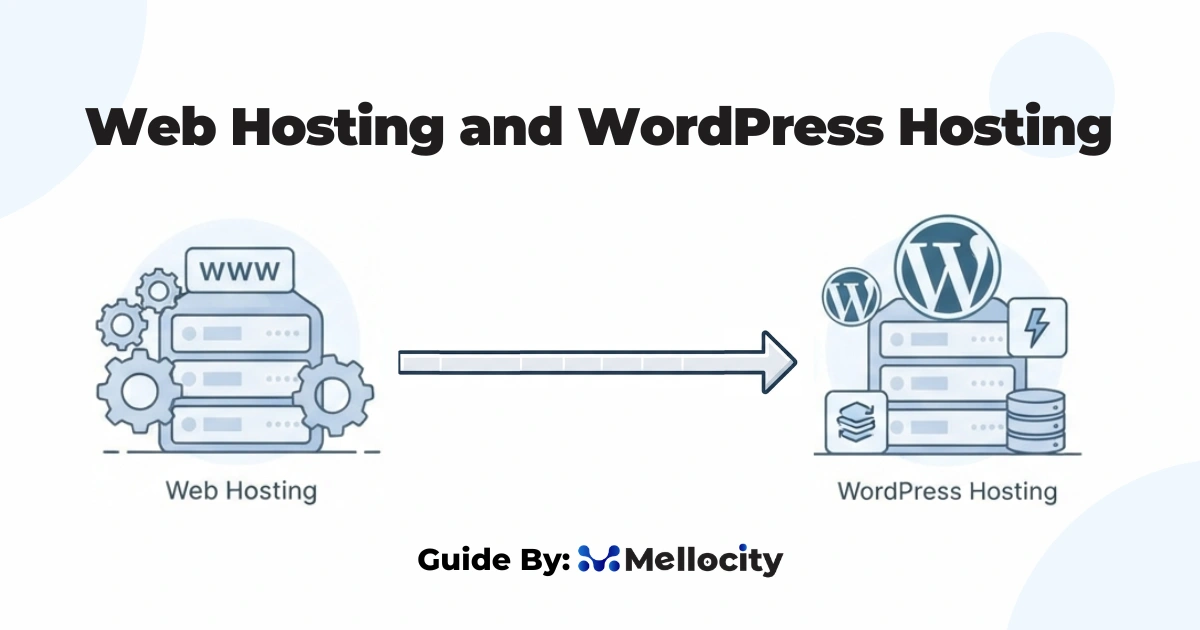
Web hosting is the service that provides the infrastructure, servers, storage, networking, and software stack—required to make a website accessible on the internet. At its core, a hosting provider allocates space on a physical or virtual server. Where website files (HTML, CSS, JavaScript, images, databases) reside and are served to visitors via HTTP/HTTPS protocols. The quality of web hosting directly influences site speed, uptime, security posture, and ultimately, user experience and search engine rankings.
Traditional web hosting encompasses several models:
- Shared Hosting: Multiple websites reside on a single physical server, sharing CPU, RAM, and disk I/O. This is cost-effective but introduces performance variability and security risks due to resource contention.
- Virtual Private Server (VPS) Hosting: A physical server is partitioned into multiple virtual servers, each with dedicated resources and isolated environments. VPS offers greater control and stability than shared hosting.
- Dedicated Hosting: An entire physical server is leased to a single client, providing maximum performance, customization, and isolation, at a premium cost.
- Cloud Hosting: Resources are distributed across a cluster of interconnected servers, enabling elastic scalability, redundancy, and high availability. Cloud hosting is ideal for applications with fluctuating traffic patterns.
What Is WordPress Hosting?
WordPress hosting is a specialized subset of web hosting optimized explicitly for the WordPress content management system (CMS). While generic web hosting can technically run WordPress. WordPress hosting is engineered to address the platform’s unique architectural requirements. PHP execution, MySQL/MariaDB database interactions, file system permissions, and plugin/theme ecosystems.
WordPress hosting solutions typically fall into two categories:
- Managed WordPress Hosting: The provider handles server configuration, security patching, performance optimization, backups, and WordPress-specific updates. This model abstracts infrastructure complexity, allowing teams to focus on content and business logic.
- Unmanaged (Self-Managed) WordPress Hosting: The client retains full responsibility for server administration, security hardening, and performance tuning. This offers maximum flexibility but demands significant technical expertise.
The distinction between generic web hosting and WordPress hosting is not merely semantic—it reflects fundamental differences in stack optimization, caching layers, security protocols, and support specialization. For mission-critical sites, WordPress hosting delivers tangible advantages in load times, threat mitigation, and operational reliability.
Technical Architecture of High-Performance WordPress Hosting
Server Stack Optimization
A robust WordPress hosting environment begins with a meticulously tuned server stack. Leading providers deploy a combination of Nginx or Apache as the web server, PHP-FPM (FastCGI Process Manager) for PHP execution, and MariaDB or MySQL for database management. Each layer is configured to maximize throughput while minimizing latency.
Nginx vs. Apache: Nginx is increasingly favored for WordPress due to its event-driven architecture, which handles concurrent connections more efficiently than Apache’s process-based model. Nginx excels at serving static assets and acting as a reverse proxy for dynamic PHP requests. Apache remains viable, particularly when .htaccess-based rewrite rules are required, but demands careful tuning of modules like mod_php or mod_proxy_fcgi.
PHP-FPM Configuration: PHP-FPM enables isolated, per-site PHP processing pools, preventing one compromised or resource-intensive site from affecting others. Key parameters include:
pm.max_children: Limits concurrent PHP processes to prevent memory exhaustion.request_terminate_timeout: Prevents runaway scripts from monopolizing resources.open_basedir: Restricts PHP file access to designated directories, enhancing security.
Disabling dangerous PHP functions (e.g., exec, shell_exec, system) and enforcing strict file permissions (755 for directories, 644 for files, 600 for sensitive configs like wp-config.php) are non-negotiable security practices.
Database Optimization: WordPress relies heavily on database queries for content retrieval, user authentication, and plugin operations. Optimized hosting environments implement:
- Query Caching: Utilizes Redis or Memcached to store frequent query results in memory, reducing database load.
- Object Caching: Persistent object caching (via Redis) accelerates admin dashboard and complex plugin operations.
- Database Indexing: Proper indexing on
wp_posts,wp_postmeta, andwp_optionstables minimizes full-table scans. - Connection Pooling: Maintains a pool of persistent database connections to reduce handshake overhead.
Caching Layers and Content Delivery
Caching is the cornerstone of WordPress performance. A multi-tier caching strategy ensures that dynamic content is served as static HTML whenever possible, dramatically reducing server load and improving Time to First Byte (TTFB).
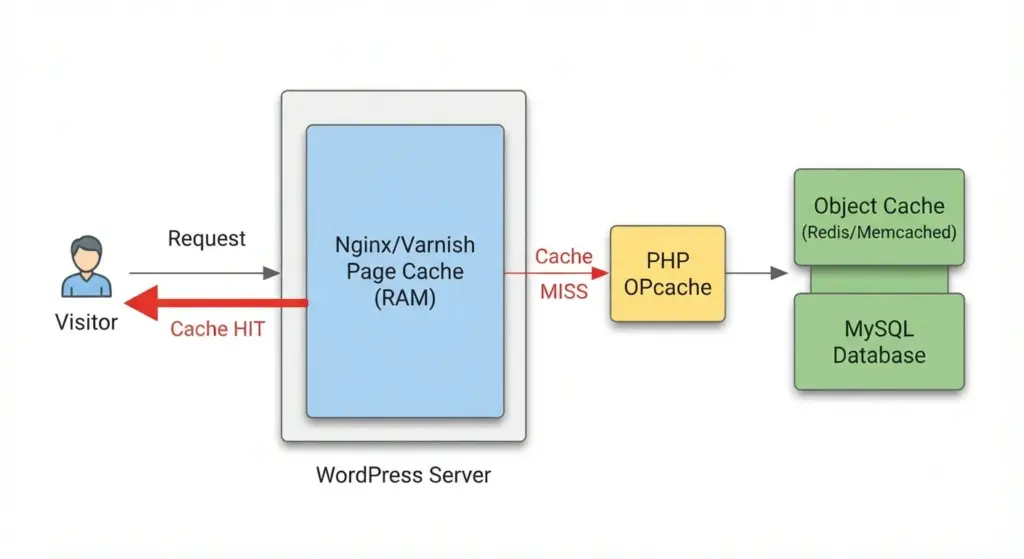
Page Caching: Full-page caches store rendered HTML versions of pages, bypassing PHP and database execution for subsequent requests. Providers often integrate Varnish or Nginx-based microcaching (sub-second cache TTLs) for high-traffic endpoints.
Object Caching: As mentioned, Redis or Memcached stores database query results and WordPress objects in memory. This is particularly beneficial for sites with complex queries or high admin usage.
Opcode Caching: PHP opcode caches (e.g., OPcache) store precompiled PHP scripts in memory, eliminating the need for repeated parsing and compilation.
Content Delivery Network (CDN): A CDN distributes static assets (images, CSS, JavaScript) across geographically dispersed edge servers, reducing latency for global audiences. Integration with WordPress is seamless via plugins or native hosting features.
Browser Caching: Leveraging HTTP headers (Cache-Control, ETag, Last-Modified) instructs browsers to cache static resources locally, reducing repeat visit load times.
Scalability and High Availability
For e-commerce platforms and high-traffic publications, scalability is paramount. Cloud-based WordPress hosting architectures employ horizontal scaling (adding more server instances) and vertical scaling (upgrading server resources) to accommodate traffic spikes.
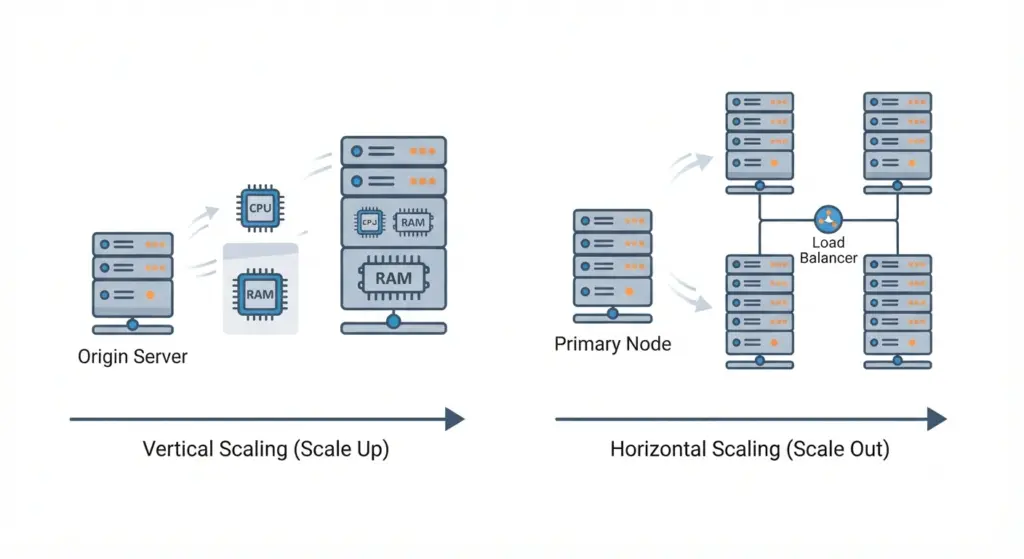
Load Balancing: Distributes incoming traffic across multiple server instances, preventing any single node from becoming a bottleneck. Health checks ensure traffic is routed only to healthy servers.
Auto-Scaling: Automatically provisions additional server instances during traffic surges (e.g., flash sales, viral content) and deprovisions them during lulls, optimizing cost and performance.
Database Replication: Master-slave or master-master database configurations distribute read/write operations across multiple nodes, enhancing throughput and providing failover capabilities.
Geographic Redundancy: Deploying servers across multiple data centers (regions) ensures continuity in the event of localized outages or disasters.
Protecting Your WordPress Infrastructure
Server-Level Security
A compromised server can lead to data breaches, defacement, or complete site takeover. Robust WordPress hosting implements defense-in-depth strategies across the infrastructure stack.
Isolation: Container-based (Docker, LXC) or VM-based isolation ensures that each WordPress site operates in a sandboxed environment, preventing lateral movement in the event of a breach.
Operating System Hardening: Minimal base images reduce attack surface. Security modules like SELinux or AppArmor enforce mandatory access controls. Non-root service users and locked-down file system permissions (e.g., WordPress files owned by a dedicated www-data user) are standard practices.
Network Security: Firewalls (iptables, UFW, or cloud-based security groups) restrict inbound traffic to essential ports (80/HTTP, 443/HTTPS, 22/SSH). Rate limiting and DDoS mitigation (via tools like mod_evasive, Cloudflare, or AWS Shield) protect against volumetric attacks.
TLS/SSL Encryption: Enforcing HTTPS via TLS 1.2 or 1.3 encrypts data in transit. HSTS (HTTP Strict Transport Security) headers prevent downgrade attacks.
WordPress Application Security
Beyond server hardening, WordPress itself requires diligent security configuration.
Core, Theme, and Plugin Updates: The single most critical security practice is maintaining up-to-date software. Vulnerabilities in outdated plugins or themes are the primary attack vector for WordPress sites. Automated update mechanisms (for minor releases and trusted plugins) reduce human error.
Authentication Hardening:
- Strong Passwords: Enforce complex password policies for all user accounts.
- Two-Factor Authentication (2FA): Require 2FA for admin and editor roles to prevent credential stuffing attacks.
- Limit Login Attempts: Plugins or server rules that block IPs after repeated failed logins mitigate brute-force attacks.
- Disable XML-RPC: XML-RPC is a legacy API often exploited for DDoS and brute-force attacks. Disabling it (via
.htaccessor plugins) closes this vector.
File Editing and Execution Controls:
- Disable File Editing: Add
define('DISALLOW_FILE_EDIT', true);towp-config.phpto prevent admins from editing theme/plugin files via the dashboard—a common post-compromise tactic. - Restrict File Uploads: Limit allowable file types and scan uploads for malware.
- Disable Directory Indexing: Prevent directory listing by adding
Options -Indexesto.htaccessor Nginx config.
Security Plugins and Scanning: While not a substitute for server-level security, reputable plugins (e.g., Wordfence, Sucuri, Jetpack Security) provide malware scanning, firewall rules, and login hardening. Regular vulnerability scans against OWASP Top 10 and CIS Benchmarks are advisable.
Backup and Disaster Recovery
Even with impeccable security, breaches or human errors can occur. A robust backup strategy is the last line of defense.
3-2-1 Backup Rule: Maintain at least three copies of data, on two different media types, with one copy stored offsite (geographically redundant). For WordPress, this includes:
- Database: Daily (or hourly for high-transaction sites) SQL dumps.
- Files: Full backups of
wp-content(themes, plugins, uploads) and critical configs (wp-config.php,.htaccess). - Server Images: Periodic snapshots of the entire server state for rapid rebuilds.
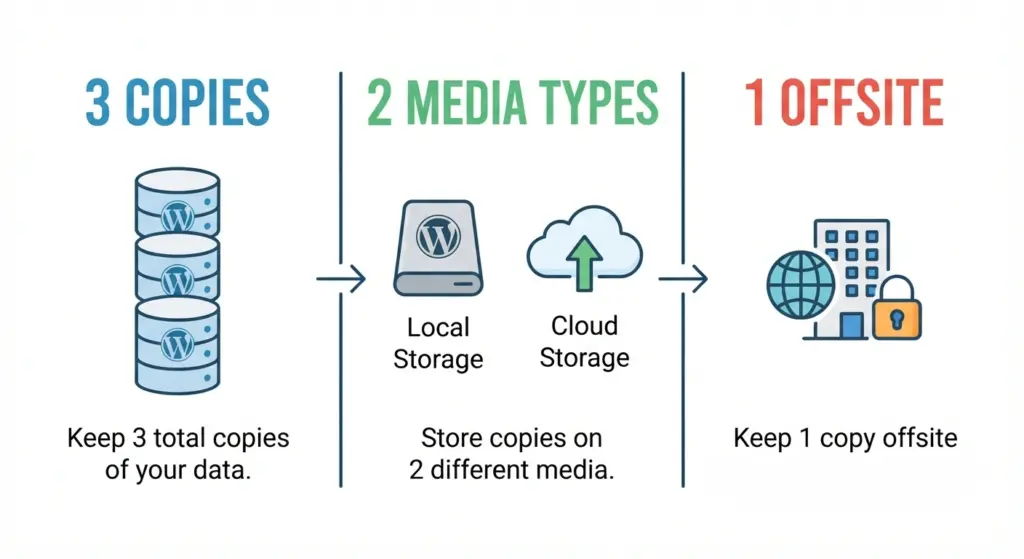
Automated and Immutable Backups: Backups should be automated, encrypted, and stored in immutable storage (e.g., AWS S3 with Object Lock) to prevent tampering or ransomware encryption.
Testing Restore Procedures: Regularly test backup restoration to ensure data integrity and minimize downtime during recovery.
Performance Optimization: Speed as a Competitive Advantage
Core Web Vitals and SEO Impact
Google’s Core Web Vitals—Largest Contentful Paint (LCP), Interaction to Next Paint (INP), and Cumulative Layout Shift (CLS)—are critical ranking factors. Slow-loading sites suffer higher bounce rates, lower conversions, and diminished search visibility.
LCP (Loading Performance): Measures the time until the largest visible element (often a hero image or headline) renders. Target: under 2.5 seconds.
INP (Interactivity): Assesses responsiveness to user input (clicks, taps). Target: under 200 milliseconds.
CLS (Visual Stability): Quantifies unexpected layout shifts. Target: under 0.1.
Optimized WordPress hosting directly improves these metrics through server-side caching, efficient asset delivery, and minimized TTFB.
Asset Optimization Techniques
Image Optimization: Serve images in modern formats (WebP, AVIF) with responsive srcset attributes. Lazy loading defers off-screen images until needed.
Minification and Concatenation: Minify CSS, JavaScript, and HTML to reduce file sizes. Concatenate files where practical to reduce HTTP requests (though HTTP/2 multiplexing mitigates this need).
Critical CSS: Inline essential CSS for above-the-fold content to render pages faster, deferring non-critical styles.
Font Loading: Use font-display: swap to prevent text invisibility during font loading.
Database and Query Optimization
Bloated databases slow down WordPress. Regular maintenance includes:
- Cleaning Post Revisions: Limit or delete excessive post revisions stored in
wp_posts. - Transients Cleanup: Remove expired transient options from
wp_options. - Optimize Tables: Run
OPTIMIZE TABLEon MySQL tables to reclaim fragmented space. - Query Monitoring: Use tools like Query Monitor or New Relic to identify slow queries and optimize them via indexing or caching.
Choosing the Right Hosting Provider: A Strategic Framework
Selecting a hosting provider is a strategic decision that impacts long-term scalability, security, and support. Evaluate providers against the following criteria:
| Criterion | Key Questions to Ask |
|---|---|
| Performance | What is the average TTFB? Do they offer server-level caching (Varnish, Redis)? Is a CDN included? |
| Security | Are firewalls, malware scanning, and DDoS protection included? How are OS and stack patches applied? |
| Scalability | Can resources be scaled vertically/horizontally on demand? What is the auto-scaling policy? |
| Support | Is support available 24/7 via phone/chat? Do they have WordPress-specific expertise? |
| Backups | Are backups automated, immutable, and offsite? What is the RTO (Recovery Time Objective)? |
| SLA and Uptime | What uptime guarantee is offered (e.g., 99.9%)? Are there penalties for downtime? |
| Pricing Transparency | Are there hidden fees for migrations, SSL, or overages? |
Red Flags to Avoid
- Over-Provisioned Shared Hosting: If your site generates revenue, avoid budget shared hosts where resource contention is inevitable.
- Lack of Staging Environments: Professional workflows require staging sites for testing updates and deployments.
- No Automated Backups: Manual backups are error-prone and insufficient for business continuity.
- Opaque Security Practices: If a provider cannot detail their security stack, assume it is inadequate.
Troubleshooting Common WordPress Hosting Issues
Even with optimal hosting, issues arise. Below are systematic approaches to diagnosing and resolving common problems.
Slow Page Load Times
Symptoms: High TTFB, poor Core Web Vitals scores.
Diagnosis:
- Run Lighthouse or WebPageTest to identify bottlenecks.
- Check server response times via
curl -w "@format.txt" -o /dev/null -s https://yoursite.com. - Review database query logs for slow queries.
Solutions:
- Enable or optimize page caching (Varnish, Nginx microcaching).
- Implement Redis object caching.
- Optimize images and defer non-critical JavaScript.
- Upgrade PHP to the latest stable version (8.2+).
500 Internal Server Errors
Symptoms: Site returns HTTP 500, often after plugin/theme updates.
Diagnosis:
- Check server error logs (
/var/log/nginx/error.logor/var/log/apache2/error.log). - Enable
WP_DEBUGinwp-config.phpto reveal PHP errors.
Solutions:
- Increase PHP memory limit (
define('WP_MEMORY_LIMIT', '256M');). - Disable problematic plugins/themes via FTP or WP-CLI.
- Verify file permissions (755 for directories, 644 for files).
Database Connection Errors
Symptoms: “Error establishing a database connection” message.
Diagnosis:
- Verify database credentials in
wp-config.php. - Check if MySQL service is running (
systemctl status mysql).
Solutions:
- Repair corrupted tables via
wp db repair(WP-CLI). - Increase MySQL
max_connectionsif under heavy load. - Restore from a recent backup if data corruption is suspected.
Frequently Asked Questions (FAQ)
What is the difference between web hosting and WordPress hosting?
Web hosting is a general service that provides server space for any type of website. While WordPress hosting is specifically optimized for the WordPress CMS. With pre-configured stacks, caching layers, and security protocols tailored to WordPress’s architecture.
Is managed WordPress hosting worth the cost?
For business-critical sites, managed WordPress hosting is often worth the investment. It reduces operational overhead, ensures expert-level security and performance tuning, and provides dedicated support—freeing internal teams to focus on growth initiatives.
How often should I back up my WordPress site?
For most sites, daily backups are sufficient. High-transaction e-commerce sites should consider hourly backups. Always adhere to the 3-2-1 rule and test restore procedures quarterly.
Can I migrate my existing WordPress site to a new host?
Yes, most professional hosting providers offer free migration services. Alternatively, use plugins like Duplicator or All-in-One WP Migration, or perform a manual migration via FTP and database export/import.
What hosting type is best for a high-traffic e-commerce store?
Cloud-based managed WordPress hosting with auto-scaling, load balancing, and a global CDN is ideal for high-traffic e-commerce. This ensures performance during traffic spikes and geographic redundancy for uptime.
How do I know if my hosting provider is secure?
Ask for details on their security stack: firewalls, malware scanning, isolated environments, automated patching, and compliance certifications (SOC 2, ISO 27001). Transparent providers will readily share this information.