What Makes a Good Website?
A website is no longer just an online presence. In 2026, it is your storefront, sales representative, customer support desk, marketing channel, and brand ambassador working around the clock.
Whether you’re running a small business, managing an eCommerce store, offering professional services, or growing a personal brand, your website often creates the first impression. Visitors decide within seconds whether to stay, explore your content, or leave for a competitor.
So, what makes a good website?
It’s not just beautiful visuals or modern animations. A truly successful website combines speed, usability, trust, helpful content, accessibility, and strong technical foundations. It delivers value while making every interaction simple and enjoyable.
In this comprehensive guide, we’ll cover everything that contributes to a high-performing website, from design and SEO to security, user experience, and long-term growth.
Why Having a Good Website Matters More Than Ever
People expect websites to work instantly. They want fast loading pages, intuitive navigation, reliable information, and a seamless experience across every device.
If your website fails in any of these areas, visitors rarely give you a second chance.
A well-designed website helps you:
- Build trust with potential customers
- Improve search engine rankings
- Increase conversions and sales
- Generate qualified leads
- Strengthen your brand identity
- Reduce bounce rates
- Encourage repeat visits
- Create long-term customer relationships
Your website isn’t simply competing against businesses in your industry. It’s competing against every excellent digital experience your visitors have ever had.
The Core Elements of a Good Website
A great website combines several essential elements that work together.
These include:
- Fast loading speed
- Mobile responsiveness
- Clear purpose
- User-friendly navigation
- High-quality content
- Strong SEO
- Secure infrastructure
- Accessibility
- Consistent branding
- Continuous optimization
Missing even one of these can negatively affect user satisfaction and search rankings.
Website Speed: The Foundation of Every Good Website
Speed influences nearly every website metric.
Visitors expect pages to load almost instantly. If your website takes too long, many users leave before they even see your content.
Search engines also consider page speed as a ranking factor, making performance essential for both SEO and user experience.
Why Website Loading Speed Matters
A faster website can:
- Reduce bounce rates
- Increase conversions
- Improve SEO rankings
- Create better user experiences
- Encourage visitors to browse more pages
Even a one-second delay can reduce customer satisfaction and lower sales.
Reduce Unnecessary Plugins
Many websites, especially WordPress sites, become slow because they rely on too many plugins.
While plugins add functionality, excessive use often introduces:
- Extra CSS files
- Heavy JavaScript
- Database queries
- Unused features
Instead of installing multiple plugins, choose lightweight alternatives or custom-built solutions whenever possible.
Optimize Images
Large images are one of the biggest causes of slow websites.
Best practices include:
- Compress images before uploading
- Use modern formats like WebP
- Enable lazy loading
- Resize images appropriately
- Avoid uploading oversized files
Optimized images improve loading speed without sacrificing quality.
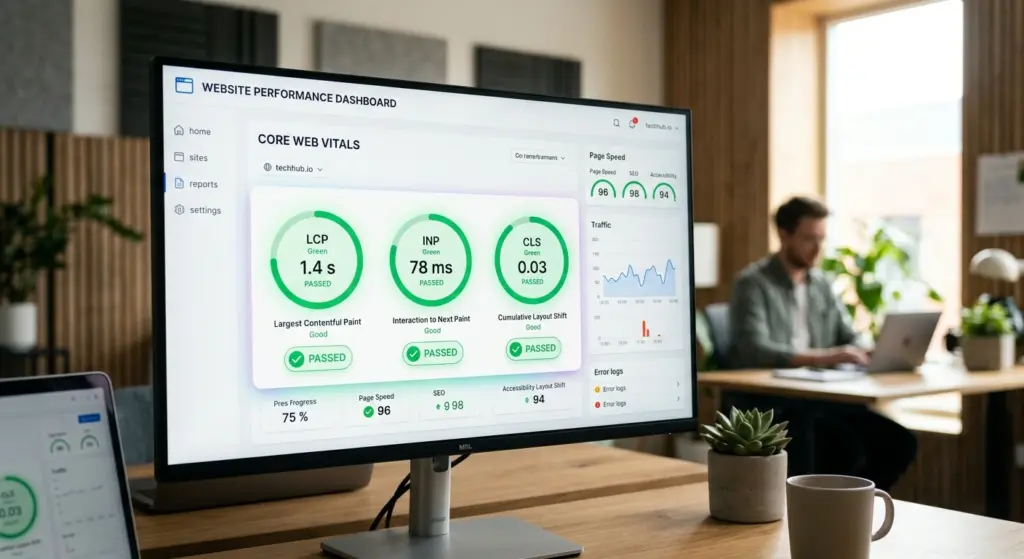
Improve Core Web Vitals
Google measures website performance using Core Web Vitals.
These include:
Largest Contentful Paint (LCP)
Measures how quickly the main content loads.
Aim for under 2.5 seconds.
Interaction to Next Paint (INP)
Measures how responsive your website feels when users interact with it.
Fast interactions create a smoother experience.
Cumulative Layout Shift (CLS)
Measures unexpected movement on a webpage.
Buttons, images, and text shouldn’t jump around while loading.
Stable layouts increase user confidence and improve usability.
Mobile-Friendly Design Is No Longer Optional
More than half of global web traffic now comes from smartphones.
A good website isn’t simply resized for smaller screens. It is designed with mobile users in mind from the beginning.
Mobile-First Design Principles
A mobile-friendly website should include:
- Large touch-friendly buttons
- Easy-to-read typography
- Simple navigation
- Fast loading pages
- Optimized images
- Minimal popups
- Responsive layouts
Every action should feel natural on both phones and tablets.

Purpose-Driven Website Design
Beautiful websites don’t automatically generate results.
Every design decision should support a specific business objective.
Ask yourself:
- Do you want leads?
- More sales?
- Newsletter subscribers?
- Consultation bookings?
- Product purchases?
Everything on the page should guide users toward that goal. Of course, to build something that truly drives these results, it’s also important to have a realistic understanding of the investment involved in a website.
Create a Strong Visual Hierarchy
Visual hierarchy tells visitors where to look first.
Use:
- Larger headlines
- Contrasting colors
- Clear spacing
- Strategic placement
- Eye-catching buttons
The most important information should always be impossible to miss.
Use White Space Effectively
White space isn’t empty space.
It improves readability by:
- Separating sections
- Reducing visual clutter
- Highlighting important content
- Making pages easier to scan
Professional websites often appear cleaner because they aren’t trying to fill every available pixel.
Maintain Consistent Branding
Consistency builds recognition and trust.
Maintain the same:
- Fonts
- Colors
- Button styles
- Icons
- Image style
- Tone of voice
A consistent design creates a polished and memorable experience.
User Experience (UX): Make Every Visit Easy
User experience determines how people feel while using your website.
Good UX removes obstacles instead of creating them.
Visitors shouldn’t have to think about where to click next.
Keep Navigation Simple
Navigation should help users find information quickly.
Limit menu items to the essentials.
Common navigation includes:
- Home
- About
- Services
- Products
- Blog
- Contact
If visitors struggle to find information, they’ll leave.
Reduce Friction
Every unnecessary step decreases conversions.
Simplify:
- Contact forms
- Checkout processes
- Account creation
- Navigation
- Search functionality
The easier your website is to use, the more successful it becomes.

Website Content That Builds Trust
Content is one of the strongest ranking factors and one of the biggest drivers of customer confidence.
Your website should educate, solve problems, and answer questions.
Write for Humans First
Avoid robotic language.
Instead of writing:
“We leverage cutting-edge digital transformation strategies.”
Write:
“We help businesses build faster websites that attract more customers.”
Simple language connects better with readers.
Focus on User Problems
The best website copy speaks directly to the visitor.
Instead of talking about yourself constantly, explain:
- What problem you solve
- How you solve it
- Why it matters
- What results users can expect
People care more about solutions than company history.
Use Clear Calls-to-Action
Every page should have a purpose.
Examples include:
- Get a Free Quote
- Schedule a Consultation
- Download the Guide
- Start Your Free Trial
- Contact Our Team
- Shop Now
Strong CTAs guide visitors toward taking action.
SEO: Make Your Website Easy to Find
Search engine optimization helps people discover your website through Google and other search engines.
Good SEO isn’t about stuffing keywords into paragraphs.
It’s about providing valuable content that answers real questions.
Use SEO-Friendly Headings
Organize content using:
- One H1
- Multiple H2 headings
- Supporting H3 sections
Well-structured pages improve readability for users and search engines.
Optimize Keywords Naturally
Include relevant keywords without forcing them.
Examples:
- What makes a good website
- Website design tips
- Website best practices
- SEO-friendly website
- Fast website design
- Responsive web design
Natural writing always performs better than keyword stuffing.
Internal Linking
Connect related pages across your website.
Benefits include:
- Better navigation
- Increased page views
- Improved SEO
- Stronger site structure
Every important page should be easy to reach.
Publish Helpful Content Regularly
Fresh content keeps your website active.
Consider publishing:
- Tutorials
- Industry news
- Case studies
- FAQs
- Customer success stories
- Buying guides
Helpful content establishes authority over time.
Build Trust Through Security
Visitors won’t share personal information if your website feels unsafe.
Security is one of the strongest trust signals online.
Install an SSL Certificate
HTTPS encryption protects user data.
It also:
- Improves SEO
- Builds trust
- Displays the secure padlock icon
- Prevents browser warnings
Today, SSL is considered a basic requirement.
Keep Software Updated
Regularly update:
- WordPress
- Themes
- Plugins
- CMS platforms
- Server software
Outdated software creates security vulnerabilities.
Display Trust Signals
Trust signals include:
- Customer reviews
- Testimonials
- Awards
- Certifications
- Contact information
- Privacy policy
- Return policy
- Secure payment badges
These reassure visitors that your business is legitimate.
Website Accessibility Benefits Everyone
Accessibility ensures your website can be used by everyone, including people with disabilities.
It also improves SEO and usability.
Accessibility Best Practices
Include:
- Alt text for images
- Keyboard navigation
- High color contrast
- Descriptive link text
- Readable fonts
- Proper heading structure
- Screen reader compatibility
Accessible websites reach larger audiences and demonstrate inclusivity.
Authenticity Creates Stronger Connections
Modern consumers value transparency.
People want to know who they’re buying from.

Show the Human Side of Your Business
Include:
- Team photos
- Founder story
- Behind-the-scenes content
- Company values
- Customer success stories
Real people build stronger trust than generic stock photography.
Publish Educational Content
Helpful blogs and guides position your business as an industry expert.
Focus on solving customer problems instead of constantly promoting products.
Educational content naturally earns backlinks, shares, and search traffic.
Build an Online Community
Successful websites encourage visitors to return.
Community features may include:
- Blog comments
- Email newsletters
- Resource libraries
- Forums
- Exclusive content
- Webinars
Repeat visitors are more likely to become loyal customers.
SEO and User Experience Work Together
SEO brings visitors.
User experience keeps them there.
You can’t succeed with one while ignoring the other.
For example:
- Fast websites rank better.
- Helpful content ranks better.
- Mobile-friendly pages rank better.
- Accessible websites rank better.
Google increasingly rewards websites that create positive user experiences.
Analytics Help You Improve
A great website is never finished.
Successful businesses constantly measure performance.
Useful tools include:
- Google Analytics
- Google Search Console
- Microsoft Clarity
- Heatmaps
- A/B testing software
These tools reveal:
- Where users click
- Where they leave
- Which pages convert
- Which content performs best
Data removes guesswork from website improvements.
Conversion Rate Optimization (CRO)
Traffic alone doesn’t grow a business.
Conversions matter more.
Improve conversions by:
- Simplifying forms
- Strengthening CTAs
- Reducing distractions
- Improving page speed
- Adding testimonials
- Testing headlines
- Optimizing landing pages
Small improvements often produce significant business results.
Build a Website That Can Grow
Your website should support future growth.
Scalable websites make it easier to:
- Add products
- Publish content
- Expand internationally
- Handle more visitors
- Integrate new tools
- Launch marketing campaigns
Planning for growth today prevents expensive redesigns tomorrow.
Common Mistakes That Make a Website Bad
Avoid these common problems:
- Slow loading pages
- Poor mobile experience
- Confusing navigation
- Too many plugins
- Weak SEO
- Broken links
- Outdated content
- Generic copywriting
- Missing contact information
- Poor accessibility
- No clear call-to-action
- Inconsistent branding
Fixing these issues often delivers immediate improvements.
Website Maintenance Is an Ongoing Process
Even the best websites require regular maintenance.
Create a schedule for:
- Software updates
- Security checks
- Content updates
- SEO audits
- Performance testing
- Backup verification
- Broken link monitoring
Routine maintenance keeps your website secure, fast, and competitive.
Future-Proof Your Website
Technology evolves rapidly.
A modern website should be flexible enough to adapt to:
- New SEO standards
- AI-powered search
- Voice search optimization
- Emerging web technologies
- Privacy regulations
- Changing user expectations
Future-ready websites are built on clean code, scalable architecture, and user-focused design principles.
Final Thoughts: What Truly Makes a Good Website?
A good website isn’t defined by flashy animations, expensive themes, or the latest design trend. It’s defined by how effectively it serves the people who use it.
The best websites load quickly, work flawlessly on every device, provide valuable information, inspire confidence, and make it easy for visitors to achieve their goals. They combine thoughtful design, high-quality content, technical excellence, strong security, and search engine optimization into one seamless experience.
Most importantly, a successful website puts the user first. Every headline, image, button, and piece of content should answer a simple question: “How does this help the visitor?”
If your website solves real problems, communicates honestly, loads fast, and continuously improves based on user feedback, you’re already ahead of many competitors.
At the end of the day, a good website is more than an attractive digital presence. It’s a powerful business asset that builds trust, generates leads, supports customers, and drives sustainable growth. Focus on creating genuine value, and both your users and search engines will reward you for it.