Website Construction Cost
In the current digital landscape, a website has evolved far beyond a simple collection of pages. It is now your business’s 24/7 storefront, your most tireless employee, and your most vocal advocate. Yet, when you ask the seemingly simple question, “How much does a website cost?”, you rarely get a straight answer. Instead, you are met with a dizzying price range that spans from a “free” DIY builder to a half-million-dollar enterprise platform.
The truth is that website construction in 2026 is much like building a house. You can purchase a pre-fab modular home, you can renovate an existing structure with high-end finishes, or you can commission a custom architect to design a bespoke mansion from the foundation up. Each path comes with its own price tag, its own timeline, and its own set of hidden long-term costs.
This guide breaks down the financial landscape of web development today. We are stripping away the industry mystery so you can make decisions that align with your actual business goals rather than just your immediate budget.
Understanding the Three Primary Development Paths
Before diving into specific features or line items, it is vital to understand the primary “modes” of development. These models dictate not only your initial financial outlay but also your ongoing maintenance burden and technical freedom.
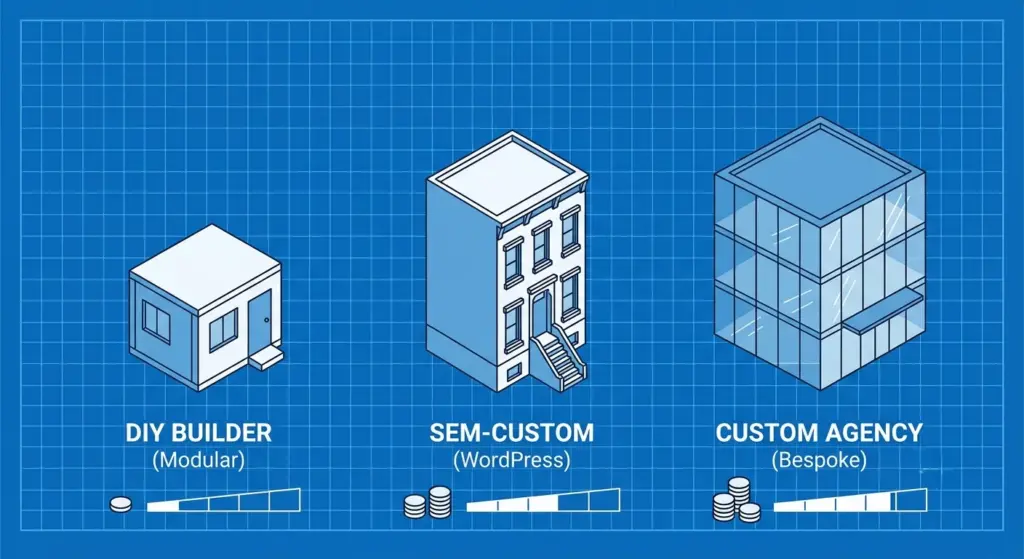
1. The DIY Website Builder (The Modular Approach)
Best for: Solopreneurs, early-stage startups, and simple portfolios.
The Investment: Mostly your time, plus a monthly subscription (typically $25–$500/month).
Platforms like Wix, Squarespace, and Framer have become incredibly sophisticated by 2026. They offer intuitive drag-and-drop interfaces that allow a non-technical founder to go live in a matter of days. These systems are “closed ecosystems,” meaning the platform handles the hosting, security, and core updates for you.
However, the trade-off is long-term flexibility. Because these platforms are proprietary, you are effectively renting your digital space. If you outgrow their specific features or want to implement complex custom logic, moving your site to a more scalable architecture can be a massive, costly headache that often requires starting from scratch.
2. The Flexible WordPress Path (The Semi-Custom Approach)
Best for: Small to mid-sized businesses, professional bloggers, and WooCommerce stores.
The Investment: $2,500–$30,000+ for professional setup.
WordPress continues to power a massive portion of the web because it represents a perfect balance: you get “off-the-shelf” functionality combined with “limitless” customization. By using robust frameworks and page builders like Elementor or Tailpress, developers can achieve professional, high-performance results at a fraction of the cost of a ground-up build.
The financial risk here is “plugin bloat.” Every extra feature added via a third-party plugin—whether it’s for SEO, forms, or speed optimization—costs money in licenses and adds weight to the site. If not managed by a professional, these can slow down your site and create security vulnerabilities that are expensive to fix later.
3. The Custom Agency Build (The Bespoke Approach)
Best for: Scaling startups, complex SaaS platforms, and enterprise-level brands.
The Investment: $30,000–$500,000+.
This is where you pay for code written specifically for your business logic. There are no heavy, unnecessary files from pre-built templates. You get optimal performance, proprietary security, and an interface designed specifically for your unique user journeys.
When you hire a high-end agency, you aren’t just paying for the design; you are paying for the strategy, the technical architecture, and the scalability that allows you to handle 100,000 visitors as easily as ten. This path provides the highest ROI for businesses where the website is the product or the primary revenue driver.
The Anatomy of Costs: What Are You Actually Paying For?
When an agency or a high-level freelancer provides a quote, they are calculating the “man-hours” required to navigate five core pillars of development. Understanding these can help you identify why one quote might be $5,000 and another $50,000 for what looks like the “same” site.
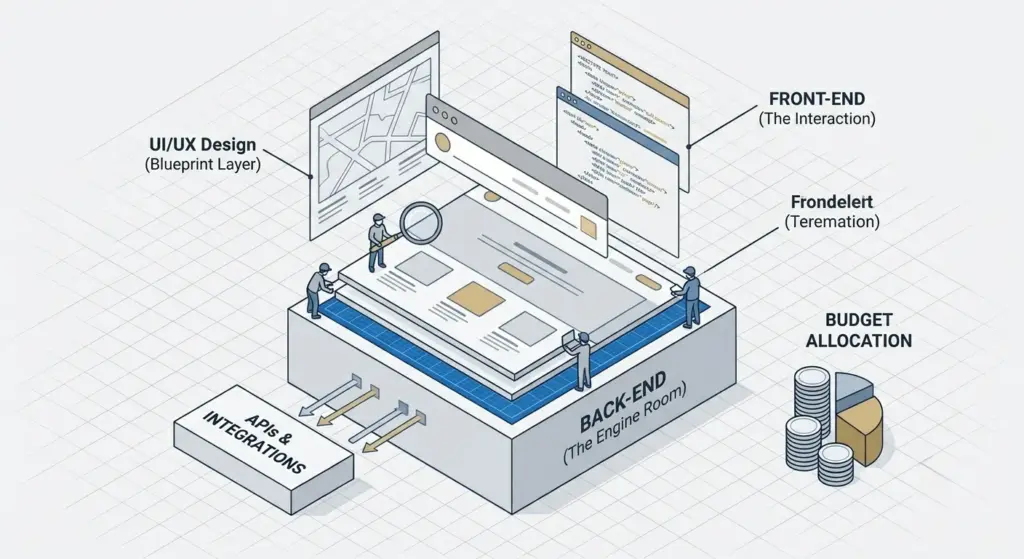
Strategy and Discovery: The Intellectual Blueprint
You wouldn’t start building a skyscraper without an architect’s plan, yet many people try to “wing it” with their websites. A professional build begins with discovery: wireframing, user journey mapping, and a comprehensive SEO strategy.
If this phase is skipped to “save money,” you will inevitably pay for it later. Without a blueprint, projects suffer from “scope creep”—where features are added haphazardly mid-build—and expensive redesigns often occur when the site fails to convert visitors into customers as expected. Strategy is the insurance policy for your investment.
UI/UX Design: Beyond Just Aesthetics
UI (User Interface) and UX (User Experience) design is the psychological side of your site. It’s about more than just picking brand-appropriate colors and logos. It’s the science of where to place a button to maximize conversions and how to guide a user’s eye across the screen.
In 2026, custom UI design often includes motion graphics, bespoke illustrations, and interactive elements. Because this requires specialized designers rather than just developers, this phase can easily account for 20% to 25% of your total project budget.
Front-End Development: Handling the Interaction
This is the process of translating those designs into functional code (HTML, CSS, JavaScript). High-quality front-end work ensures your site is “responsive,” meaning it looks and works perfectly on everything from a budget smartphone to a 32-inch 4K monitor.
A significant cost driver in 2026 is digital accessibility. Ensuring that users with visual or motor impairments can navigate your site is no longer a “nice-to-have”; in many jurisdictions, it is a legal requirement. Implementing these standards adds technical complexity and, subsequently, cost.
Back-End Development: The Engine Room
This is where the magic—and the bulk of the cost—really lives. If you need a user login portal, a custom booking engine, or a system that allows customers to track orders, you are in the realm of back-end development.
This phase is usually the most expensive because it involves server-side programming and complex database architecture. It’s the difference between a pretty brochure (front-end) and a functional tool (back-end). The more “logic” your site needs to perform, the higher this number climbs.
Integrations and API Connectivity
Your website rarely exists in a vacuum. Usually, it needs to “talk” to other services like Salesforce for CRM, Stripe for payments, or a legacy inventory system.
Integrations are rarely “plug-and-play.” They require careful coding for security, error handling (what happens if the payment fails?), and data synchronization. Each external connection adds a layer of testing and maintenance that reflects in the final price.
Infrastructure and Domain Costs: The Foundation
Beyond the build itself, you must account for the digital “land” your site sits on. These are the recurring costs that keep your site visible to the world.
- Domain Names: Your address on the web (e.g., www.yourbusiness.com). Most domains cost between $15 and $60 per year, though “premium” domains can cost thousands in one-time acquisition fees.
- SSL Certificates: These provide the “green padlock” in the browser, encrypting data between your user and your server. Many hosts now provide basic SSL for free, but enterprise-level “Extended Validation” certificates can still cost several hundred dollars annually.
- Web Hosting: Think of this as your monthly rent. For a business site, you should avoid the “bargain” $5/month plans. High-performance managed hosting, which provides speed and security, typically ranges from $30 to $500 per month depending on your traffic volume.
The “Silent” Killers: Ongoing and Hidden Costs
Many business owners are blindsided not by the cost of building the site, but by the cost of keeping it alive and healthy. A website is not a static asset; it is a living piece of software.
| Cost Category | Typical Annual Range (2026) | Why It Matters |
|---|---|---|
| Hosting & CDN | $400 – $6,000+ | Keeps the site fast and accessible globally. |
| Maintenance & Security | $1,200 – $7,200+ | Patches vulnerabilities and updates core code. |
| Software Licenses | $200 – $2,500+ | Fees for premium plugins, themes, or APIs. |
| Content Updates | $1,000 – $10,000+ | Keeping your info, blogs, and products fresh. |
| Marketing & SEO | $6,000 – $100,000+ | Ensuring people actually find the site. |
Understanding the Maintenance Trap
In 2026, web standards and security threats evolve weekly. If you ignore maintenance, your site’s performance will degrade, and its security will weaken. A security breach or a site crash during a peak sales period can cost you more in one day than five years of professional maintenance would. Budgeting for a maintenance retainer is not an “extra”—it is a critical operational expense.
The Hidden Cost of “Free”
If you choose “free” themes or plugins, you often end up paying with your time. Troubleshooting conflicts between outdated, unsupported tools can swallow dozens of billable hours. If your time is worth anything, paying for premium, well-supported tools—or hiring a professional to curate your “tech stack”—is almost always the more economical choice in the long run.
Advanced Features That Drive Up the Price Tag
As you scale, you may want to add features that move your site from a “website” into the territory of a “web application.” These features require significantly more testing and security protocols.
E-commerce and Payment Processing
Selling products online adds a layer of complexity regarding tax calculations, shipping integrations, and PCI compliance (security standards for handling credit cards). A basic store with ten products is manageable, but a marketplace with thousands of SKUs and dynamic pricing requires heavy-duty architecture.
Membership Portals and Community Areas
Allowing users to create accounts, save profiles, and access gated content is a major undertaking. This requires robust database management and strict privacy controls to protect user data. In a post-GDPR world, the legal and technical requirements for data protection add to the development hours.
Multilingual and Multi-regional Support
If you are a global brand, you don’t just need a “Translate” button. You need a site that serves different content based on a user’s location, handles multiple currencies, and follows local regulations. This essentially doubles or triples the amount of content management and testing required.
How to Budget for Success Without Going Broke
The golden rule of web development in 2026 is: Build for where you are, but plan for where you are going. Here is how to manage your budget effectively.
1. Define the MVP (Minimum Viable Product)
What is the absolute bare minimum your site needs to function and generate revenue today? Build that first. You don’t need complex AI chatbots or high-end 3D animations on day one. Do not add the “fancy-to-haves” until the core site proves its ROI and generates the cash flow to fund further development.
2. Budget for a “Risk Buffer”
Always add a 20% to 25% contingency fund to your initial quote. Web projects are notorious for encountering unforeseen technical hurdles—perhaps an API you need has changed its documentation, or a specific design element is harder to code than anticipated. Having that buffer prevents the project from stalling when these realities hit.
3. Prioritize Your Hosting Foundation
Do not put a high-performance business site on a “bargain” hosting plan. It will slow down, it will crash under load, and it will limit your SEO rankings. Your host is the foundation of your digital house; treat it with the respect your business deserves.
4. Absolute Ownership Matters
Ensure that you own the code, the domain, and the assets. Never let a developer or agency hold your domain “hostage” on their personal account. You should have “Owner” level access to everything. The more control you have over your assets, the lower your long-term business risk.
The Evolution of Design Trends in 2026
To understand the cost, you must also understand what “modern” looks like. In 2026, web design has moved away from static, boxy layouts.
- Immersive Storytelling: We are seeing more “scrollytelling,” where the site responds to the user’s scrolling with animations and transitions. This takes more time to polish but keeps users engaged longer.
- AI Integration: Many sites now feature personalized content blocks that change based on user behavior. Setting up these logic flows requires a developer who understands data and AI implementation.
- Micro-interactions: Small animations (like a button gently glowing when hovered over) make a site feel “premium” and “alive.” These small details are what separate a $5,000 site from a $50,000 site.
Final Thoughts: Looking Through the ROI Lens
Ultimately, the cost of a website should not be viewed as a sunk expense, but as a capital investment.
Think of it this way: A $20,000 website that is strategically designed to generate $200,000 in new revenue is an incredibly “cheap” project. Conversely, a $2,000 website that is slow, confusing, and fails to convert a single visitor is an incredibly “expensive” mistake.
In 2026, web development is an exercise in balancing your ambition with technical reality. Whether you are bootstrapping a new venture or scaling a global brand, the most important thing is to be intentional. Build for the growth you want, but don’t overbuild to the point where your costs stifle your agility. Your website is your digital legacy—invest in it wisely.