Webflow vs. WordPress: Which Platform Wins Your Website Strategy?
WordPress remains the global standard for high-scale, content-heavy websites and complex databases, whereas Webflow is the premier choice for design-driven marketing sites that require pixel-perfect layouts and zero technical maintenance.
Most growing companies treat the choice between Webflow and WordPress as a simple feature-by-feature shootout or a battle of sticker prices. In reality, it is a maintenance budget, design philosophy, and organizational velocity decision that will compound over the three intersecting years of your growth.
If you choose the wrong foundation, the friction points show up late, usually 18 months down the road. For some, it is the classic WordPress “plugin update mismatch” at midnight before a major promotion. For others, it’s a Webflow scaling wall when trying to build a highly complex developer portal or an advanced, multi-tiered subscription store.
Both platforms build gorgeous, highly optimized websites, but they come from entirely different planets. Let’s trace their exact blueprints to help you make an objective, data-backed choice.
Understanding the Fundamental Difference: Managed SaaS vs. Open Source
Before looking at menus of options, you must appreciate the core structural philosophies of these two Web titans.
Webflow: The Managed Visual Software-as-a-Service (SaaS)
Founded in 2012, Webflow is a visual development platform that operates on a fully managed SaaS subscription model. It is designed to act like Photoshop or Figma, translating visual layouts directly into clean, semantic HTML, CSS, and JavaScript.
With Webflow, your code, hosting (powered by Fastly and Amazon CloudFront CDN), SSL certificates, and security updates are unified under one roof. It acts as an all-in-one product, meaning there are no third-party server lines to configure or external plugin updates to manually click.
WordPress: The Open-Source Global Infrastructure Standard
Launched in 2003 as a simple blogging tool, WordPress is an open-source content management system. However, the ecosystem is currently experiencing its first prolonged period of market saturation and contraction. According to mid-2026 tracking data from W3Techs, WordPress powers 41.9% of all websites globally and controls 59.4% of the CMS market share (down from its 2024 peak of 43.5% of all websites and 62.8% of the CMS market).
As analyzed by publications like Search Engine Journal, this downward trend has been driven in part by a migration of simple “brochure” websites to the “No CMS” category, which includes static-site frameworks like Astro or Next.js, as well as lightweight AI-built pages.
The WordPress core itself is completely free and uncopyrighted. You must download it, select a third-party server host, map your domain, and assemble your site with a library containing over 65,000 plugins. It provides ultimate developer freedom with zero vendor lock-in, but requires diligent curation, server setup, and technical overhead.
Design Freedom and the Page Building Workflow
How a platform handles design directly dictates how fast your marketing team can move.
Webflow’s “Visual Code” Blank Canvas
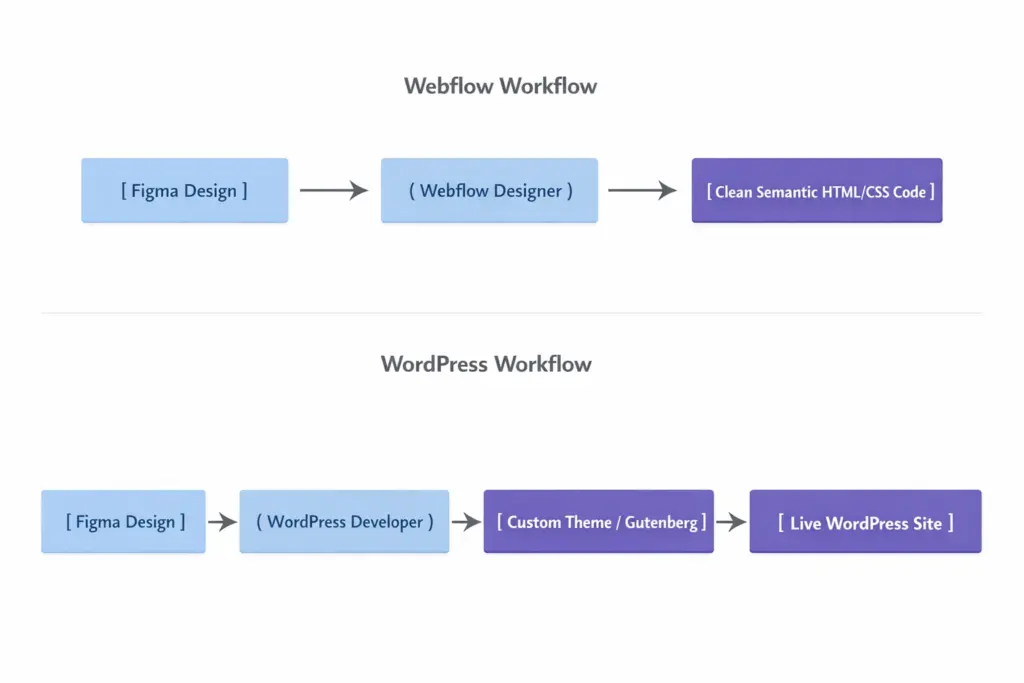
For design-centric agencies and custom brands, Webflow is a revelation. Its editor acts as an elegant GUI for writing front-end CSS rules. Designers can implement pixel-perfect layouts, complex CSS flexboxes, grid systems, custom page scroll interactions, and micro-animations naturally.
Because Webflow writes clean, semantic markup on the fly, there is no manual “design-to-developer handoff” lag. What you build visually is exactly what is generated in clean code.
WordPress’s Theme-Dependent Architecture
Historically, WordPress required raw PHP/HTML theme editing for custom layouts. Modern WordPress sites rely heavily on Gutenberg (the native block editor) or visual drag-and-drop page builders like Elementor or Divi.
Page builder dominance is shifting. Per the latest mid-2026 web statistics, WordPress’s native Block Editor has grown to hold 18% of the page builder market, while Elementor sits at 43% (down from 56% in 2024). The biggest technological leap for WordPress occurred with the launch of WordPress 7.0 on April 9, 2026. This release officially introduced “Phase 3” of the Gutenberg roadmap, bringing Google Docs-style real-time administrative collaboration natively into the block editor alongside a native, provider-agnostic AI Client API representing a massive leap in closing the collaboration gap with Webflow.
However, third-party page builders often inject deep nesting div layers, popularly termed “code bloat”, which can slow page render times if left unoptimized. For truly bespoke designs, you must purchase a premium theme canvas (averaging $59 to $139 annually) or partner with a specialized WordPress website design agency to build a custom Gutenberg theme from scratch.
Daily Editing and Content Management (CMS)
Updating blog posts, landing pages, and marketing campaigns is the lifeblood of a growing site.
The Webflow Editor: Slick, Visual, but Structurally Capped
Webflow separates the technical builder (the “Designer”) from the editorial user (the “Editor”). Authors can make direct layout edits in “Edit Mode” visually on the live page, and manage structured databases inside CMS Collections.
In May 2026, Webflow completely simplified its pricing and plan architecture. It consolidated its historical “CMS” and “Business” tiers into a single Premium Site plan. This plan:
- Costs $25/month when billed annually (or $39/month when billed monthly).
- Raised the baseline database limit to 20,000 CMS items across 40 collections (a significant upgrade from the previous limits of 2,000 to 10,000 items).
While this plan expansion makes Webflow much more viable for mid-sized blogs, highly complex editorial operations with multi-step draft approvals, automated author-attribution trails, and native comment threads will still struggle with Webflow’s lightweight system out of the box.
The WordPress CMS: The Undisputed King of Content-Heavy Sites
WordPress was engineered for publishing. It handles thousands of articles, multi-author editorial teams, categories, nested tags, and user permissions beautifully and with no structural upper bounds.
The admin dashboard is the absolute worldwide standard for copywriters. If you run a massive magazine, a daily news site, or a deep content library with 20,000+ posts, WordPress’s open-source architecture handles database queries far more efficiently and affordably than Webflow’s subscription collections, with zero arbitrary item limits.
Technical SEO, GEO, and the Core Web Vitals
Search Engine Optimization in the modern era is no longer just about keyword density; it is heavily dictated by performance optimization and semantic structure.
Webflow’s Lightning-Fast Semantic Core
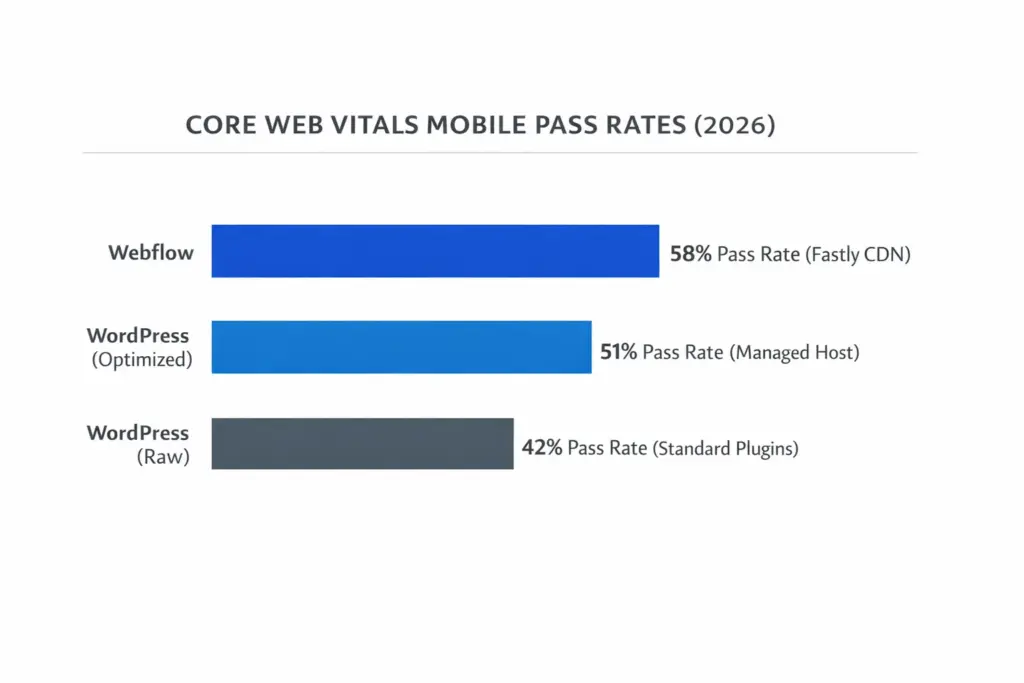
Because Webflow outputs cleanly written code without nested page-builder wrapper divs or plugin overhead, its technical SEO is highly performant by default. Real-world field data compiled in Google’s Chrome UX Report (CrUX) highlights Webflow leading general CMS platforms with a 58% mobile Core Web Vitals pass rate out of the box.
Webflow packages on-page metadata controls, automatic XML sitemaps, clean HTML semantic tagging, and global Fastly CDN delivery natively. Additionally, Webflow’s native AI Optimize matches modern search patterns like Generative Engine Optimization (GEO) and AI Search Optimization (AEO), making it easy to feed clear structured data directly to search crawlers.
WordPress’s SEO Ecosystem Depth
WordPress SEO is highly capable but entirely dependent on third-party integrations like Yoast SEO or Rank Math. These plugins provide unparalleled granular control over advanced schema markups, breadcrumbs, content readability audits, and custom redirection trees.
The downside is performance fragility. According to the same UX reports, an optimized WordPress site on premium managed hosting can hit a highly competitive LCP (Largest Contentful Paint) and achieve a 51% Core Web Vitals pass rate, but raw, unoptimized WordPress setups utilizing heavy plugin stacks and budget hosting trail significantly with a 42% average pass rate. If your server is on cheap, unoptimized hosting, or if you run dozens of active plugins injecting massive scripts, your Core Web Vitals will suffer, eroding your organic Google ranking power.
E-Commerce Capabilities: WooCommerce vs. Webflow Commerce
For transactional sites, the structural divergence between these platforms is highly pronounced.
| Feature | Webflow Commerce | WordPress (WooCommerce) |
|---|---|---|
| Catalog Capacity | Up to 15,000 items (Custom Plans) | Unlimited (Scales to millions of items) |
| Design Flexibility | Complete visual customization | Template-driven (Page builders / CSS needed) |
| Transaction Fees | 2% on Standard (0% on Plus/Advanced) | 0% (Standard merchant processor fees only) |
| Integrations | Webflow Apps, Stripe, PayPal | 5,000+ custom checkout & inventory ERPs |
| Subscriptions & Memberships | Highly restricted (Native Memberships sunset Jan 2026) | Powerful, multi-tier native support (MemberPress/Woo) |
Webflow for Direct-to-Consumer (D2C) Boutiques
Webflow is ideal for visually striking storefronts and simple digital products (like a single ebook or restricted course catalog). You can visually construct custom, beautiful checkout screens and gorgeous cart animations without typing programmatic code.
However, critical changes occurred in January 2026 when Webflow officially sunsetted its native Webflow Memberships feature. For subscription logic, multi-tier access, or recurring billing, Webflow users must now rely on external third-party integrations like Memberstack. For deep inventory management, international tax localization, or complex shipping logic, you will hit Webflow’s native limits quickly.
WooCommerce for Pure E-Commerce Scale
Powering 31.6% of the global e-commerce market and running on roughly 8.3% of all websites on the internet, WooCommerce (which is free software designed for self-hosted WordPress) is an open-source transactional powerhouse. It integrates flawlessly with warehouse shipping systems, ERPs, dynamic scaling tax matrices, and endless global payment gateways.
If you have a complex catalog, subscription-based business models, dynamic bulk-discount systems, or look to scale past 10,000 products, WooCommerce is natively equipped to handle that burden, whereas Webflow would require expensive third-party wrappers.
Security, Updates, and Total Cost of Ownership (TCO)
The financial reality of setting up a site is often the exact opposite of what you see on initial marketing landing pages.
Webflow’s Low-Overhead Sandbox
Webflow is a closed-source sandbox. Your site files are served globally on AWS, and you cannot directly log into or modify the raw server database. Because there are no traditional external plugins, there is no threat from unpatched PHP files.
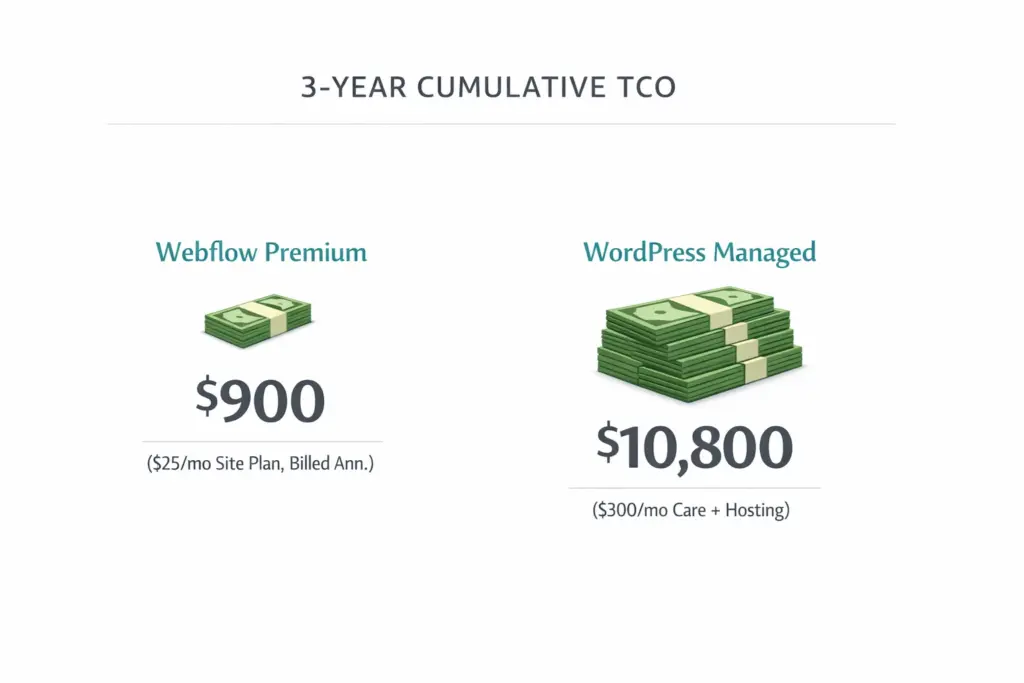
Updates to Webflow security, system upgrades, and platform patches are executed transparently on the backend with zero downtime. You never have to log in on Sunday morning to resolve an unexpected database crash. Following the May 2026 plans update, the Premium Site plan at $25/month (billed annually) brings your 3-year cumulative platform TCO down to a highly competitive $900 (or $1,404 on the $39/month monthly plan).
WordPress’s Vulnerability Surface and Maintenance Retainers
Because WordPress is completely open-source, it is the primary target for malicious web traffic. Vulnerability trackers note that the vast majority of WordPress security exploits target outdated or abandoned third-party plugins. If you fail to keep your security layers and plugin stacks regularly updated, a vulnerability could compromise your site.
To avoid this, businesses running professional WordPress sites must budget for:
- Premium Managed Hosting: (e.g., WP Engine, Kinsta) – $30 to $150/month.
- Security & Optimization Plugins: (e.g., WP Rocket, Wordfence) – $100 to $300/year.
- Professional Care Plans: Maintenance, continuous backups, and proactive updates typically run between $100 and $600/month to ensure software updates don’t lead to database layout conflicts.
While the WordPress core software remains free, the total cost of operating a highly secure, performant enterprise WordPress site safely over three years is often far more expensive than a flat Webflow subscription.
The Final Strategy Checklist: Making the Call
To make the best decision for your team, follow this clear platform alignment checklist:
1. Choose Webflow if:
- Velocity is key: Your marketing team wants the ability to instantly build, test, and ship beautiful landing pages without filing tickets for backend developers.
- Pixel-perfect design matters: Your brand relies heavily on high-end layouts, continuous scroll micro-animations, and bespoke presentation without settling for rigid templates.
- Low technical overhead is a priority: You do not have a dedicated developer on standby and want to completely eliminate technical maintenance, plugin updates, and server care costs.
2. Choose WordPress if:
- Heavy Publishing / Scale: You are managing a large web property with over 20,000 articles, multi-author editorial teams, and complex classification taxonomies.
- Highly Specialized Configurations: You need to build a custom web directory, a scalable online forum, or complex multi-tiered subscription memberships that require deeply integrated databases.
- High-Volume E-Commerce: You are managing an online superstore via WooCommerce with complex warehouse pipelines, massive SKU variations, and deep ERP sync requirements.