WooCommerce vs Shopify:
While Shopify is the best choice for absolute beginners and fast-growing brands who want a completely hands-off, secure, and hassle-free hosted utility. WooCommerce is the superior platform for businesses prioritizing long-term cost efficiency, advanced SEO, full database ownership, and infinite design customization. Your choice boils down to whether you want to focus your energy on managing products (Shopify) or building and customizing a unique digital asset (WooCommerce).
Let’s explore this decision in comprehensive, real-world detail, covering everything other articles write about—and highlighting the critical factors they completely miss.
The Philosophical Divide: Hosted Utility vs. Open-Source Architecture
At their core, Shopify and WooCommerce represent two distinct approaches to building a business. Choosing between them is not just a feature checklist; it is a choice about your operational philosophy.
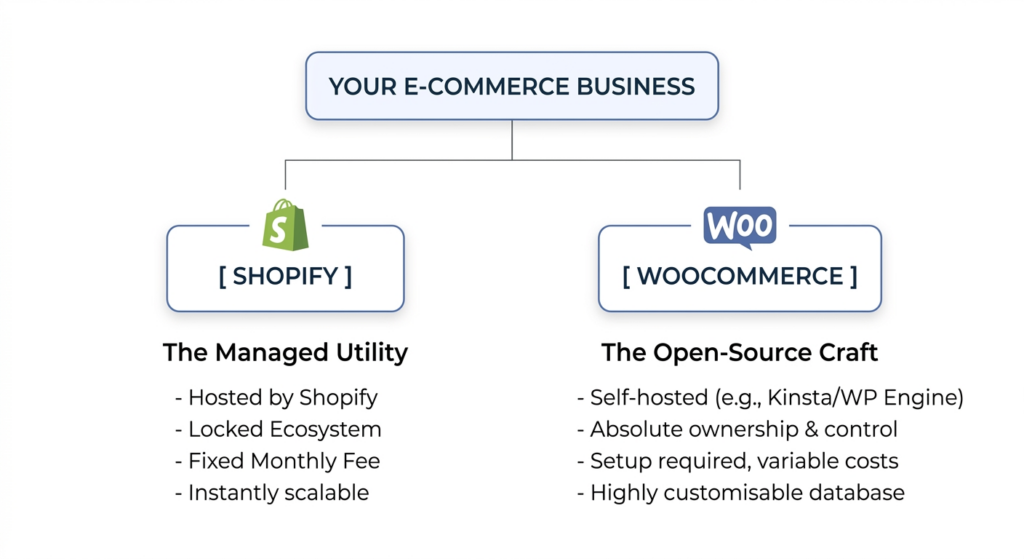
Shopify: The Managed Utility
Shopify is a Software-as-a-Service (SaaS) platform. When you pay your monthly subscription, you are renting space on their enterprise-grade, globally optimized infrastructure. It is designed to act like a utility company. You do not worry about how the electricity is generated, you just flip the switch and it works.
On Shopify, security updates, database administration, server performance, and PCI compliance are handled entirely for you. The trade-off is control. You must play by Shopify’s rules, use their approved checkout layouts. Pay their transaction fees if you choose not to use their native gateway.
WooCommerce: The Open-Source Craft
WooCommerce is a self-hosted, open-source plugin built on top of WordPress . The content management system (CMS) that powers over 40% of the internet. When you select WooCommerce, you are choosing complete digital sovereignty. You own the code, the database, and the relationships with your hosting provider.
There are no platform software fees, and you can modify any line of code to suit your brand’s workflow. The trade-off here is operational overhead. You are the digital landlord. If a plugin conflict breaks your checkout during a Black Friday sale. It is your responsibility (or that of your developer) to troubleshoot and fix it.
The True Cost of Ownership in the UK Market
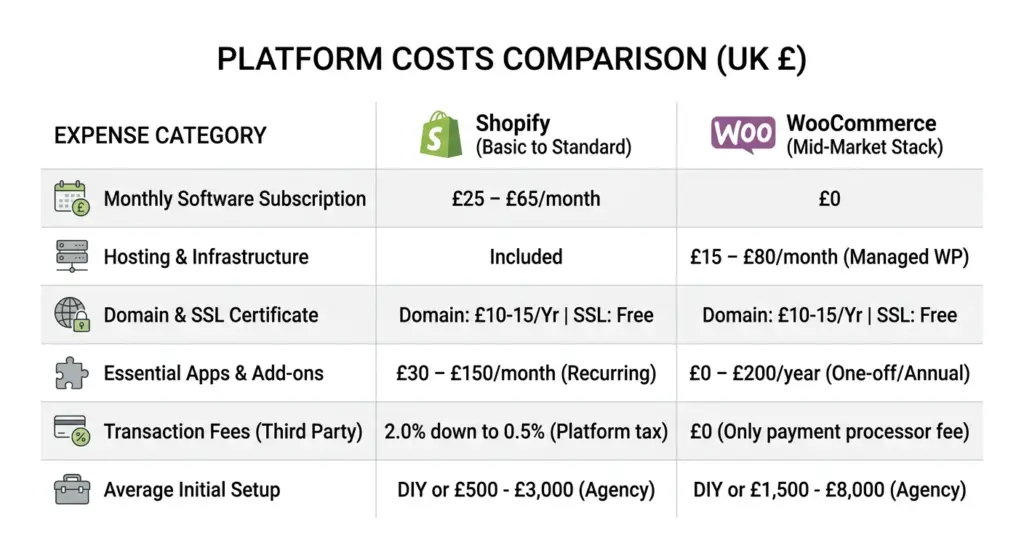
Most merchants fall into a trap. They compare Shopify’s basic monthly fee with WooCommerce’s “free” plugin download and assume WooCommerce is automatically the cheaper option. Let’s unmask the actual, real-world costs of running both platforms in the UK in 2026.
Breaking Down the Shopify Costs
Following significant structural price increases across 2024 and 2025. The Basic Shopify plan is roughly £25 per month when billed annually, rising to £65 for the standard Shopify tier. While this covers your hosting, CDN, and basic security, a standard store almost always requires external applications from the Shopify App. Store to run professional features like product reviews, advanced bundle discounts, or custom fields.
Because Shopify apps run on monthly recurring SaaS models, subscription stacking can easily balloon a beginner’s operational bills to £150–£300 per month before factoring in a single sale.
Unveiling the WooCommerce Maintenance Tax
WooCommerce itself is free, but the infrastructure required to run it professionally is not. If you run a high-volume store, hosting your site on a cheap £4-a-month shared host will lead to slow page speeds, database timeouts, and lost sales.
To match the out-of-the-box performance of Shopify, a serious UK business needs managed WordPress hosting (such as WP Engine, Kinsta, or specialized UK hosts like Hostinger UK or SiteGround) starting at £15 to £80 per month. Additionally, you need to budget for premium themes (typically a one-time fee of £50 to £100), backup systems, and high-quality security firewalls.
The primary cost advantage of WooCommerce is that extensions are usually sold as annual licenses (e.g., £49/year) rather than monthly charges, resulting in a predictable . Significantly lower software run-rate over a three-year period.
Transaction Fees and the UK Payment Gateway Reality
In the UK, transaction fees can quietly cannibalize your profit margins if you do not pay close attention to your platform’s fine print. Let’s analyze the financial implications of woocommerce vs shopify relative to payment processing.
The Shopify Payments Ecosystem and the “Platform Tax”
If you use Shopify in the UK, you are strongly incentivized to use Shopify Payments (their primary gateway powered by Stripe). If you use Shopify Payments, your processing fees on the Basic plan are typically around 2.9% + 30p for domestic transactions, dropping as you upgrade to higher plans.
However, if you choose to use an external payment processor, such as your own merchant account with a provider like Stripe, Opayo (formerly SagePay). Or standard Barclaycard business services, Shopify levies an additional “transaction fee” of 2.0% (Basic), 1.0% (Standard), or 0.5% (Advanced). This means you are essentially paying a tax to Shopify simply for routing money through a third-party gateway.
WooCommerce and Absolute Gateways Freedom
With WooCommerce, there is no such thing as a platform-level transaction fee. The core code does not charge you a single penny for how you process your payments.
You can connect directly to Stripe, PayPal, Klarna, Opayo, or Google Pay. This allows British brands to shop around and negotiate competitive processing rates. For instance, if you are a high-volume merchant processing over £20,000 a month:
- You can secure custom interchange-plus pricing from providers like European-friendly Adyen or Mollie.
- On WooCommerce, you keep 100% of those savings.
- On Shopify, you would still be hit with an additional third-party integration fee unless you run on their highest enterprise plans.
This flexibility makes WooCommerce highly appealing to high-volume or low-margin retailers in the UK who need to squeeze every fraction of a percent out of their payment processing costs.
SEO and Content Marketing: Dominating Google UK
E-commerce success rests on your ability to acquire customers cost-effectively, and organic search remains the most sustainable channel for doing so. While both platforms possess strong SEO capabilities, they approach optimization in radically different ways.
The Content Advantage: WooCommerce & WordPress
Because WooCommerce is natively integrated with WordPress, it inherits the industry’s most powerful content management and blogging system. If your marketing strategy relies on blogging, long-form guide distribution, complex content silos, or review aggregation, WooCommerce is the undisputed king.
Tools like Rank Math or Yoast SEO allow you to manage schema markup, fine-tune canonical tags, customize XML sitemaps, and structure URL redirects with absolute precision. More importantly, WooCommerce gives you complete control over your site’s physical hosting architecture. You can configure server-level caching (Redis, Memcached) to ensure that your pages load in fractions of a second, which is a major ranking signal.
Shopify’s Structural Boundaries
Shopify has made great strides in its SEO capabilities. It automatically generates XML sitemaps, includes SSL out of the box, and handles basic meta tags seamlessly.
However, SEO professionals frequently run into structural roadblocks with Shopify:
- Rigid URL Structures: Shopify forces you to use specific directories in your URLs (e.g.,
/products/and/pages/). You cannot change these structures, which can hinder complex siloing for specific SEO plans. - Robots.txt Control: While Shopify now allows some editing of the
robots.txtfile, custom parameters are still deeply restricted compared to a self-hosted WordPress site. - Content Editing Limitations: Shopify’s built-in blogging system is rudimentary. If you want to build interactive landing pages, resource centers, or complex digital guides to build brand authority, the default editor quickly feels restrictive unless you integrate expensive third-party library applications.
Customization Speed vs. Deep Development Flexibility
One key aspect of daily management is how easily you can scale, adapt, and build unique storefront features.
Customizing Shopify’s Structured Theme Language
Shopify uses its proprietary, open-source template language called Liquid. Adapting visual parts of your standard page is very straightforward using native theme block customizers.
However, if you want to implement deep, non-standard business logic—such as a custom custom-fit product calculator or a highly custom checkout flow—you either have to install a recurring-subscription app, or hire a specialized developer who understands Liquid APIs to build a custom application from scratch. Furthermore, unless you are on their enterprise-tier plan (Shopify Plus), customizing the core checkout layout is explicitly locked down.
WooCommerce’s Infinite Code Canvas
For businesses with highly unique workflows, WooCommerce has a competitive edge. It is written in standard PHP, making custom plugins much quicker and cheaper to develop than complex standalone Shopify SaaS applications. Because you have unrestricted access to the site’s code, your developers can overhaul or inject logic into any step of the buyer’s journey, including the cart and checkout page experience. You can integrate any third-party inventory, CRM, or local courier system with direct, unpenalized database connections. If you do not have the in-house development resources to build these structures, partnering with an experienced woocommerce development agency allows you to engineer high-fidelity product customizers, bespoke theme installations, complex plugin modifications, and execute secure, zero-downtime database migrations.
Ease of Use, Store Management, and Daily Operations
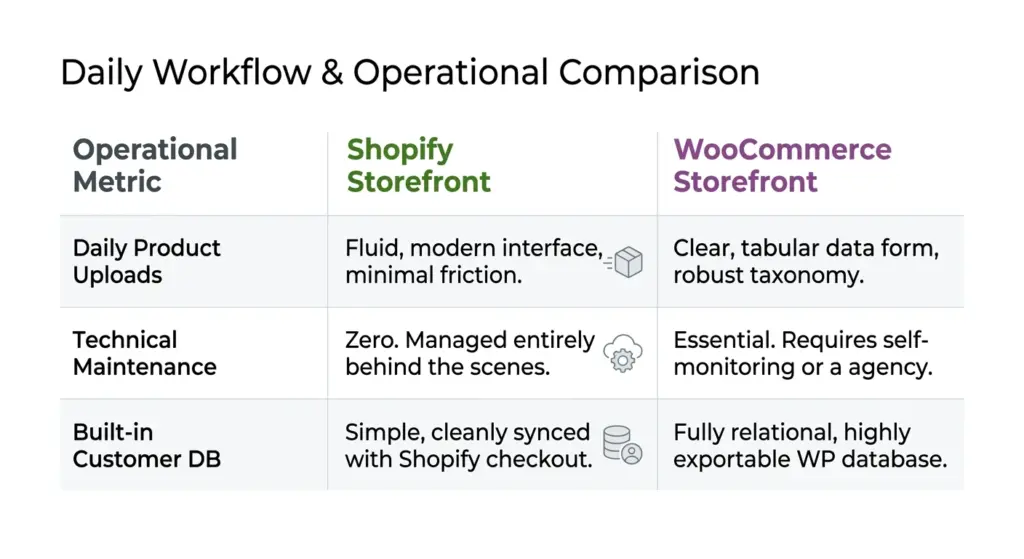
Running an e-commerce business is a daily grind of filling orders, updating inventory, and managing customer inquiries. The platform you choose dictates how smooth this daily workflow will be.
Shopify’s Plug-and-Play Philosophy
For absolute beginners, Shopify is a masterclass in user experience design. You can sign up, select an official theme, link your domain, input your inventory, and configure payments in an afternoon.
The entire dashboard is intuitive, sleek, and optimized to prevent you from making mistakes. You do not need to know what a database is, what hosting means, or how to write a line of CSS. If anything goes wrong, you can open a live chat window with Shopify Support 24 hours a day, 7 days a week, and a representative will help you fix the issue. For established brands operating on custom software who need a professional touch to manage custom theme designs, private application builds, and payment integrations, or migrate safely without losing SEO history, working with an accredited Agency ensures a flawless website setup and a secure Shopify migration pipeline that transitions your infrastructure without operational interruption.
WooCommerce’s Custom Learning Curve
WooCommerce has a steeper learning curve. You must purchase hosting, install WordPress, upload the WooCommerce plugin, and configure your site settings manually.
While modern page builders like Elementor, Divi, or native Gutenberg blocks have made designing WooCommerce sites highly visual and accessible, you are still interacting with a more complex interface.
Furthermore, because WooCommerce is open-source, there is no official central helpdesk. If your website crashes or experiences a conflict, you cannot call “WooCommerce.” You must rely on your hosting provider, check support forums, search documentation, or pay a web development agency to troubleshoot.
The Shipping and Logistics Strategy Clash
Getting your products packed and out of the door is the physical heartbeat of your business. How do these platforms scale relative to third-party logistics?
Shopify’s Quick Shipping Framework
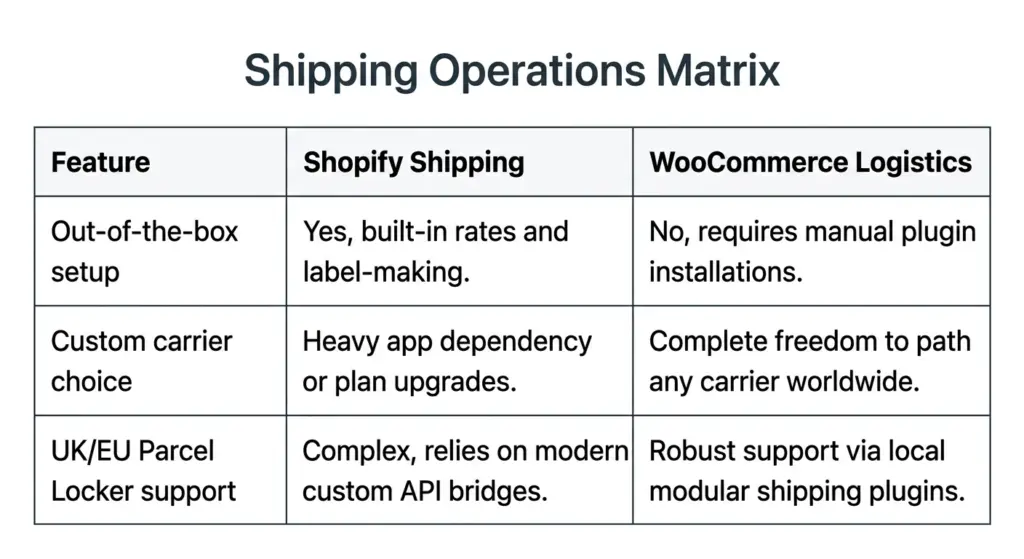
Shopify simplifies setup with its native “Shopify Shipping” dashboard. If you’re based in a supported market, you can print shipping labels, calculate carrier discount rates, and track parcels seamlessly from your administrative dashboard.
However, if you operate in a region where Shopify’s native shipping discounts aren’t supported, or if you prefer to negotiate private terms with local UK/European carriers (like Evri, DPD, or DHL Express), you’ll quickly have to rely on third-party apps to parse real-time carrier calculations to your customers at checkout.
WooCommerce’s Modular Shipping Engine
WooCommerce doesn’t include ready-to-run shipping labels natively out-of-the-box. Instead, you build your own modular stack. Using WooCommerce’s expansive plugin directory, you can integrate with regional couriers directly. For EU and UK retailers, this allows you to hook directly into parcel locker services (which are massive across northern Europe), local postal codes, and custom shipping weight-rules, without needing to pay a third-party app service on a monthly subscription.
What They Miss: The Hidden Truths and Regional UK Nuances
While standard posts list basic pricing tables and plug-and-play features, they almost always fail to mention the deep technical realities of running a business over a 3-to-5-year horizon.
1. Post-Brexit Compliance, GDPR, and SCA
Following Brexit, UK businesses face rigid guidelines under UK GDPR (Data Protection) and SCA (Strong Customer Authentication).
- Under Shopify: The cloud framework updates automatically. Tax rules, Cookie declarations, and secure processing logic are adjusted in the background without merchant intervention.
- Under WooCommerce: You are the legal and technical data controller. You must configure your database storage, ensure security compliance, and manually configure localized tax systems for UK, EU, or international customers using specialized plugins.
2. The Multi-Market paywall
For UK sellers looking to sell easily into Europe, Northern Ireland, and North America, multi-currency handling is vital.
- On Shopify: Recent structural updates on Shopify have capped localized “Markets” to a mere three countries on standard plans. To add more currencies, local pricing rules, or domains, you must upgrade your billing subscription or pay a steep extra fee per market.
- On WooCommerce: You can quickly install lightweight, open-source plugins (such as WPML or multi-currency switchers) to translate and process local currencies for as many countries as you want, completely free of platform-imposed paywalls.
3. Database Sovereignty and Platform Risk
On Shopify, your digital assets (customer database, order history, and product architecture) are locked inside their secure proprietary servers. If Shopify flags your store for a policy or payment issue, your store can be shut down instantly, leaving you with zero system access.
On WooCommerce, you have 100% database sovereignty. You can secure local SQL database backups daily, migrate hosts at will, and carry your operational software anywhere you choose. No company can ever shut your storefront down.
4. The Product Options Limit
Shopify historically limits products to 3 options and 100 variations (unless you use newer custom themes or complex apps). This is a massive headache for UK brands with extensive custom ranges (like apparel or furniture). WooCommerce allows infinite product variations, attributes, and custom input fields natively without requiring expensive app extensions.
Summary of Platform Direction
To make your definitive choice, ask yourself where you want to focus your team’s energy. If you want to run a product business and have zero interest in managing software, Shopify’s predictable SaaS model is built for you. If you want to build a highly customized digital experience, own your data, and minimize your transaction and subscription fees over the long term, WooCommerce’s open-source architecture is the clear winner for your UK e-commerce journey.
Have questions about setting up your storefront, or migrating your existing retail store online? Leave a reply below or reach out to discuss your specific build requirements.