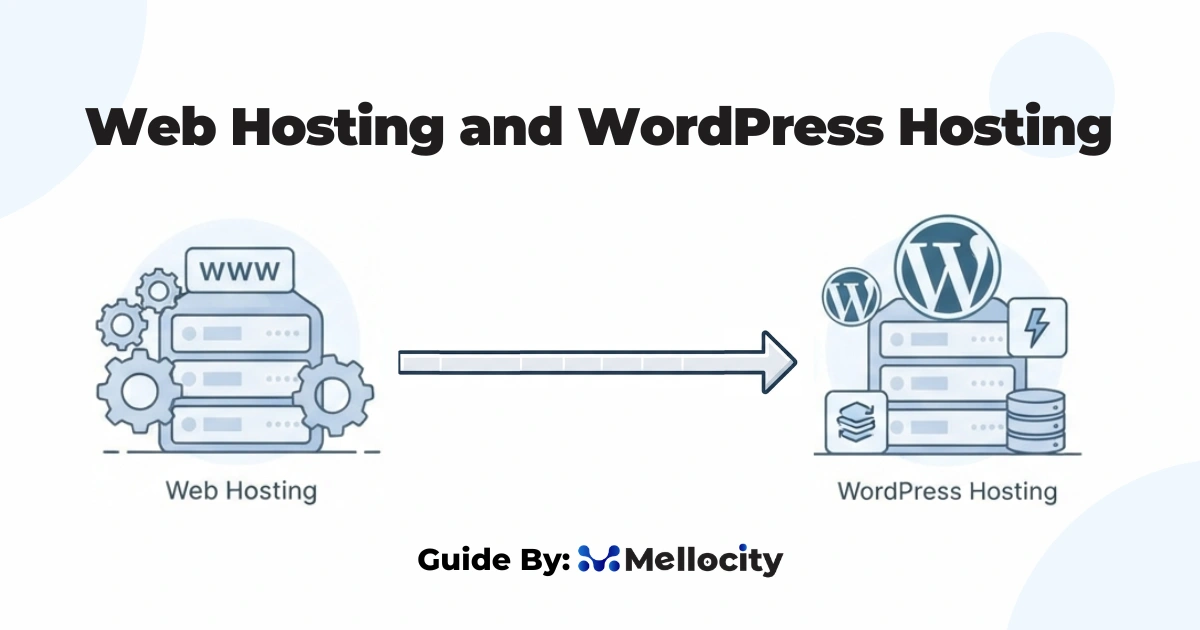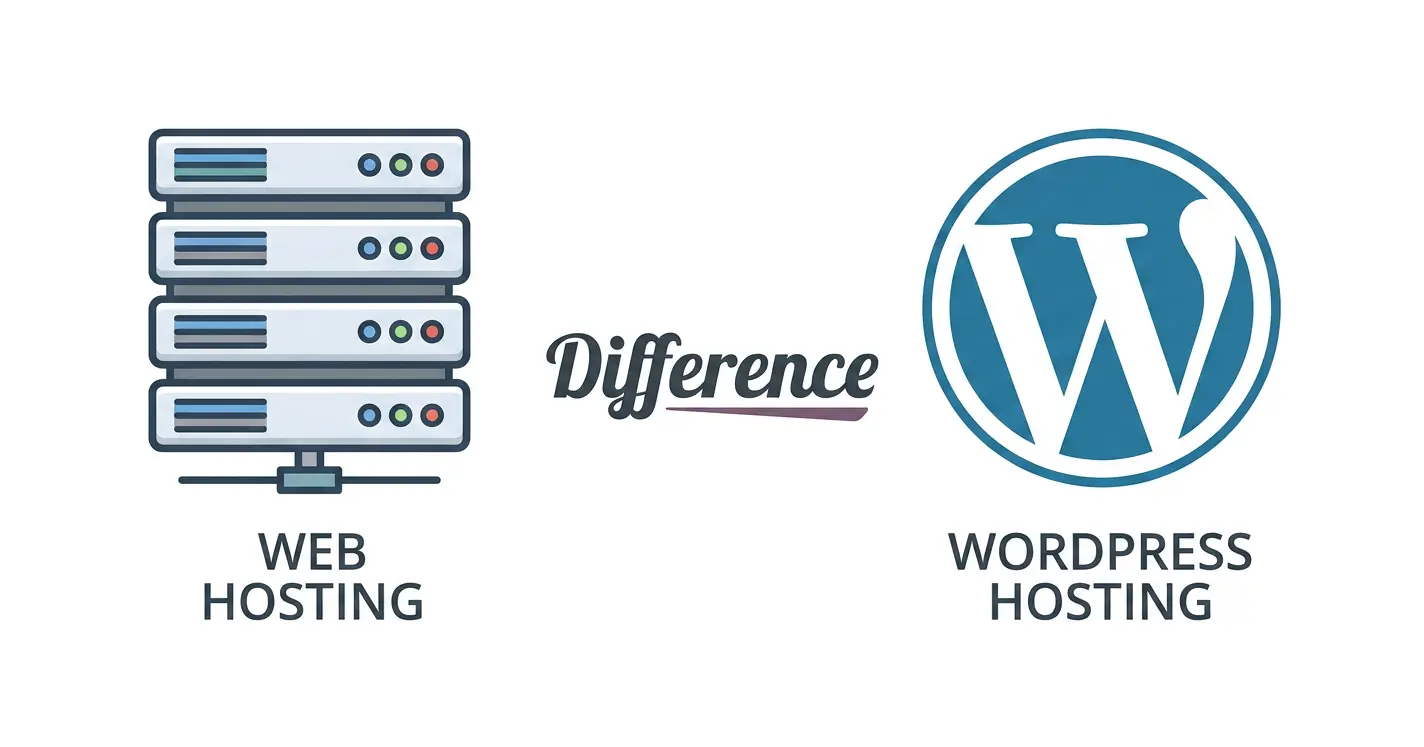
The primary difference between web hosting and wordpress hosting is versatility versus optimization: general web hosting is a flexible, multi-purpose blank canvas designed to host any type of website, while WordPress hosting is custom-built and pre-configured at the server level specifically to make WordPress sites run faster and more securely. If you spend five minutes searching for this comparison, you will otherwise find a mountain of repetitive, affiliate-driven articles. Most of them are written to push you toward expensive plans without explaining the actual server engineering. This guide breaks down exactly what happens at the server level, exposes the sneaky pricing tactics common in the UK market, and explains what most review sites completely miss about real-world performance.
The Underlying Server Architecture
To understand how these platforms deploy your files, we have to look past the brand names and inspect what you are actually buying when you rent space online.
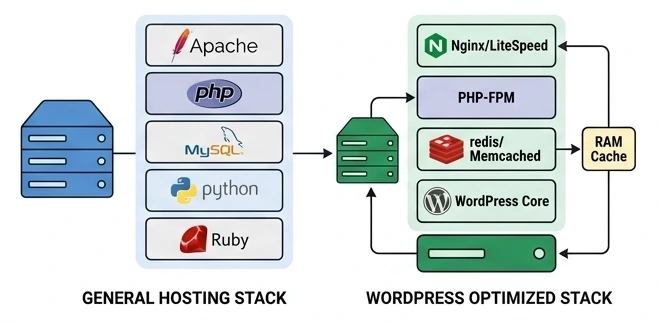
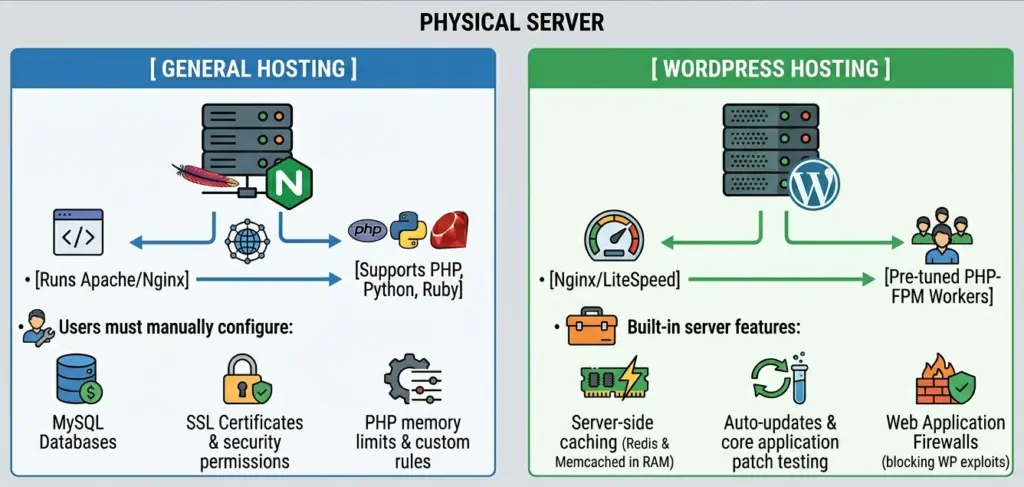
What is General Web Hosting?
Think of general web hosting as a blank virtual plot of land. Your provider gives you a set amount of server storage, bandwidth, and processing power, but they do not care what you build on it.
You can run custom HTML, Python, or even other content management systems like Joomla. To configure your domain,
It is a highly flexible, multi-purpose environment that runs on a standard web stack. However, you are entirely responsible for databases, updates, and optimization.
What is Dedicated WordPress Hosting?
WordPress hosting is a subset of web hosting that has been custom-engineered for one specific application. You cannot host a Node.js app or a custom Python script here.
The underlying server software, usually high-performance setups like LiteSpeed or Nginx, is calibrated from day one to handle the specific database queries and PHP routines that WordPress uses. It often includes server-side caching (storing static files directly in the server’s RAM), automatic core software updates, and firewalls designed specifically to block common WordPress vulnerabilities.
While the hosting provider manages the backend server hardware, many UK businesses partner with specialized teams like Mellocity to handle the actual theme design, custom plugin development, and daily hands-on website maintenance that standard server host support desks won’t touch.
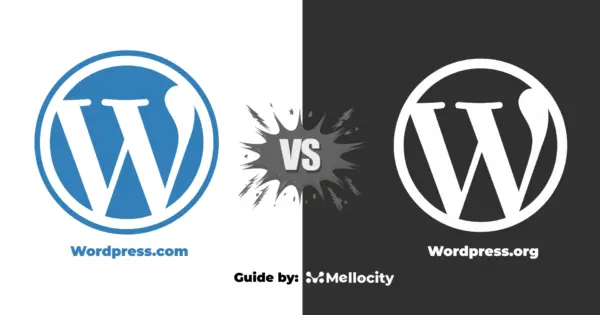
WordPress.org vs. WordPress.com: Demystifying the Software
Before choosing a host, you must understand a critical software distinction. WordPress.org is the open-source, free software you self-host on either a standard web server or a specialized WordPress server. It gives you 100% ownership over your files, code, and database.
WordPress.com, on the other hand, is a fully commercial hosting service run by Automattic. It acts as a closed, simplified ecosystem similar to Shopify or Wix. While it is beginner-friendly, you must pay for their highest-tier business plans just to install custom plugins or upload a theme. For professional UK business websites, self-hosting the open-source WordPress.org software on customized hosting is almost always the preferred path for budget flexibility and technical control.
The Structural Difference Between Web Hosting and WordPress Hosting
Many cheap providers sell a “WordPress Tax” by charging extra for standard shared plans with a pre-installed copy of WordPress. Always inspect the server specs instead of relying on the promotional badges on the host’s homepage.
True managed environments run on isolated cloud clusters, giving you guaranteed processing speed. For a deeper look at optimizing your backend,
The key architectural differences lie in how your server handles daily operations:
- Server Software Stack: General hosts use flexible but heavier server setups. Specialty setups use high-performance stacks like Nginx or LiteSpeed.
- Operating System Tuning: Specialty engines set specific memory resources for PHP, avoiding common platform execution limits.
- Database Isolation: Databases run on faster, dedicated virtual pathways rather than sharing resources with thousands of other sites.
Under the Hood: Technical Realities
Most standard comparison sites fail to mention the hardware bottlenecks that actually dictate your site performance during a traffic spike.
1. Clock Speed Over Core Count
Traditional hosts sell you on the number of Virtual Cores (vCPUs) allocated to your account. What they do not tell you is that PHP, the language that runs WordPress, is single-threaded.
A single PHP process has to execute tasks in sequence to build a page. If your host uses slow processors, your site will feel sluggish even if you have several cores. Premium plans run on high-frequency processors (3.5GHz or higher) to compiler pages instantly.
2. The Bottleneck of PHP-FPM Workers
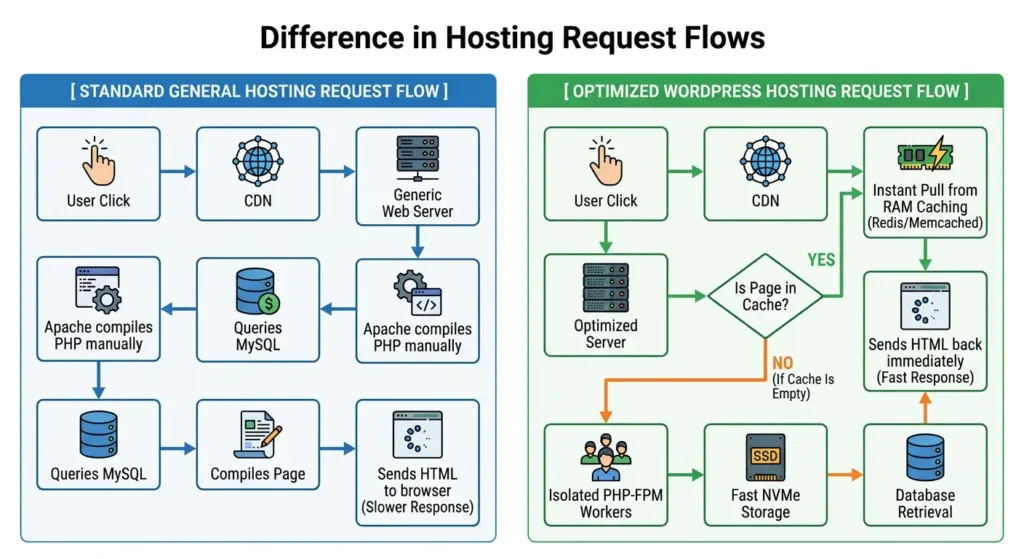
Every time a user adds an item to a cart or runs a search, it consumes a server processing connection called a PHP worker. Cheap plans strictly limit these connections, often allocating only two or three simultaneous workers.
When four people try to check out on your site at the exact same moment, the fourth person’s request hangs. If you are running a shop, read our how to secure your wordpress site? to optimize your transaction paths.
3. Database Bloat and Storage Speeds
As your website grows, its database fills up with metadata, login tables, and customer options. General web hosting plans often store databases on slower solid-state drives or budget storage systems.
Specialty setups run databases on enterprise-grade NVMe drives. These drives process search queries up to ten times faster, keeping your response times well under the critical 200-millisecond mark.
Caching and Load Speeds
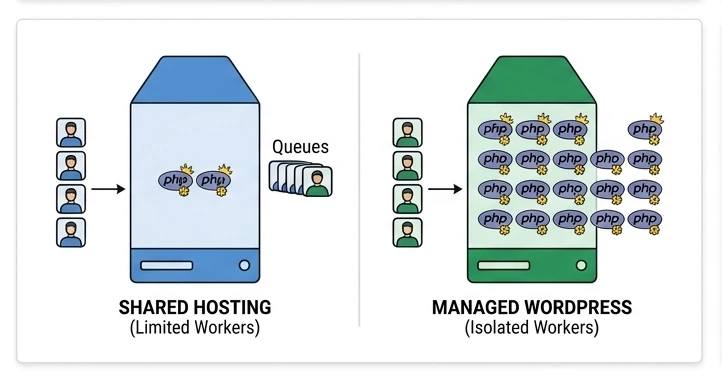
Page speed affects your conversion rates and search team rankings. On a standard web plan, you must manage your cache yourself using third-party plugins.
Because these plugins run inside your application, they still require the slow PHP engine to boot up before the page can load.
The difference between web hosting and wordpress hosting is that specialty servers cache pages at the server level.
High-performance platforms use built-in caching systems like Varnish or Redis. When a customer in the UK loads your page, the server fetches the static file directly from its high-speed physical memory.
This process bypasses the PHP interpreter and the database entirely. This technical layer keeps your site functional under intense, unexpected traffic spikes without slowing down.
Edge Caching: Why You Need a CDN Regardless of Your Host
Regardless of the difference between web hosting and wordpress hosting, utilizing a Content Delivery Network (CDN) like Cloudflare is essential for protecting your site and speeding up delivery. A CDN works by caching your static files (like images, CSS, and JS) across a global network of servers. When a user in London visits your site, they grab these static assets from a nearby UK data center instead of waiting for your main host server to deliver them.
While anybody can set up a free Cloudflare account on standard general web hosting, you are responsible for managing your own DNS zones, configuring SSL rules, and purging cached assets manually when you update your design. Premium WordPress hosting plans often integrate enterprise-level Cloudflare routing or specialized CDN edge networks directly into their server setups out of the box. This provides automated, code-aware caching that dynamic plug-ins can clear instantly without needing any manual setup on your part.
Security Engineering: Proactive vs. Reactive
Your underlying server architecture determines how you defend your business against online threats and vulnerabilities.
- General Hosting Security: Standard plans focus on protecting the physical hardware. They cannot see if an active user in your dashboard is actually a malicious database script. If your system gets hacked, the host will suspend your entire account to protect other sites on the server.
- Specialty Hosting Security: These setups use firewalls calibrated to shield WordPress files. They block brute-force directory attacks and monitor file-system permissions. Many providers automatically patch known vulnerable plug-ins, securing your site before a hacker can exploit it.
According to the official build security requirements on WordPress.org, maintaining strong HTTPS configurations and regular systems patching is vital for modern site safety.
Total Cost of Ownership
To calculate a realistic budget, you have to look past the introductory teaser prices. While general web hosting looks incredibly cheap on paper, the cost of the necessary add-ons required to match the performance of a specialty environment can quickly bridge the price gap.
| Annual Cost Component (UK GBP) | General Hosting + Essential Add-ons | Managed WordPress Hosting |
|---|---|---|
| Average Monthly Base Fee | £3.99 per month (£47.88/year) | £19.99 per month (£239.88/year) |
| Teaser-to-Renewal Price Increase | High (Jumps 2x to 3x on renewal) | None (Flat, predictable yearly renewals) |
| SSL Certificate Fee | Often charged as an add-on (£39.99/year) | Included free (Auto-renewing Let’s Encrypt) |
| Automated Daily Backups | Often sold as an upgrade (£30.00/year) | Included free (Daily automatic & on-demand) |
| Security Scanning & Cleaning | Third-party service (£79.00/year) | Built-in platform security (£0.00) |
| One-Click Staging Environment | Not available or manual setup (£40.00/year) | Included free (1-click sandbox testing) |
| Total Real Yearly Operating Cost | £236.87 | £239.88 |
If you want to keep your hosting base rates as low as possible but still need a professional online setup, you can run a cost-effective hosting plan and delegate your design tweaks, plugin conflicts, and server updates to a dedicated team like Mellocity to keep your development overhead predictable.
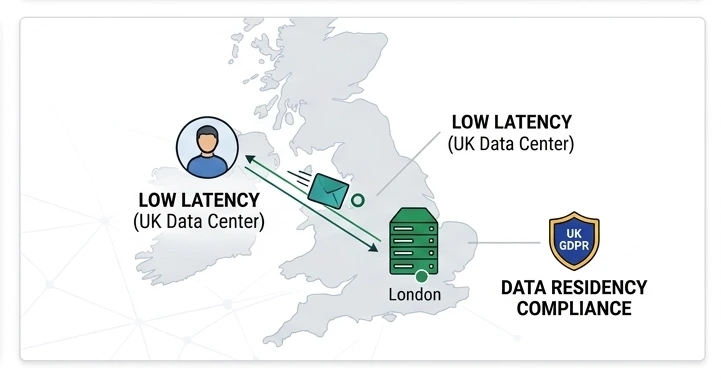
UK Data Centers: Latency, Compliance, and GDPR
If you are building an online presence targeting users in London, Manchester, Edinburgh, or Belfast, your physical server location is non-negotiable.
- The VAT and Currency Factor: Many global hosts advertise in USD or Euros and hide the 20% UK VAT until checkout. Always choose a provider that bills in GBP (£) with a documented tax invoice to keep your local business accounting straightforward.
- The 100ms Latency Factor: Web traffic is limited by physical distance. If you use a cheap US-based datacentre, every user action must cross transatlantic cables. This adds roughly 100 to 150 milliseconds of latency to your dynamic page generation steps (like checkout pages). Locating your server physically inside the UK keeps your Core Web Vitals healthy, giving you a competitive edge in local Google search engine rankings.
- UK GDPR and Data Residency Compliance: Following Brexit, UK businesses must comply with the strict guidelines of the UK General Data Protection Regulation (UK GDPR) and the Data Protection Act 2018. If your WooCommerce or lead-generation site collects personal customer details (emails, shipping addresses, or payment logs), storing this sensitive data on UK soil simplifies your compliance protocols. It completely avoids the complex legal challenges associated with transfer mechanisms for cross-border data routing.
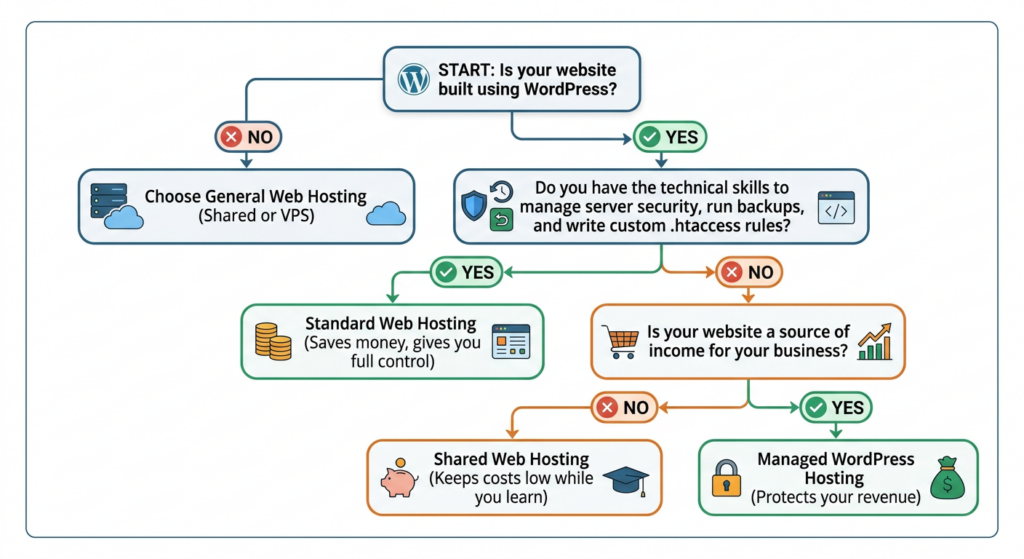
Practical Decision Checklist
Use this simple, direct diagram to determine the best path for your current project.
Choose General Web Hosting If:
- You are building your website using alternative platforms like Joomla, Magento, or plain HTML.
- You are testing a new concept on a very tight starting budget where every pound matters.
- You are comfortable editing system files and configuring database directories yourself.
Choose WordPress Hosting If:
- Your UK business relies on a WordPress or WooCommerce website to generate leads or sales.
- You want your pages to load instantly for local users without having to configure complex caching systems.
- You want to focus on running your business, and want to offload updates, backups, and security patching to experts.