Why WordPress Ecommerce Today
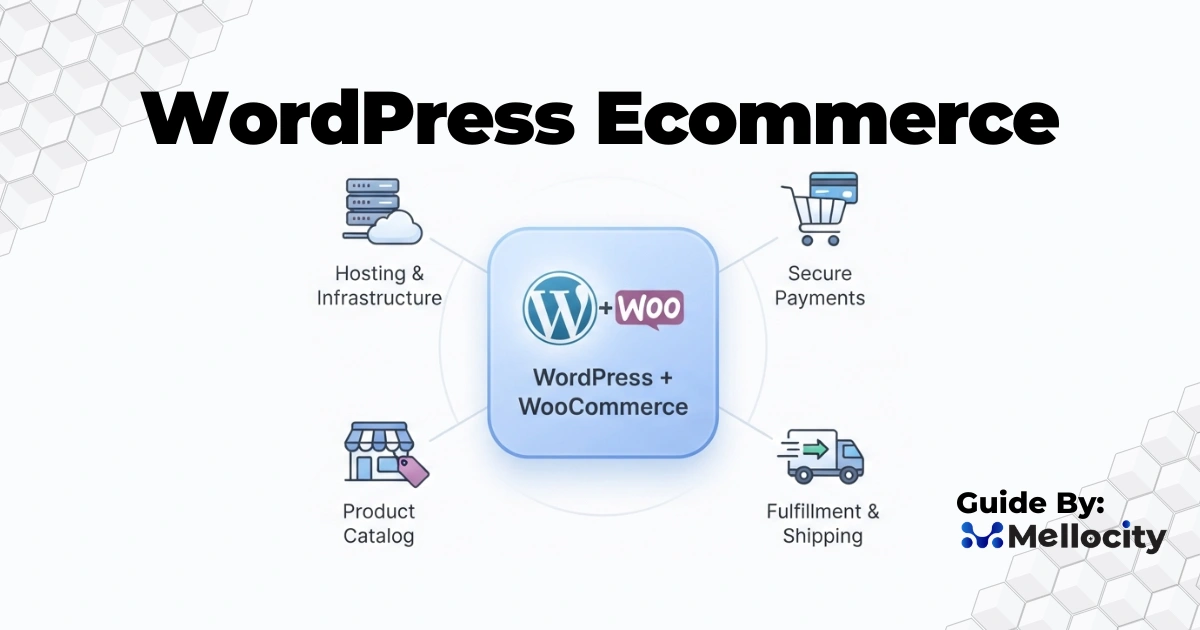
WordPress ecommerce is a powerful, flexible, and cost-effective platform choice for small businesses, store managers, and technical leaders who need a tailored online store without sacrificing control or scalability. WordPress paired with modern ecommerce stacks, most commonly WooCommerce, supports everything from simple single-product shops to complex multi-vendor marketplaces while allowing full control of SEO, performance, and integrations.
This guide explains concrete architecture patterns, step-by-step build processes, technical details, operational practices, troubleshooting approaches, and an extensive FAQ so you can plan, build, and run a high-performance wordpress ecommerce site confidently.
Core Concepts and Ecosystem Overview
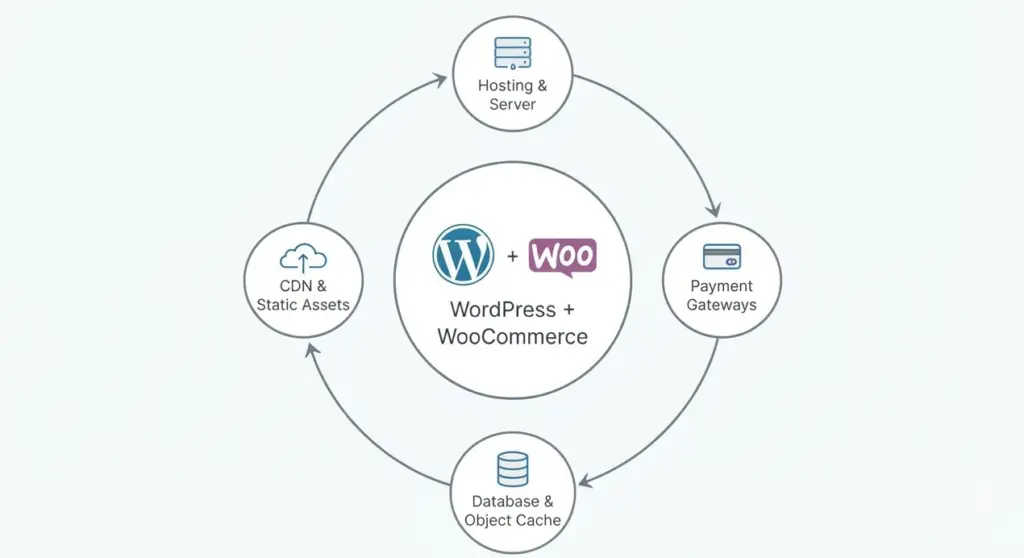
- Platform pieces: WordPress as the CMS, an ecommerce plugin such as WooCommerce, payment gateway integrations, hosting, caching, a database layer, object cache, CDN, and optional headless frontend layers.
- Extensibility: WordPress hooks, custom post types, template hierarchy, and REST API endpoints make custom commerce logic possible without rebuilding the whole stack .
- Typical stack options: monolithic WordPress + WooCommerce for simplicity, headless WordPress with a JavaScript frontend for advanced UX, and multi-site or marketplace setups for franchises and vendor networks.
- Data flows: product catalog, pricing, cart/session data, checkout, payment provider, order record, and fulfillment are all connected in a single operational loop.
Architecture Patterns and Design Decisions
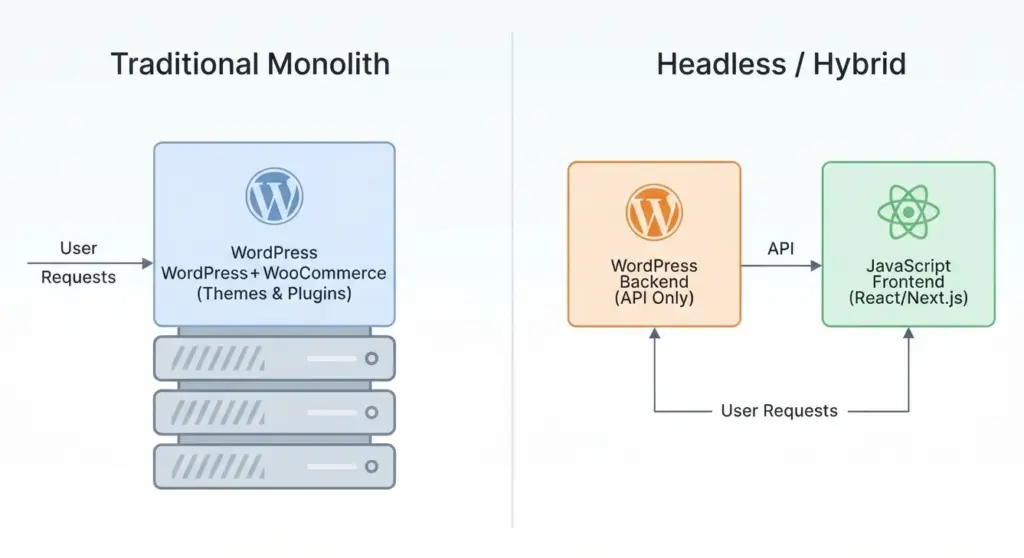
1) Traditional Monolith
A monolithic WordPress + WooCommerce setup is usually the fastest path to launch and the easiest to manage for small and mid-sized stores. It is a strong fit when the catalog is manageable, the team wants plugin compatibility, and the business prefers a lower total cost of ownership. The trade-off is that high-concurrency traffic can expose performance bottlenecks if caching, database indexing, and hosting resources are not tuned.
2) Headless or Hybrid Commerce
Headless WordPress ecommerce uses WordPress as the backend content and product source while a separate frontend, often built in React or Next.js, handles the customer experience. This approach can improve frontend performance, design flexibility, and multi-channel delivery, but it adds complexity around sessions, cart persistence, and real-time inventory syncing. It is best for teams with solid engineering support and a clear need for independent scaling.
3) Multi-site and Marketplace Structures
WordPress multisite works well for brands with multiple regions, sub-brands, or franchise-like structures. Marketplace setups are different because they require vendor dashboards, commission logic, moderation, and payout flows. These environments often need custom workflows or marketplace plugins, plus careful governance around data ownership and permissions.
Implementation Roadmap
1) Planning and Discovery
Start with product strategy, tax rules, shipping logic, and fulfillment responsibilities. Map user journeys for browsing, filtering, product detail pages, checkout, account management, and post-purchase support. Define the data model early so attributes, categories, SKUs, and custom fields stay clean and scalable.
2) Hosting and Environment Setup
Choose hosting based on expected traffic and complexity. Managed WordPress hosting is convenient, while VPS or cloud infrastructure gives more control over tuning, scaling, and isolation. Separate development, staging, and production environments reduce risk and make deployment safer.
3) Core Installation and Configuration
Install WordPress, configure HTTPS, and harden the site from the beginning. Use secure database credentials, disable file editing in production, and ensure server-side protections like WAF rules and login throttling are in place. These are not optional on an ecommerce site because checkout and customer data are business-critical.
4) Ecommerce Plugin and Product Setup
Install WooCommerce and configure currency, tax, shipping, and product types. For large catalogs, use structured CSV imports and validate them on staging before production rollout. Make sure product pages include rich content, clear variants, and schema markup so they serve both users and search engines.
5) Theme and Front-End UX
Choose a performance-focused theme or build a custom theme if the business requires a tailored experience. Product pages should prioritize clarity: strong imagery, price visibility, variant selectors, trust indicators, and a highly visible call to action. Short, readable content blocks generally convert better than long unstructured product descriptions.
6) Performance, Caching, and Scaling
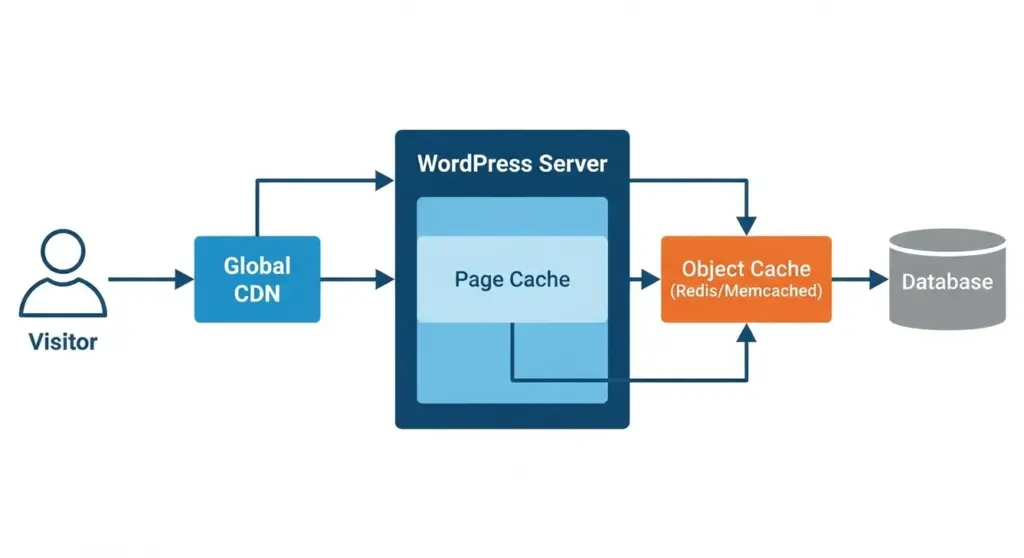
Use page caching for anonymous traffic, but exclude cart, checkout, and account pages. Add object caching with Redis or Memcached to reduce database pressure and improve repeated query performance. Offload images and static assets to a CDN, and optimize image formats so product pages load fast on mobile networks.
7) Checkout, Payments, and Order Processing
Checkout should be short, secure, and reliable. Hosted payment pages reduce PCI complexity, while direct gateway integrations can improve UX but require stronger compliance discipline. Add webhook monitoring, idempotency handling, and transaction logs to prevent duplicate orders or missed payment events.
8) Shipping and Tax Automation
Automate shipping rules where possible so the cart and checkout reflect accurate delivery costs. For tax, use a service or plugin that matches the business footprint and jurisdiction rules. This is especially important for stores selling across regions or countries because tax mistakes directly affect margin and compliance.
9) Integrations and Automation
Connect the store to email marketing, inventory systems, CRM, and analytics platforms. If the business uses an ERP or warehouse system, order sync and stock sync must be reliable and auditable. Webhooks and scheduled jobs are often better than manual updates because they reduce human error.
Security and Compliance
A WordPress ecommerce store needs layered security, not just a strong password policy. Use two-factor authentication, limit admin roles, and keep plugins and themes updated on a schedule. Backups should be automated, stored off-site, and tested regularly so the team can restore the site quickly after an incident.
PCI scope matters as well. Hosted checkout flows usually reduce compliance burden, while embedded payment flows require stricter controls. Privacy compliance also matters, especially if the site collects customer account data, order history, or marketing preferences.
Advanced Technical Topics
Session Handling and Cart Scaling
Cart sessions become difficult when traffic rises or when pages are cached aggressively. Use a persistent session store such as Redis and avoid caching dynamic cart and checkout pages. If inventory is limited, stock reservation logic can prevent overselling during flash sales or high-traffic campaigns.
Search and Filtering at Scale
WordPress search is fine for small catalogs, but advanced stores usually need a dedicated search layer. Elasticsearch or Algolia can improve faceted search, typo tolerance, and speed for large inventories. This becomes especially useful when stores have many attributes, variations, or seasonal collections.
Headless Commerce Synchronization
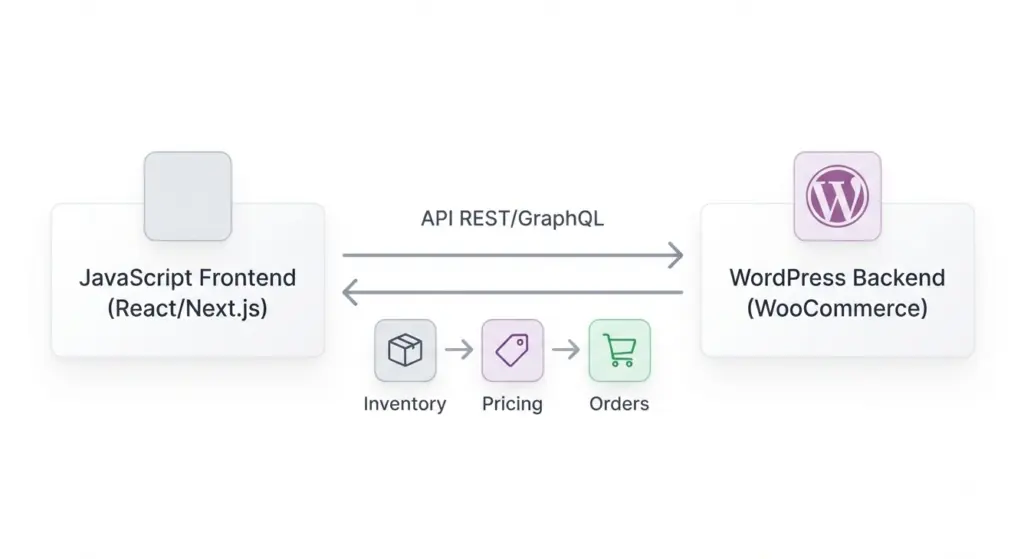
If the frontend is separate from WordPress, product and order data must stay in sync through APIs and webhooks. Security becomes more important because the frontend, backend, and third-party services all exchange data. Clear contracts for inventory, pricing, and promotions prevent hard-to-debug inconsistencies.
Observability and Operations
Monitoring should cover uptime, checkout failures, error rates, and slow database queries. A storefront can appear healthy to visitors while payments are failing silently in the background, so synthetic checkout tests are valuable. Centralized logs and alerting help the team detect issues before they affect revenue.
Optimization Checklist for Conversion and SEO
- Use schema markup for products, prices, availability, and reviews.
- Keep product and category URLs clean and stable.
- Write unique product descriptions instead of reusing manufacturer copy.
- Add breadcrumbs, internal links, and category hubs to strengthen site structure.
- Improve mobile speed with optimized images, caching, and minimal script bloat.
- Reduce checkout friction by limiting required fields and supporting guest checkout.
Common Plugins and Tools
- Commerce core: WooCommerce.
- Performance: caching plugins, Redis object cache, and CDN integration.
- Security: Wordfence or server-level firewall tools.
- Search: Algolia or Elasticsearch connectors.
- Marketing: email automation and analytics integrations.
Use plugins carefully because every extra extension adds maintenance overhead and possible compatibility risk .
Migration and Large-Catalog Strategy
Migrating an existing store into WordPress requires careful mapping of products, variants, images, and redirect rules. Preserve SEO value by keeping URLs stable where possible and using 301 redirects where they are not. Large imports should be tested in staging first, then rolled out in batches to avoid timeouts and data corruption.
Troubleshooting and Best Practices
- Slow product pages: check database queries, add object caching, and optimize images.
- Cart/session loss: confirm cache exclusions, cookie settings, and session persistence.
- Payment failures: review webhooks, gateway logs, and HTTPS certificate validity.
- Inventory mismatches: sync stock through a single source of truth and reconcile regularly.
Operationally, the best wordpress ecommerce sites are the ones with fewer plugins, strong staging workflows, regular backups, and continuous monitoring .
Testing, Metrics, and KPIs
Track both business and technical metrics. Business metrics include conversion rate, average order value, cart abandonment, repeat purchase rate, and customer lifetime value. Technical metrics include page speed, server response time, checkout success rate, and error frequency. If the team can measure these consistently, improvement becomes much easier.
FAQ
Is WordPress suitable for large ecommerce stores?
Yes, provided the architecture is engineered correctly with caching, indexing, search optimization, and reliable hosting. The platform itself is flexible enough, but scale depends on implementation quality.
Should I use a headless approach?
Use headless when the business needs a custom frontend, advanced performance control, or multi-channel delivery. It is not automatically better; it is better when the added complexity matches a real business requirement.
How do I prevent overselling?
Use server-side stock validation, reservation logic when needed, and reliable order finalization checks. Also make sure inventory sync with ERP or warehouse systems is monitored and tested.
What is the biggest mistake in WordPress ecommerce?
The most common mistake is treating ecommerce like a normal brochure site. Stores need stronger performance, stricter security, cleaner data flows, and better operational monitoring than standard content sites.
How do I improve ecommerce SEO on WordPress?
Focus on product schema, category architecture, unique copy, internal linking, and fast page load times. Search engines reward stores that are technically sound and genuinely helpful to users.
Conclusion
WordPress ecommerce can support everything from lean startup stores to complex online retail operations when it is built with the right architecture, performance strategy, and operational discipline. If your team needs help planning, building, or scaling a wordpress ecommerce store, a technical audit and implementation roadmap are the smartest next steps.