WordPress Appointment Booking Automotive:
WordPress appointment booking for automotive businesses helps shops automate scheduling, reduce no-shows, capture better vehicle details, and increase bookings 24/7. Moving to a WordPress appointment booking system isn’t just a convenience; it’s a business necessity.
Why Automotive Businesses Need Digital Scheduling
Automotive shops live and die by utilization. An empty bay or a mis-booked job costs more than a single appointment—it disrupts the day.
- The callback trap: When technicians are busy, phone calls are interruptions. Missed calls become lost bookings when customers call the next shop.
- Poor intake data: Phone or walk-in bookings rarely capture accurate vehicle details and symptoms. This causes surprises, longer service times, and scheduling errors.
- No-show risk: Manual systems rely on memory and follow-up labor. Automated reminders reduce no-shows and cancellations.
- Missed revenue windows: Online booking means customers can reserve services at 10PM after they remember a problem—converting interest into sales beyond business hours.
A 24/7 booking form on WordPress turns your site into a frontline service advisor. It captures the essential information, offers pre-payment or deposits, and slots jobs into the correct bays and technicians without a human constantly monitoring the phone.
Automotive Booking: What Makes It Different?
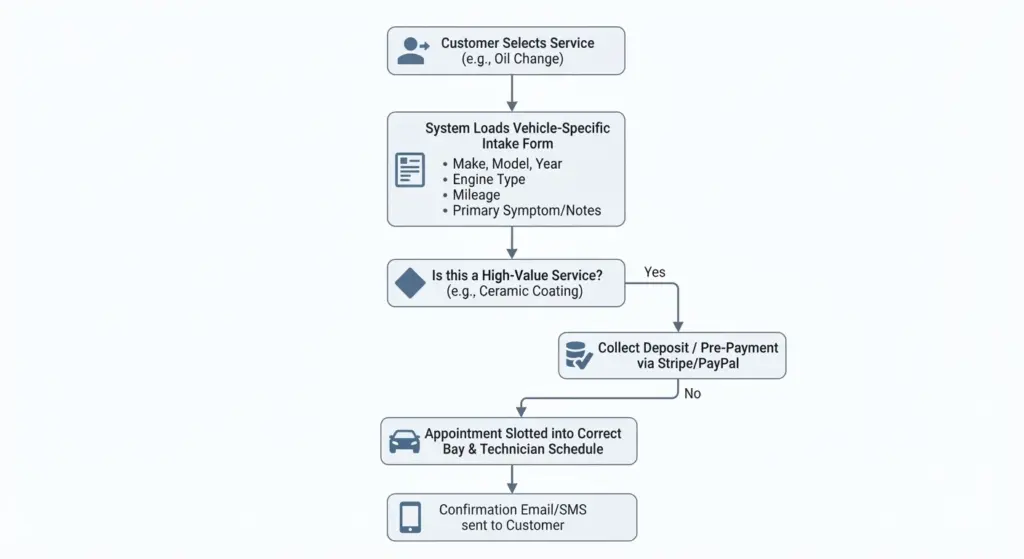
Not all appointment systems are created equal. Automotive shops require an intake workflow tailored to vehicles and services.
- Vehicle-first intake: Ask for Make, Model, Year, VIN (optional), engine type, mileage, current mods, and primary symptom. These fields let you route the right service and prepare tools/parts in advance.
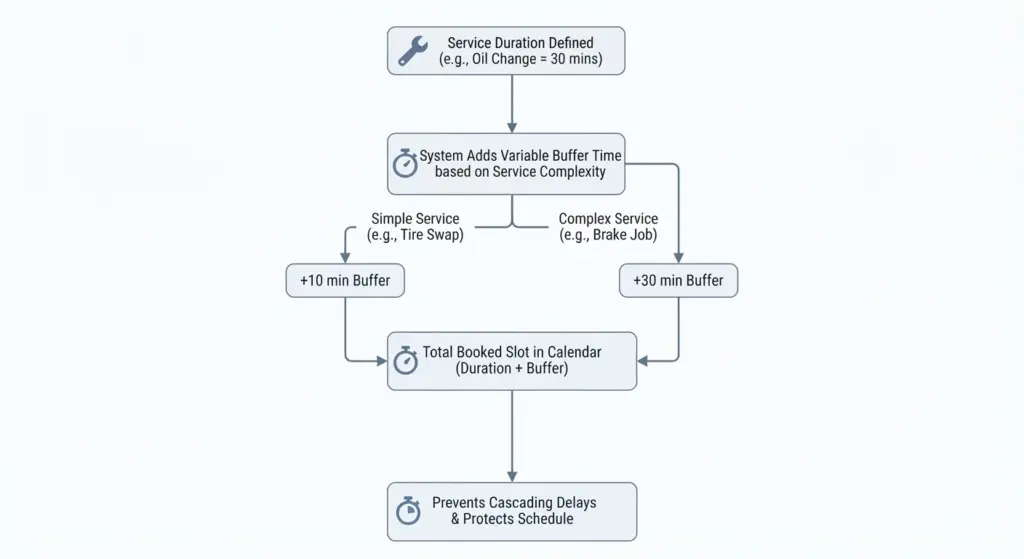
- Service-specific timing: Different services need different lengths—oil changes vs. transmission rebuilds. Your system must let you define service duration and add buffer time for overruns.
- Resource management: Link services to bays, lifts, alignment machines, or specialty techs. Avoid double-booking an alignment machine or booking an ECU tune with no tuner available.
- Deposits/payments: High-ticket services should require deposits. Your plugin must support Stripe, PayPal, or WooCommerce to accept payments and reduce cancellations.
- Multi-step appointments: Some services need pre-inspection, a main job, and a post-check. Support chained steps or multi-session bookings.
- Add-ons and upsells: Tire balancing, air filter replacement, or wash packages are common add-ons—your booking flow should surface relevant upsells at booking time.
The Four Pillars of a Good Automotive Booking Experience
- Vehicle-Centric Flow
Make the booking experience center around the vehicle, not just the person. When intake collects precise vehicle info, your team arrives prepared—faster diagnosis, more accurate time estimates, and improved parts readiness. - Smart Scheduling with Buffers
Services should carry durations plus optional buffers. Buffers protect your schedule from cascading delays when a job runs long. Allow for variable buffer sizes by service complexity. - Resource & Staff Linking
If your shop has specialized techs or equipment, your system must manage resources. Bookings should check both staff availability and equipment availability. - Payment & Deposit Handling
Collect deposits for high-value bookings and integrate refunds/credits into your workflow. Support partial payments at booking and final payment at checkout in-shop or via the site.
Best WordPress Appointment Booking Plugins for 2026 (Automotive-Focused)
Here’s a practical list of plugins that work especially well for automotive shops in 2026. I’ll summarize strengths and what types of shops each fits best.
- Booknetic
- Best for: Multi-service, multi-staff shops
- Why: Strong UI, built for service workflows, staff-level availability, buffer times, deposits, and advanced notifications. Good for shops that need granular control.
- BookingPress
- Best for: Shops wanting full-featured value
- Why: Bundled premium add-ons with a predictable pricing model. Good integrations (Stripe POS) let shops accept deposits online and final payments in-person.
- Bookly (Pro + Add-ons)
- Best for: Customization-first shops
- Why: Modular approach—buy only needed features. Strong SMS and email automations. Good when you want tailored behavior without paying for unrelated extras.
- Simply Schedule Appointments
- Best for: Solo mechanics and small shops
- Why: Extremely user-friendly, easy Google Calendar sync, simple setup. Ideal if you want fast deployment and low maintenance.
- MotoPress (Bookings)
- Best for: Shops offering both services and classes
- Why: Flexible for one-on-one services and group workshops (e.g., car care classes). Good calendar and inventory handling.
- Amelia (if you use it)
- Best for: Mid-size to large shops that need professional booking dashboards
- Why: Enterprise-grade features for calendar views, roster management, detailed reporting, and recurring bookings.
Each plugin has pros and cons—evaluate them against your shop’s scale, whether you need resource management, deposit support, SMS reminders, or integration with shop management software.
Plugin Comparison: Quick Decision Guide
- You run a 1–2 person neighborhood shop: Simply Schedule Appointments—fast setup, low tech overhead.
- You have multiple bays and specialized equipment: Booknetic or Amelia—resource linking and advanced staff scheduling.
- You want predictable pricing with many premium features included: BookingPress.
- You want to buy only what you need and customize deeply: Bookly with selected add-ons.
- You run classes or group sessions: MotoPress.
Building Your Automotive Booking Workflow: Step-by-Step
A good booking workflow is straightforward for customers and powerful for the shop.
Phases:
1 : Define services and tiers
- Break services into precise packages:
- Oil Change > 30 minutes > No deposit
- Full-Service Inspection > 90 minutes > Optional deposit
- Ceramic Coating > Full day > 50% deposit
- Brake Job > 2–4 hours > Parts pre-authorization required
- For each package specify: duration, required bay/equipment, recommended tech skill level, deposit rules.
2 : Create vehicle intake forms
- Required fields: First/Last Name, Phone, Email, Make, Model, Year, Mileage, VIN (optional), Symptom/Notes.
- Optional fields for advanced shops: prior modifications, last service date, preferred tech, insurance claim number.
3 : Resource mapping
- Tag each service with required resources: lift, scissor lift, alignment rack, engine hoist, specific technician.
- Mark resources as unavailable for maintenance or specific days and set staff shift schedules.
4 : Payment and deposit rules
- High-value jobs: require a non-refundable or refundable deposit. Use Stripe or WooCommerce integration.
- Offer card-on-file or in-person payment. Clearly display cancellation/refund policies on the booking flow.
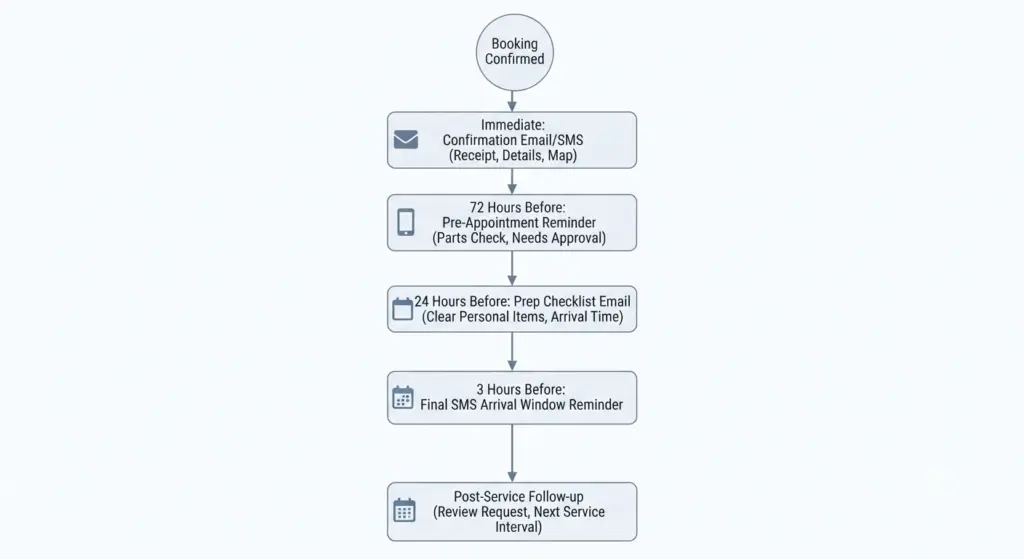
5 : Automate communications
- Confirmation: immediate after booking with service summary, deposit receipt, and shop location.
- Pre-appointment: 72 hrs (parts check), 24 hrs (prep checklist—remove personal items), 3 hrs (arrival window).
- Day-of reminder: include map link and estimated wait or arrival instructions.
- Post-service follow-up: satisfaction survey and review request, including recommended next service intervals.
6 : Sync and validate
- Sync bookings to Google Calendar for individual techs and to a central calendar for managers.
- If you have shop management software (like Mitchell1, Shopmonkey, or others), use Zapier or built-in integrations to transfer bookings to your invoicing and parts workflow.
Handling Edge Cases and Common Problems
- Walk-ins vs. appointments: Maintain a buffer percentage of bays for walk-ins or urgent drop-offs. Offer “same-day” slots that can be booked via a separate flow.
- Complex diagnostics: Offer “diagnostic appointments” with initial shorter slots and recommend a follow-up booking once the diagnosis is complete. This keeps your schedule predictable.
- Parts lead time: If a job requires OEM parts, block tentative slots until parts are confirmed. Automate emails to the customer when parts arrive.
- Warranty and insurance jobs: Create a separate intake field for insurer and claim numbers; track approvals before booking long jobs.
- No-shows and cancellations: Implement graded penalties (fee or non-refundable deposit) for repeat offenders, clearly communicated at booking.
Integrations That Matter
- Payment Gateways: Stripe + PayPal + WooCommerce support is essential.
- SMS/Email providers: Twilio, SendGrid, or plugin-built SMTP for sending reminders.
- Shop Management Systems: Zapier bridges (or direct APIs) to sync bookings to invoicing, parts ordering, and repair orders.
- Calendar Sync: Two-way sync with Google Calendar or Outlook for staff availability.
- Review Platforms: Automate asking for Google Reviews or Facebook recommendations after completed services.
Make Automation Feel Personal
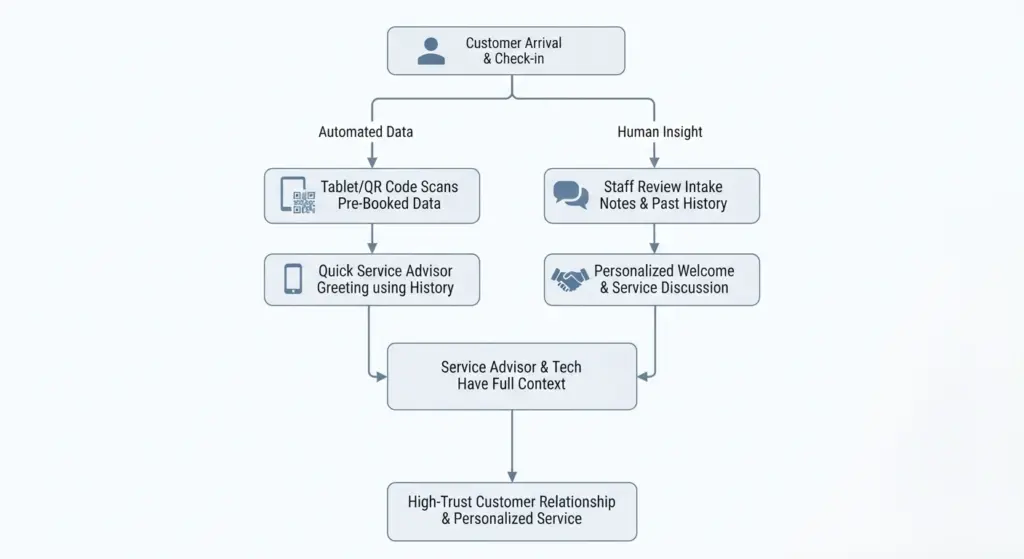
Automation should free time for your team to be more human. A booking system should collect the facts—then let your staff do the relationship work.
- Personal confirmations: Use the customer’s first name and car nickname in messages when appropriate.
- Service notes: Show techs intake notes and previous work history so they can greet customers by remembering past service.
- Welcome rituals: Have staff use the saved booking data to prepare a personalized welcome (e.g., “I see you had a ceramic coating in 2024 — we’ll check the curing and top-up”).
- On-site simplicity: Avoid re-entering booking data at check-in—scan a QR code or have a tablet that pulls up the appointment for quick check-in.
- Feedback loop: If customers leave specific feedback, ensure it’s linked to their booking and acted on by a manager.
SEO and Conversion Tips for Your Booking Page
- Use clear H2/H3 headings on your booking and services pages that match search intent: “Oil Change Booking in [City]”, “Ceramic Coating Appointments — [Shop Name]”.
- Include schema markup for LocalBusiness and Service to improve search result visibility (your WordPress theme or SEO plugin can add this).
- Load speed matters—keep booking scripts optimized and lazy-load third-party assets.
- Mobile-first design—most customers will book from phones. Ensure forms render cleanly and NFC/call-to-action buttons are thumb-friendly.
- Use short, scannable steps in the booking flow; long forms reduce conversions. Break into pages if needed (Vehicle info → Service → Extras → Payment).
- Local signals: add maps, operating hours, and short testimonials to increase trust and local SEO.
Monitoring and KPIs to Track
- Booking Conversion Rate: visits to booking page vs. completed bookings.
- No-show Rate: appointments booked vs. attended.
- Revenue per Bay/Day: measure utilization across bays and compare before/after automation.
- Average Repair Order (ARO): track upsells from booking add-ons.
- Time-to-Service: average time between booking and service date—helps you understand lead time.
- Customer Satisfaction (CSAT): post-service surveys tied to bookings.
Recommended Booking Setup by Shop Size
- Solo Mechanic / Micro-shop
- Tool: Simply Schedule Appointments
- Focus: Speed, Google Calendar sync, clear service packages.
- Workflow: Basic services, no resource linking, optional deposit for big jobs.
- Small Shop (2–4 techs)
- Tool: Bookly or BookingPress
- Focus: Staff availability, deposit support, SMS reminders.
- Workflow: Tiered services, basic resource linking, parts notes.
- Medium Shop (5–15 techs)
- Tool: Booknetic or Amelia
- Focus: Resource management, multi-bay scheduling, automated notifications.
- Workflow: Advanced intake, deposits, Zapier link to shop management.
- Large/Franchise Shop
- Tool: Amelia or a custom integration via Booknetic + enterprise tools
- Focus: Multi-location support, reporting, complex resource allocation.
- Workflow: Central dispatch calendar, franchise-level reporting, standardized intake.
Security, Compliance, and Customer Trust
- PCI Compliance: If you collect payments, use gateways that handle PCI for you, and never store full card data on your site.
- Data privacy: Make your privacy policy accessible and concise—customers trust shops that explain how they use contact/vehicle data.
- Backup your booking data: Use regular backups or rely on plugin vendors with strong export options.
- Accessibility: Ensure forms are keyboard-friendly and support screen readers—this helps both SEO and customer experience.
Future Trends: What to Watch in Automotive Booking
- AI-assisted bookings: Chatbots and assistant flows that ask follow-up diagnostic questions and recommend services automatically.
- Predictive maintenance scheduling: Using mileage and service history to proactively remind customers about preventive maintenance.
- Dealer and aftermarket parts availability integration: Real-time parts availability checks at booking to give accurate lead times.
- Voice booking and smart assistant integration: Booking through voice assistants or in-car systems.
- Enhanced loyalty integration: Booking systems that tie into loyalty points, recurring subscriptions (e.g., monthly car washes), and service bundles.
Final Checklist Before You Launch
- Define every service clearly with duration and required resources.
- Build vehicle-first intake forms and keep them as short as possible.
- Set deposits for high-value services and test payment flows.
- Configure automated SMS/email reminders and confirmation flows.
- Sync calendars and test two-way availability updates.
- Run a soft launch: invite repeat customers to test the booking flow and gather feedback.
- Train staff on check-in procedures using booking data—no re-keying.
- Monitor KPIs and iterate—optimize the flow based on real customer behavior.
Best Automotive Booking Plugins (Enlisted)
- Booknetic — best for complex, multi-staff shops
- BookingPress — best for predictable pricing and bundled features
- Bookly (with add-ons) — best for modular customization
- Simply Schedule Appointments — best for solo mechanics and small shops
- MotoPress Bookings — best for shops offering both services and group classes
- Amelia — best for professional dashboards and mid-to-large shops