Choosing the best WordPress form plugins comes down to matching the plugin’s strengths to your business goals: simple lead capture, advanced automation, or conversion-focused, multi-step forms. For most professional sites, a short-list of WPForms, Gravity Forms, Fluent Forms, Ninja Forms, Forminator, and Everest Forms will cover 95% of real-world use cases.
What Counts as the “Best” WordPress Form Plugin?
Before you compare names, define what “best” means for your team and stack.
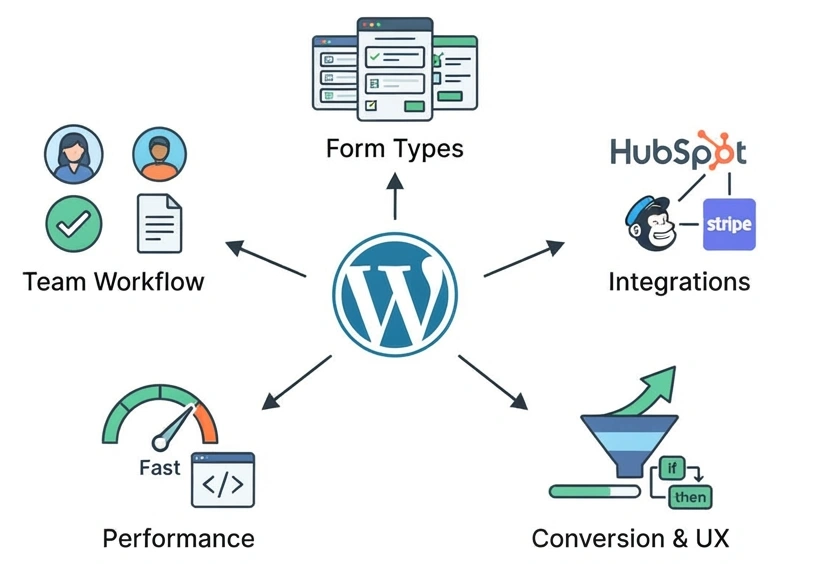
Key evaluation criteria:
- Form types you actually need
Contact forms, lead-gen forms, multi-step forms, user registration, surveys, quizzes, calculators, payments, bookings, file uploads. - Depth of integrations
Native connections with CRMs (HubSpot, Salesforce, Zoho), email tools (Mailchimp, ActiveCampaign), payment gateways (Stripe, PayPal), and automation platforms (Zapier, Make, webhooks). - Conversion & UX features
Conditional logic, multi-step forms, conversational forms, progress bars, inline validation, spam protection, A/B testing, analytics. - Performance & scalability
Clean code, minimal bloat, solid caching compatibility, ability to handle high-traffic and large numbers of submissions. - Team workflow
Role-based access, approval workflows, export/import, logging, and developer hooks for custom logic.
Set a baseline requirement list first; the best WordPress form plugins are those that satisfy this list with minimal complexity and maximum reliability.
Best WordPress Form Plugins (Shortlist)
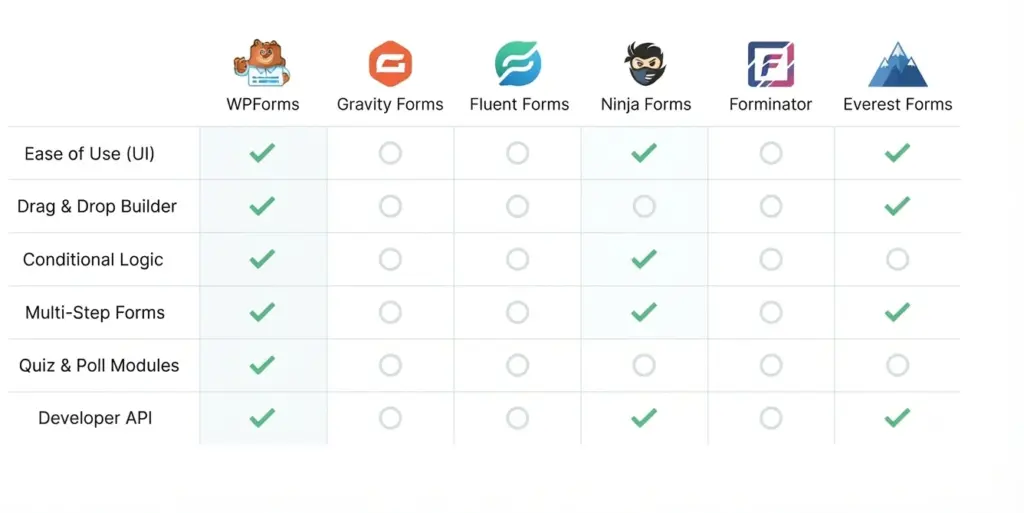
WPForms – Best for Non-Technical Teams
WPForms is built for marketers, founders, and small business owners who want powerful forms with minimal technical overhead.
Why it’s often a top pick:
- Drag-and-drop builder with pre-built templates for contact, quote, survey, and payment forms.
- Native integrations with major email tools and CRMs, plus payment gateways.
- Advanced features like conditional fields, multi-step forms, form abandonment tracking, and conversational-style forms.
- Ideal when you need launch-ready forms fast, and your internal team isn’t deeply technical.
Where it shines in real projects:
- Lead generation funnels (e.g., multi-step quote forms).
- Simple checkouts or deposit payments without full WooCommerce.
- Survey and feedback forms with basic reporting.
You can easily plug in case studies like “X% uplift in lead conversion after implementing a multi-step WPForms quote form” here.
Gravity Forms – Best for Complex, Enterprise-Level Logic
Gravity Forms is a veteran in the WordPress ecosystem and is widely used when projects need complex logic, custom workflows, and deep integration.
What makes Gravity Forms stand out:
- Extremely flexible field types, conditional logic, and multi-page forms.
- Rich ecosystem of official add-ons plus third-party extensions maintained by agencies and developers.
- Strong developer focus with hooks, filters, and an API suitable for custom applications.
Best suited for:
- Complex onboarding forms with branching paths.
- Internal tools (e.g., request systems, approval workflows) built on WordPress.
- Multi-site and multi-language environments where reliability and extensibility matter.
This is where you might insert metrics like “Reduced manual processing time by X hours per week using Gravity Forms + CRM integration.”
Fluent Forms – Best Value for Growing Businesses
Fluent Forms aims to combine a modern UX, strong features, and competitive pricing, making it a solid choice for scaling businesses.
Key strengths:
- Fast, intuitive form builder with clean, Gutenberg-friendly interface.
- Support for payment forms, registration, and advanced field types in premium tiers.
- Integrations with email services, CRMs, payment processors, plus support for webhooks and automation platforms.
Ideal use cases:
- SMB sites upgrading from a basic contact form to full lead funnels.
- E-commerce brands capturing segmented leads based on behavior or preferences.
- Agencies standardizing on a single plugin that balances features and licensing costs.
Consider adding a portfolio example like “Fluent Forms improved lead qualification accuracy by X% after adding conditional questions tied to CRM tags.”
Ninja Forms – Best for Modular, Add-On Driven Setups
Ninja Forms uses a “buy what you need” model for its premium features, which suits sites with very specific requirements.
Why teams choose Ninja Forms:
- Free core plugin is solid for contact and simple forms.
- Premium extensions let you add payments, integrations, and specialty features à la carte.
- Good conditional logic, multiple layouts, and developer-friendly structure.
Great fit when:
- You need a small number of very specific features (e.g., one CRM integration and payments) without paying for a big bundle.
- You support multiple smaller sites where each has slightly different needs.
- You prefer to keep the base plugin lean and only layer features as required.
A data point you might attach: “Saved X% in annual plugin licensing by using targeted Ninja Forms extensions instead of full-suite licenses.”
Forminator – Best for Interactive Forms, Quizzes, and Polls
Forminator is popular for sites that rely heavily on engagement: polls, quizzes, and interactive forms.
Standout capabilities:
- Built-in quizzes, polls, and payment forms.
- Calculations for pricing, estimators, or interactive tools.
- Entry management, basic analytics, and solid spam protection.
Where it works best:
- Content marketing sites using quizzes and polls to increase time-on-site.
- Service businesses using cost calculators for quotes and pre-qualification.
- Membership/education platforms collecting feedback and assessments.
You can attach performance stats like “Interactive Forminator quizzes increased email opt-ins by X% compared to static forms.”
Everest Forms – Best for Simple, Clean Forms with Room to Grow
Everest Forms targets users who want a straightforward experience with the ability to grow into more advanced setups later.
Core advantages:
- Modern UI and easy builder for non-technical users.
- Support for advanced fields, multi-column layouts, and conditional logic in paid plans.
- Integrations with email services, payments, and other tools as your needs expand.
Ideal scenarios:
- Small business sites needing clean contact/quote forms with good UX.
- Blogs and content sites where performance and simplicity matter.
- Teams planning to scale but not ready for heavy add-on ecosystems.
Metric-friendly narrative: “Upgraded from basic contact forms to Everest Forms multi-step lead forms, resulting in X% more completed submissions.”
How to Choose the Best WordPress Form Plugin for Your Site
Use these practical filters to narrow the list from “top 10” to “the one that fits your stack.”
1. Match Features to Real Use Cases
Ask:
- Do you just need contact + newsletter signup, or are you building complex workflows?
- Are you processing payments, or will a separate checkout handle that?
- Do you need quizzes, calculators, polls, or purely forms?
simple lead capture, WPForms, Everest Forms, or Fluent Forms are usually sufficient.
For complex logic or internal apps, Gravity Forms or Ninja Forms are more appropriate.
For quizzes and interactive UX, Forminator becomes very attractive.
2. Check Integration Depth Before Committing
Your forms should sit at the center of your marketing and operations stack, not in isolation.
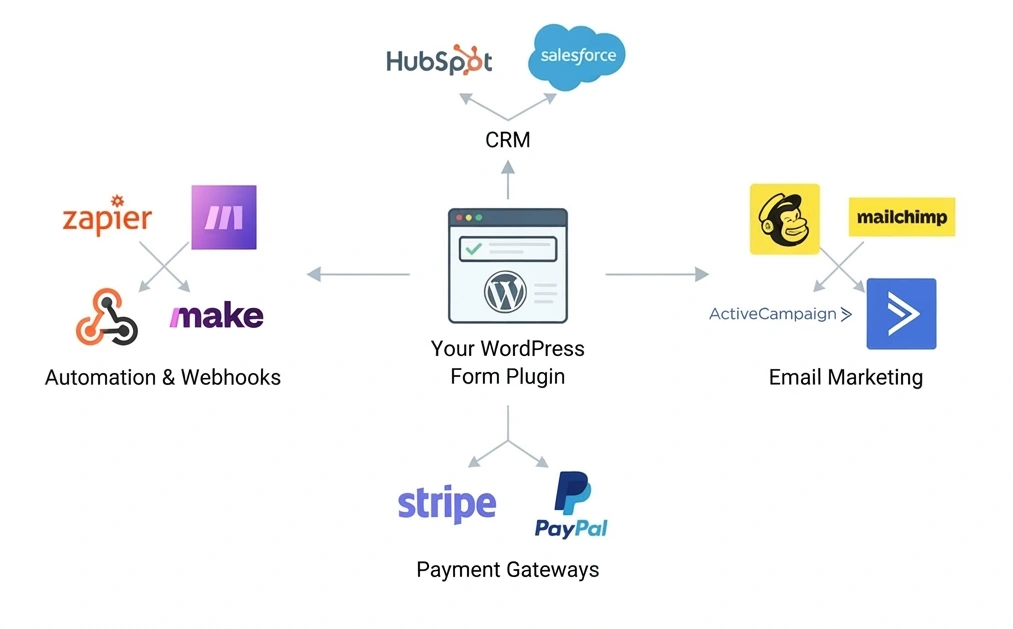
Review:
- Native integrations with your CRM and email tools.
- Payment options that match your country and currency needs.
- Support for webhooks or generic automation tools so you’re not locked in.
The best WordPress form plugins for agencies and growth-driven businesses are those that integrate cleanly with existing pipelines without custom glue code.
3. Consider Performance and Security
Form plugins can quietly become a bottleneck on high-traffic sites.
Best practices:
- Avoid bloated plugins with too many unused modules.
- Ensure compatibility with your caching and performance plugins.
- Use built-in anti-spam features (honeypots, reCAPTCHA) and security-friendly coding practices.
When you document your own cases, you can reference outcomes like “Reduced form-related page load time by X ms” or “Cut spam submissions by X% after switching plugins.”
Technical Considerations for CTOs and Developers
Developer Extensibility
If you’re leading a development team:
- Gravity Forms and Ninja Forms offer extensive hook/filter systems and REST API endpoints.
- WPForms and Fluent Forms are more productized but still provide dev-friendly extensibility.
- Ensure availability of custom actions on submission (e.g., firing webhooks, writing to custom tables).
Data Portability and Vendor Lock-In
Plan for:
- Export options (CSV, JSON) to move submissions between tools.
- Ability to programmatically access entries for custom analytics dashboards.
- Handling of GDPR/CCPA requirements (data access/export, deletion, consent tracking).
Selecting the best WordPress form plugins for a multi-site or multi-brand architecture usually means prioritizing extensibility and data control over minor UX differences.
Practical Recommendations by Scenario
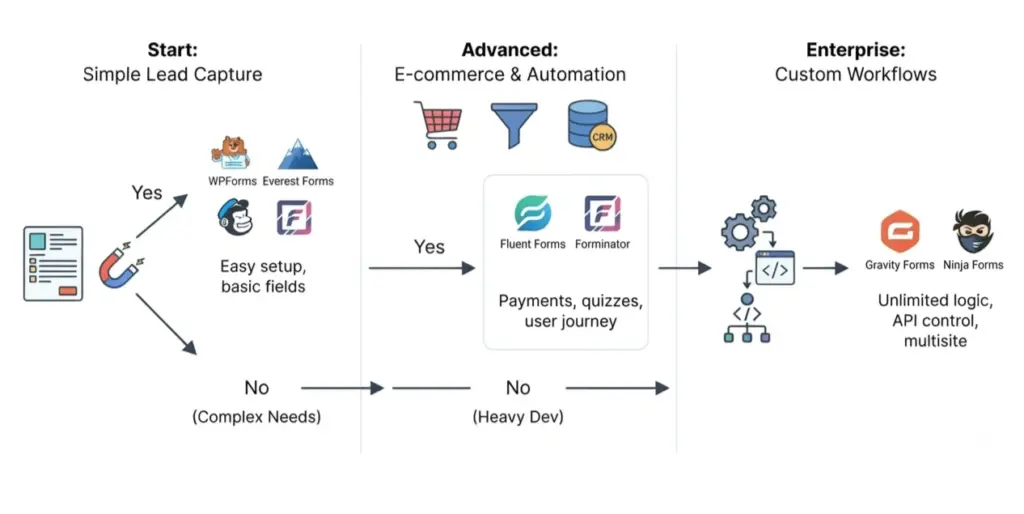
For Small Business Owners
If you primarily need:
- Contact forms
- Quote request forms
- Basic newsletter opt-ins
Then prioritize:
- WPForms or Everest Forms for ease-of-use.
- Fluent Forms if you foresee quickly growing into more advanced campaigns.
Focus on:
- Conversion-friendly layouts (multi-step, minimal fields).
- Clear inline error messages and mobile responsiveness.
For CTOs and Technical Leads
If your team:
- Builds custom workflows
- Integrates with multiple external systems
- Manages high traffic or sensitive data
Then consider:
- Gravity Forms or Ninja Forms for full control and extensibility.
- Fluent Forms when you need a balance between dev flexibility and business-friendly UI.
Focus on:
- Hook and API design.
- Error logging and monitoring.
- Security controls and access management.
For E‑Commerce & Marketing Teams
If your priority is:
- High-quality lead capture
- Intent-based segmentation
- Interactive content that drives engagement
Then look at:
- WPForms (for conversion-focused forms and payments).
- Forminator (for quizzes, polls, and calculators).
- Fluent Forms for segmented lead capture and integrations.
Emphasize:
- A/B testing forms and measuring drop-off points.
- Integrating form fields directly into CRM tags and deals.
- Tracking assisted conversions tied to form submissions.
FAQ:
Q1: What is the best WordPress form plugin for most small business websites?
A1: For most small business websites, a plugin like WPForms or Fluent Forms is often the best choice because it combines ease-of-use with essential features such as conditional logic, payment support, and CRM/email integrations. You can deploy a professional contact or quote form in minutes while still having room to grow into more advanced lead funnels as your marketing matures.
Q2: Which WordPress form plugin is best for complex, multi-step workflows?
A2: Gravity Forms is typically the strongest option for complex, multi-step workflows that require conditional routing, custom logic, and deep integration with third-party systems. Its ecosystem of official and third-party add-ons, combined with a robust API, makes it ideal for CTOs and developers building advanced business processes on top of WordPress.
Q3: Are free WordPress form plugins enough for professional websites?
A3: Free WordPress form plugins are adequate for basic contact forms and simple lead capture, but they usually lack the advanced features needed for serious marketing and operations—such as payment processing, analytics, conditional logic, and integrations. As soon as you rely on forms for revenue, automation, or detailed segmentation, a premium or feature-rich plugin becomes the more reliable and scalable choice.
Q4: How do I choose the best WordPress form plugin for my stack?
A4: Start by mapping your real use cases (types of forms, integrations, data volume), then shortlist plugins whose feature sets align with those requirements. Compare integration depth, performance impact, and extensibility, and test on a staging environment with your actual theme, caching, and security stack. The best plugin will be the one that meets these criteria with minimal customization and a clean operational workflow.
Q5: Which form plugin is best for interactive content like quizzes and calculators?
A5: For interactive content such as quizzes, polls, and cost calculators, Forminator is often the most practical choice because it includes these features out of the box, along with form submissions, payments, and reporting. This reduces the need for multiple plugins and keeps your engagement tools under a single interface.